
“I barely slept last night.” Even on mornings when you feel that way, your Apple Watch may show that you actually slept a fair amount. This gap between the sleep you feel you got and the sleep you actually got is called sleep state misperception, and it is not unusual among people who seek help for insomnia.
Starting with this article, we will introduce the main features of our sleep app, Sleepa, one at a time. First up is the feature that helps you notice that gap yourself: the sleep journal.
About this article
This article is written by Masa, an engineer and co-founder of Medisense Inc., the company that develops Sleepa. I wrote about sleep state misperception itself in What is sleep state misperception? This time, I will show how you can check for it with Sleepa.
What is a sleep journal?
In sleep medicine, patients are often asked to keep a sleep diary: when they went to bed, roughly when they fell asleep, how many times they woke up during the night. Writing down how your nights feel gives you and your doctor something concrete to look at together.
Sleepa’s sleep journal lets you keep one easily on your iPhone. The big difference from a paper diary is that you can view it side by side with the sleep your Apple Watch recorded.
Just two things to record
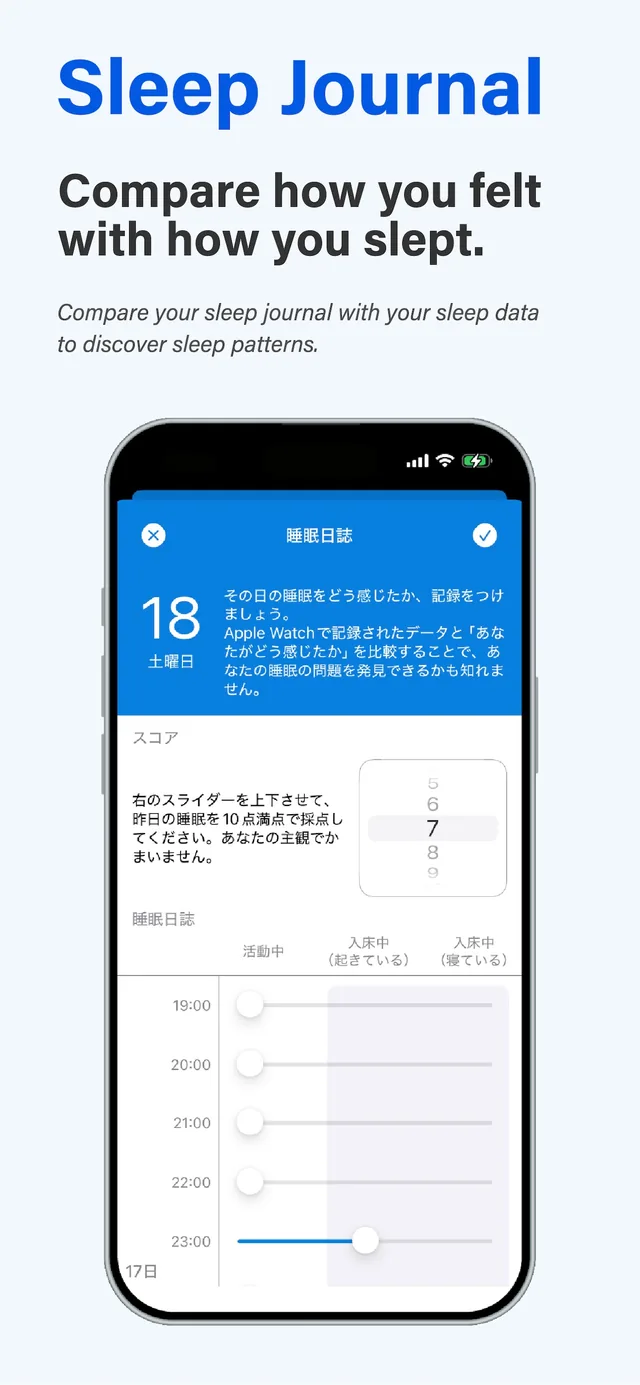
Sleepa is available in English, but some screens are still shown in Japanese. The screenshots in this article show the Japanese version.
On the Sleep Journal screen, you record two things:
- A score for last night’s sleep: use the slider on the right to rate last night’s sleep on a scale of 1 to 10. It doesn’t need to be precise; your own impression is fine.
- Your state, hour by hour: for each hour from 7 p.m. the previous day to 6 p.m. on the day, use a slider to choose whether you were “Active”, “In Bed (awake)” or “In Bed (asleep)”.
Your entries are saved as you go. There is no need to remember every detail. Just record what it felt like, such as “I think I was awake around this time.”
When to fill it in
Open the sleep journal from the pen icon next to each day in the list on the home screen. You can record today and any earlier day.
Sleepa also sends a daily sleep journal reminder (12:15 p.m. by default; you can change the time or turn it off in Settings). We recommend filling it in on the same day, while your memory is still fresh.
Compare it with your Apple Watch data
This is where the sleep journal really helps. Tap a day on the home screen to see that night’s sleep graph. It shows the awake, REM, core and deep sleep your Apple Watch recorded, hour by hour.
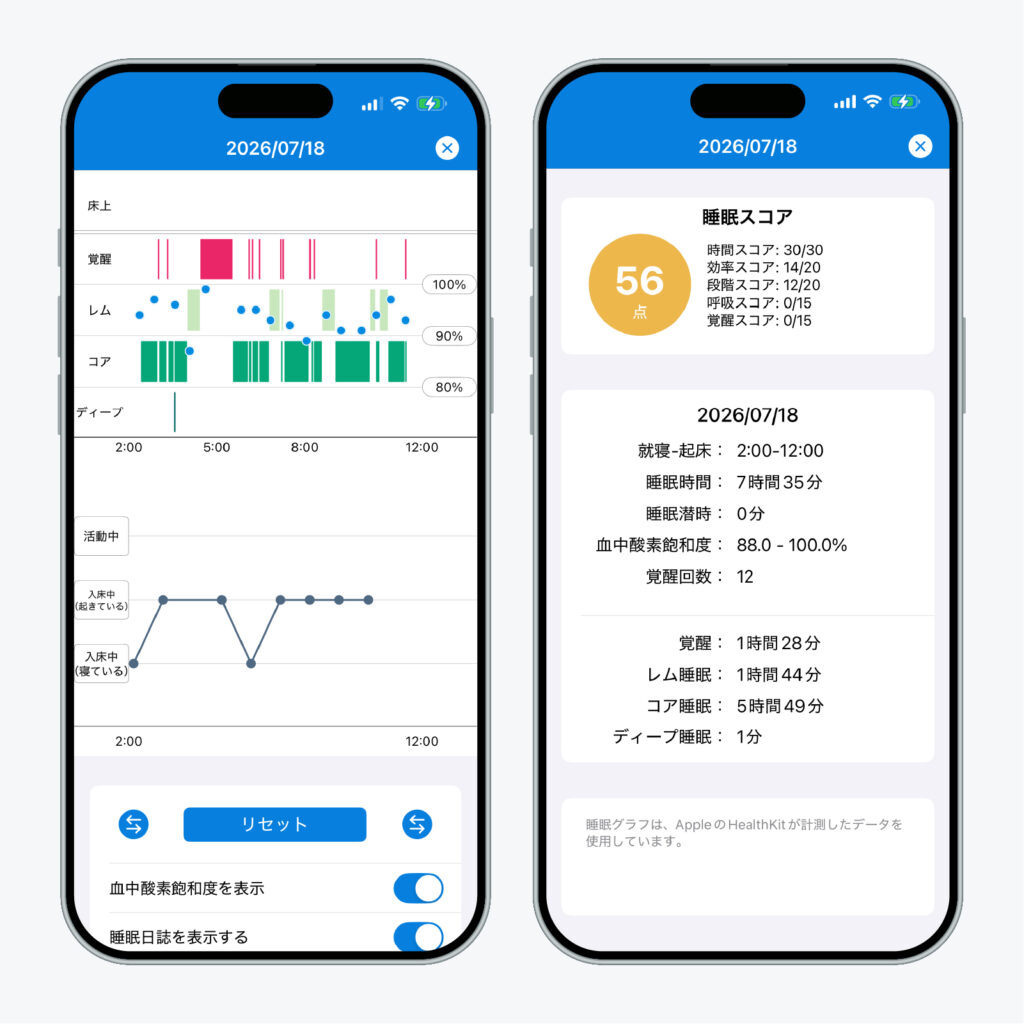
Turn on “Display sleep journal” on this screen, and your sleep journal appears below the graph on the same timeline. You can see “how it felt to me” and “what my Apple Watch recorded” on a single screen. The arrow buttons widen the time range one hour at a time.
For example, your journal may say you were awake from 2 a.m. to 4 a.m., while your Apple Watch shows you were asleep for most of that time. That is the kind of gap that occurs with sleep state misperception. Even normal sleep includes many brief awakenings during the night. If you perceive the time between those awakenings as being awake too, you end up feeling that you didn’t sleep at all.
Things to keep in mind
Sleepa does not automatically detect a gap between your journal and your Apple Watch data, nor does it tell you “this is sleep state misperception.” You are the one who compares the two graphs.
Also, the sleep your Apple Watch records is an estimate based on its sensors. It is not as accurate as a clinical sleep study. Even if you find a gap, please don’t conclude from that alone that you are sleeping well or that you no longer need your medication. If you are troubled by your sleep, talk to a doctor. A few days of sleep journal entries alongside your Apple Watch data can be a useful starting point for that conversation.
Try it for a week
One day of journaling won’t show you a pattern. Try it for about a week first. On the days you felt you couldn’t sleep, what did the data actually say? Lining up several days side by side should reveal how your own perception tends to differ.
All of Sleepa’s features are free to try for 7 days after you install it. From day 8, a paid plan is required to keep using the sleep journal. (You will not be charged automatically when the free period ends.)
Next time, we will introduce another Sleepa feature: a wake-up alarm that rings even in Silent mode.
Sleepa — The Science of Sleep
Look back on the sleep your Apple Watch measures, together with AI sleep analysis and your sleep journal. Learn more about Sleepa.

* Requires an Apple Watch (Series 6 or later) and an iPhone with iOS 26 or later.
Please note: Sleepa is not a medical device. Its analysis is for reference only and is not a medical diagnosis. If you have symptoms that concern you or are worried about your sleep, please consult a medical professional.
Sleepa features
- How you felt vs. how you slept — Sleepa’s sleep journal (this article)
- An alarm that really rings — Sleepa’s wake-up alarm built with AlarmKit
- AI that makes sense of your sleep data — Sleepa’s sleep analysis and AI summary
Related: What is sleep state misperception?