
Even if you track your sleep with an Apple Watch, a graph alone doesn’t tell you whether your sleep is actually good or bad. Knowing you had so many minutes of REM sleep and so many minutes of deep sleep doesn’t help much if you can’t tell whether that is a lot or a little for you.
In the third article of our series on Sleepa’s features, we look at the feature designed to answer that question: Sleep Analysis and its AI summary.
Analyze the past 30 days with one tap
Tap Analyze on the home screen to open the Sleep Analysis screen, which analyzes your sleep data from the past 30 days. After a short wait, an AI summary of the results appears at the top in plain sentences.
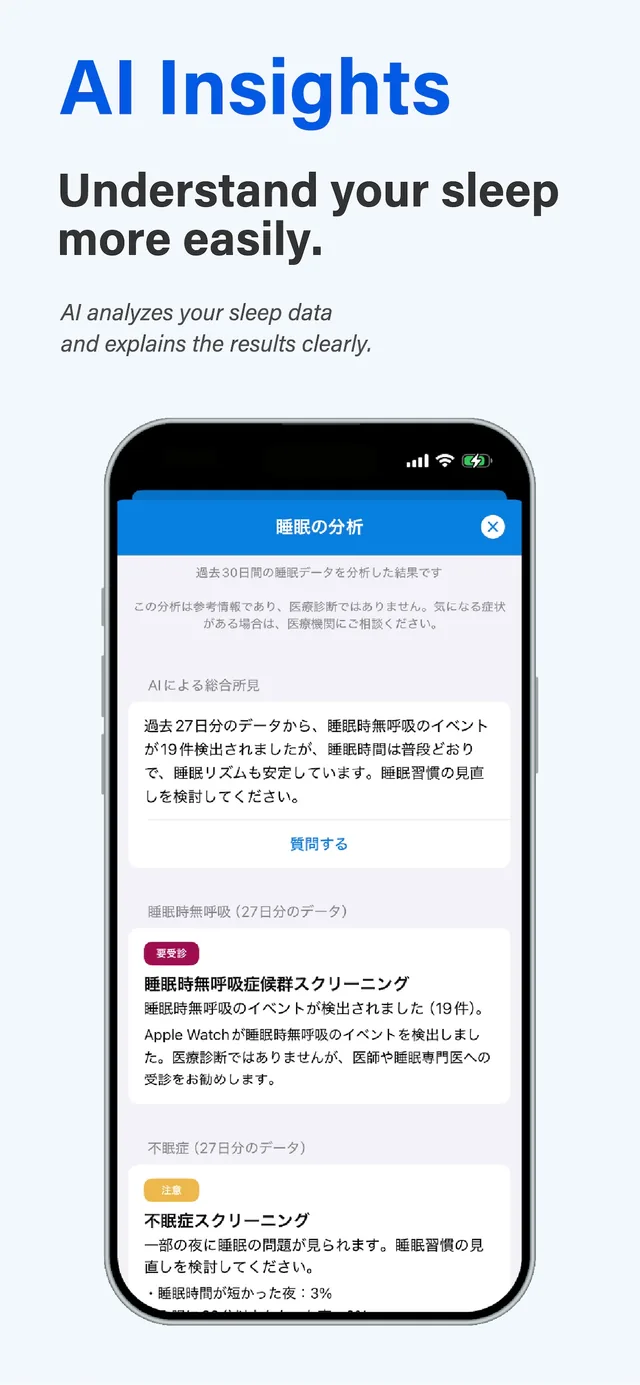
Sleepa is available in English, but some screens are still shown in Japanese. The screenshots in this article show the Japanese version.
The summary leads with the conclusion and is kept short, about three to five sentences.
What it looks at
Below the summary are the three items it is based on. Each comes with an indicator such as Normal or Caution.
- Sleep apnea: how far your blood oxygen dropped at night, and whether your Apple Watch detected breathing disturbances during sleep (sleep apnea events).
- Insomnia: for three things, your sleep duration, how long it took you to fall asleep and how many times you woke up at night, how many nights had a problem. Sleep duration is compared not with other people’s average but with your own recent average.
- Compared to your usual: your last 7 days compared with your earlier records, to see whether your sleep duration or sleep rhythm has changed.
The analysis needs at least seven nights of data.
Rules decide, AI only explains
This point matters, so I want to be clear about it: in Sleepa, the AI does not judge the state of your sleep.
What share of nights had low blood oxygen? How far did your sleep duration stray from your usual? These calculations follow predefined rules. The AI receives only the results of those calculations. Its role is limited to summarizing the results in sentences that are easy to read, and it is instructed not to make diagnoses or add numbers of its own.
We do this for two reasons. First, it confines the risk of the AI saying something untrue to the wording of the text. Second, it keeps the judgment criteria in a form that sleep specialists can review. Sleep is about your body, so we want to be careful here.
Ask questions right there
Tap “Ask a question” below the summary to open a chat with the AI. Ask something like “Why do you think I keep waking up at night?” and the AI gives a short answer based on your analysis results. Even if you can’t read the graphs, you can learn about your sleep through conversation.
Chats are not saved; they disappear when you close the screen.
Your data is processed on your iPhone
The analysis and the AI-written text are produced entirely on your iPhone, using Apple’s on-device generative AI, Apple Intelligence. Your sleep data is never sent to an outside AI service. Because this is health data, this was something we would not compromise on.
What you need
- Sleep recorded with an Apple Watch (Series 6 or later), and an iPhone with iOS 26 or later
- At least seven nights of sleep data
- The AI-written summary and chat are available on iPhone models that support Apple Intelligence, with Apple Intelligence turned on. On other iPhones, the results are shown as standard text, and chat is not available.
- Free to try for 7 days after you install it. From day 8, a paid plan is required. (You will not be charged automatically.)
Not a diagnosis, but a starting point
Sleepa’s analysis is not a medical diagnosis. But it can give you clues about the tendencies in your sleep. If a result concerns you, take it with you and talk to a medical professional. It can be useful material for that conversation.
Over three articles, we have introduced Sleepa’s main features: record how your sleep feels with the sleep journal, go to bed at ease with the alarm, and learn your sleep tendencies with AI analysis. Why not start by checking your own sleep with Sleepa for a week?
Sleepa — The Science of Sleep
Look back on the sleep your Apple Watch measures, together with AI sleep analysis and your sleep journal. Learn more about Sleepa.

* Requires an Apple Watch (Series 6 or later) and an iPhone with iOS 26 or later.
Please note: Sleepa is not a medical device. Its analysis is for reference only and is not a medical diagnosis. If you have symptoms that concern you or are worried about your sleep, please consult a medical professional.
Sleepa features
- How you felt vs. how you slept — Sleepa’s sleep journal
- An alarm that really rings — Sleepa’s wake-up alarm built with AlarmKit
- AI that makes sense of your sleep data — Sleepa’s sleep analysis and AI summary (this article)