
Wear your Apple Watch to bed, and the Health app on your iPhone shows your night as a chart in four colors: Awake, REM, Core and Deep. But what do they actually mean? Is 20 minutes of Deep sleep too little? Are a dozen awakenings a bad sign?
In this article, we go through Apple’s own published technical paper to explain what each stage represents, how Apple Watch measures sleep, and how far you can trust the numbers.
About this article
This article is written by Masa, an engineer and co-founder of Medisense Inc., the company that develops the sleep app Sleepa. Medisense is led by a physician who specializes in sleep (why we built Sleepa).
Where to find your sleep data
You can view your sleep in the Sleep section of the Health app on iPhone, or in the Sleep app on Apple Watch. Both show how long you spent in each stage and what percentage of the night it made up.
To get a good recording:
- Set up a sleep schedule (bedtime and wake time) and turn on Track Sleep with Apple Watch.
- Make sure your Apple Watch has at least 30 percent charge before bed.
- Keep it on while you sleep.
Since iOS 18 and watchOS 11, Apple Watch also tracks sleep outside your schedule, such as naps. However, the four stages are only recorded when a sleep session lasts more than three hours. For sessions of one to three hours, you only get “asleep” and “awake.”
How the four stages map to clinical sleep stages
Sleep medicine divides sleep, based on brain waves and other signals, into wake, REM sleep and three stages of non-REM sleep: N1, N2 and N3, from lightest to deepest. Apple Watch’s four stages line up with them like this:
| Apple Watch label | Clinical sleep stage |
|---|---|
| Awake | Wake |
| REM | REM sleep |
| Core | Non-REM stages N1 and N2 |
| Deep | Non-REM stage N3 (slow-wave sleep) |
Awake
Time spent awake, including brief awakenings after you have fallen asleep.
Seeing many awakenings on the chart can be unsettling. But even healthy sleep includes many short awakenings during the night. Apple’s paper notes that brief awakenings are common in normal sleep and may go unnoticed by the sleeper. Having some Awake periods recorded is not a problem in itself.
REM
Named after the rapid eye movements that happen during it, REM sleep is when most vivid dreaming occurs. The brain is about as active as when you’re awake, while the body’s muscles are relaxed. REM comes back several times a night, and the periods tend to get longer toward morning.
Core
Core combines non-REM stages N1 and N2, and is what other trackers often call “light sleep.” It is usually the largest block on your chart.
A lot of “light sleep” may sound bad, but it isn’t. N2 often makes up more than half of a night’s sleep and is a completely normal, important part of it. Apple says it chose the name “Core” precisely to avoid the unintended implications of the word “light.”
Deep
Deep is non-REM stage N3, also called slow-wave sleep because the brain waves become slow and large. It is concentrated in the first few hours after you fall asleep and becomes scarce toward morning. Deep sleep is also known to decrease with age.
How much of each is normal?
This is probably what you most want to know. The honest answer is that it varies with age and from person to person, so there is no fixed rule such as “you need X minutes of Deep sleep.”
For a reference point, look at the people in the study Apple used to validate Apple Watch (166 participants, average age 47). Measured with lab-grade tests, their sleep was about 66 percent Core, 21 percent REM and 13 percent Deep, with about 35 minutes awake after first falling asleep, on average.
These are averages for the people in that study, not a standard for healthy sleep. If your numbers look different, that alone is no reason to worry.
How accurate is Apple Watch sleep tracking?
Apple Watch does not measure brain waves. Its accelerometer picks up wrist movements, from turning over in bed to the tiny motions caused by breathing, and an algorithm estimates which of the four stages you are in for every 30 seconds.
Compared with polysomnography (a full lab sleep study), Apple reports that:
- Time asleep is almost always (about 97 percent) correctly classified as sleep.
- Time awake was correctly classified as Awake about 75 percent of the time, improving to about 79 percent with iOS 26 and watchOS 26.
- The most common stage mix-up is true Deep sleep being labeled as Core.
In other words, time spent lying still but awake may be recorded as sleep, and Deep sleep may be under-counted. Rather than worrying over a single night’s numbers, you’ll get more out of your Apple Watch data by looking at trends over several nights.
Four tips for reading your sleep chart
- Look at a week, not a night: sleep varies from night to night. Lining up about a week, including weekdays and the weekend, reveals your own pattern.
- Don’t fixate on short awakenings: instead of counting them, check whether long awakenings happen night after night, or whether it often takes you a long time to fall asleep.
- Low Deep sleep isn’t an emergency: age and measurement error both play a part. If it stays low, think about what might be affecting it, such as alcohol or caffeine before bed, or an irregular bedtime.
- Compare the data with how you felt: on nights you felt you barely slept, the data may show more sleep than you expected. That gap is called sleep state misperception, and it is not unusual among people with insomnia complaints.
If you have strong daytime sleepiness that gets in the way of daily life, have been told you snore loudly or stop breathing in your sleep, or keep having nights you can’t sleep and it is wearing you down, don’t rely on your Apple Watch alone. Please see a medical professional.
If reading the chart feels like too much
If all of this makes you feel that decoding the chart yourself is hard work, that’s where our sleep app, Sleepa, comes in. Sleepa reads the sleep data from your Apple Watch and shows a sleep graph for each night, along with its own Sleep Score.
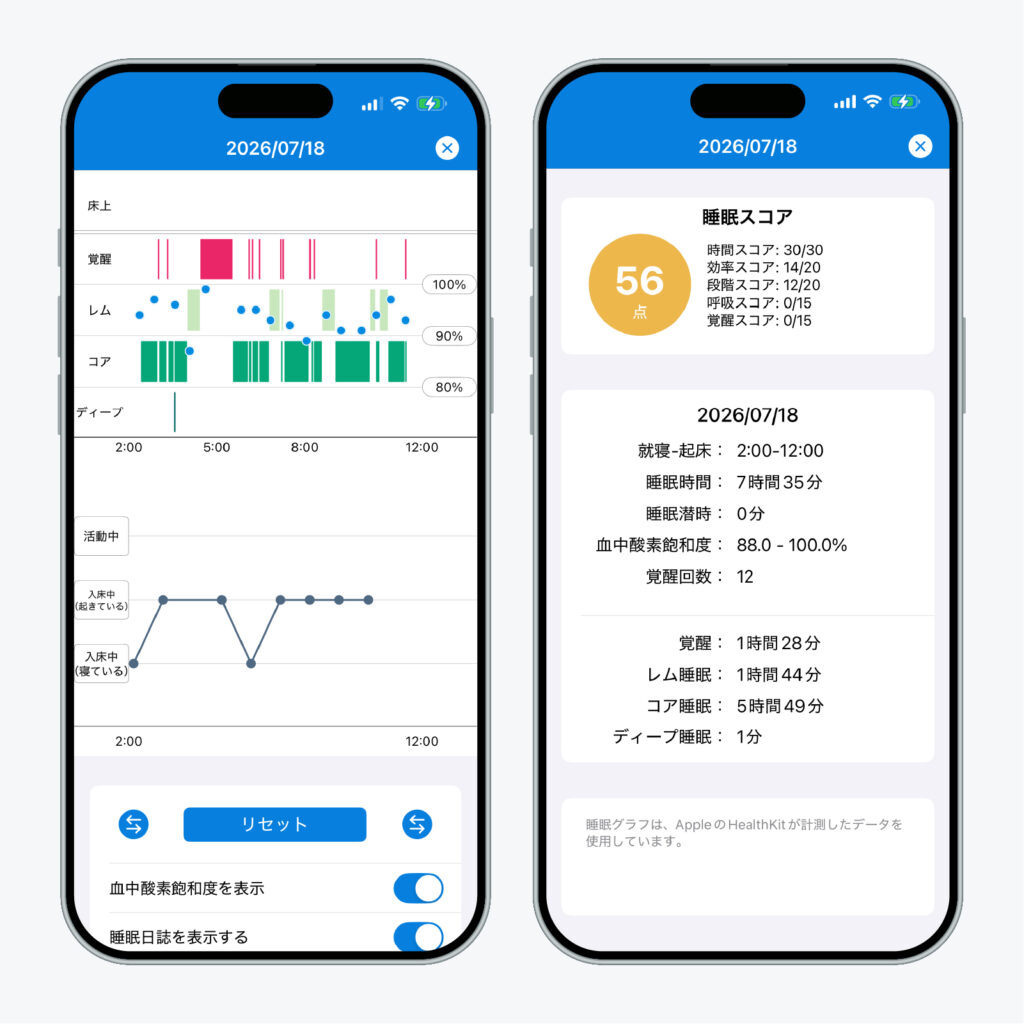
Sleepa is available in English, but some screens are still shown in Japanese. The screenshot in this article shows the Japanese version.
The Sleep Score is out of 100, and you can see how it breaks down: Duration (30 points), Efficiency (the share of your time in bed spent asleep, 20 points), Sleep Stages (20 points), Breathing (blood oxygen, 15 points) and Awakenings (15 points). For Sleep Stages, for example, Sleepa looks for at least 13 percent Deep and 18 percent REM. These are Sleepa’s own guidelines, not medical standards.
Tap Analyze on the home screen, and Sleepa reviews your last 30 days of data, then an AI explains the results in a few short sentences. You can also ask the AI questions about them. You get to know your sleep in plain words, without having to read the numbers and charts yourself (more about the AI sleep analysis).
All of Sleepa’s features are free for 7 days from the first time you open the app. (You will not be charged automatically when the free period ends.)
Sources: Apple, “Estimating Sleep Stages from Apple Watch” (updated October 2025); Apple Support, “Track your sleep on Apple Watch and use Sleep on iPhone”
Sleepa — The Science of Sleep
Look back on the sleep your Apple Watch measures, together with AI sleep analysis and your sleep journal. Learn more about Sleepa.

* Requires an Apple Watch (Series 6 or later) and an iPhone with iOS 26 or later. AI text and chat require an iPhone that supports Apple Intelligence.
Please note: Sleepa is not a medical device. Its analysis is for reference only and is not a medical diagnosis. If you have symptoms that concern you or are worried about your sleep, please consult a medical professional.