
“I haven’t been sleeping well lately.” If that sounds familiar, try keeping track of your sleep for one week. All you need is an Apple Watch and a sleep diary. Put seven nights of “how I felt I slept” next to “what my watch recorded,” and you will start to see what your sleep really looks like, and how your own perception tends to lean.
This article walks you through it step by step, from setting up on day one to reviewing the results on day eight.
About this article
This article is written by Masa, an engineer and co-founder of Medisense Inc., the company that develops the sleep app Sleepa. Medisense is led by a physician who specializes in sleep (why we built Sleepa).
Why one week?
Sleep varies a lot from night to night. Record just one night, and you can’t tell whether it was a typical night or a fluke.
A week covers both weekdays and a weekend, and some people discover that sleeping in or staying up late on days off is throwing their rhythm off. At the same time, trying to keep a diary indefinitely can wear you out. Committing to one week is a good place to start.
Day one: get set up
Your Apple Watch
- In the Health app on your iPhone, set up a sleep schedule and turn on Track Sleep with Apple Watch.
- Pick a regular time to charge, such as after dinner or while you get ready in the morning, so the watch has at least 30 percent charge at bedtime.
For what the sleep data actually shows, see How to read your Apple Watch sleep data.
Your sleep diary
A paper notebook or a notes app is fine. Each morning, jot down:
- When you got into bed
- When you think you fell asleep
- When you think you were awake during the night (“from about 3 a.m., for an hour or so”)
- When you got out of bed
- How satisfied you are with last night’s sleep, on a scale of 1 to 10
- Notes on the previous day: alcohol, coffee or other caffeine, naps, exercise, anything on your mind
The notes will come in handy later, when you look back at what happened on your worst nights.
Days 1–7: write the diary before you check the data
The single most important rule for this week: fill in your diary before you look at your Apple Watch data. If you check the data first, your memory starts to bend toward it: “Six hours? Maybe it wasn’t so bad.” What you want to capture is how the night felt to you, so write it down while that feeling is still untouched.
A few more tips:
- Rough is fine: times don’t need to be exact. Your impression matters more than precision.
- Don’t check the clock at night: you don’t need to look at the time in the middle of the night for your diary. Clock-watching can make it even harder to fall back asleep.
- Live as usual: don’t go to bed early just because it’s your tracking week. The point is to see your normal sleep.
- Missed a day? Keep going: one gap won’t spoil the week. Just pick it up again the next morning.
Day 8: compare how you felt with what was recorded
Once you have seven nights, put your diary and your Apple Watch data side by side. Compare four things:
- Falling asleep: when you think you fell asleep vs. when your watch first recorded sleep
- Awake time at night: what your watch recorded during the times you wrote down as awake
- Total sleep: how long you felt you slept vs. the sleep time your watch recorded
- Satisfaction: on nights you rated low, did the data also show shorter sleep or more awakenings?
Even just total sleep becomes much clearer in a table. For example (these numbers are made up for illustration):
| Night | Sleep I felt I got | Sleep recorded by Apple Watch | Satisfaction |
|---|---|---|---|
| 1 (Mon) | 4 h | 6 h 10 min | 3 |
| 2 (Tue) | 6 h | 6 h 30 min | 6 |
| 3 (Wed) | 3 h | 5 h 40 min | 2 |
| 4 (Thu) | 6 h | 6 h 20 min | 7 |
| 5 (Fri) | 5 h | 6 h | 5 |
| 6 (Sat) | 7 h | 7 h 50 min | 8 |
| 7 (Sun) | 5 h | 5 h 50 min | 4 |
In this example, the lower the satisfaction, the bigger the gap between the sleep felt and the sleep recorded. The nights that felt the most sleepless were actually the ones with the most hidden sleep.
What your results may mean
The data often shows much more sleep than you felt
You may be sleeping more than you think. This is called sleep state misperception, and it is not unusual among people with insomnia complaints. For some people, simply learning “I slept more than I thought” takes a weight off.
Keep in mind that Apple Watch can record time spent lying still but awake as sleep, so its numbers tend to run a little high. A small gap may be within the margin of error. What matters is whether gaps of several hours keep showing up.
How you felt and the data match, and both are short
You may genuinely not be getting enough sleep. Take a look at your bedtime, your wake time and how you spend the hour before bed. If sleepless nights continue and affect your daytime life, talk to a medical professional.
Big swings from night to night
Check your notes. Nights after drinking, late-afternoon coffee, a long nap, a weekend lie-in. If your worst nights have something in common, that may be what is affecting your sleep.
When to see a doctor sooner
Whatever your results, please see a medical professional if any of the following apply. Your week of records can also help you describe your sleep to the doctor.
- Strong daytime sleepiness is getting in the way of work, housework or driving
- You’ve been told you snore loudly or stop breathing in your sleep
- You’ve been feeling low for a long time
- Sleepless nights keep coming and it is wearing you down
If you already take sleep medication, please don’t reduce or stop it on your own based on your results. Always talk to the doctor who prescribed it.
Sleepa makes this week easy
Lining up a paper diary against your Apple Watch data by hand takes some effort. Our sleep app, Sleepa, has everything this one-week check needs.
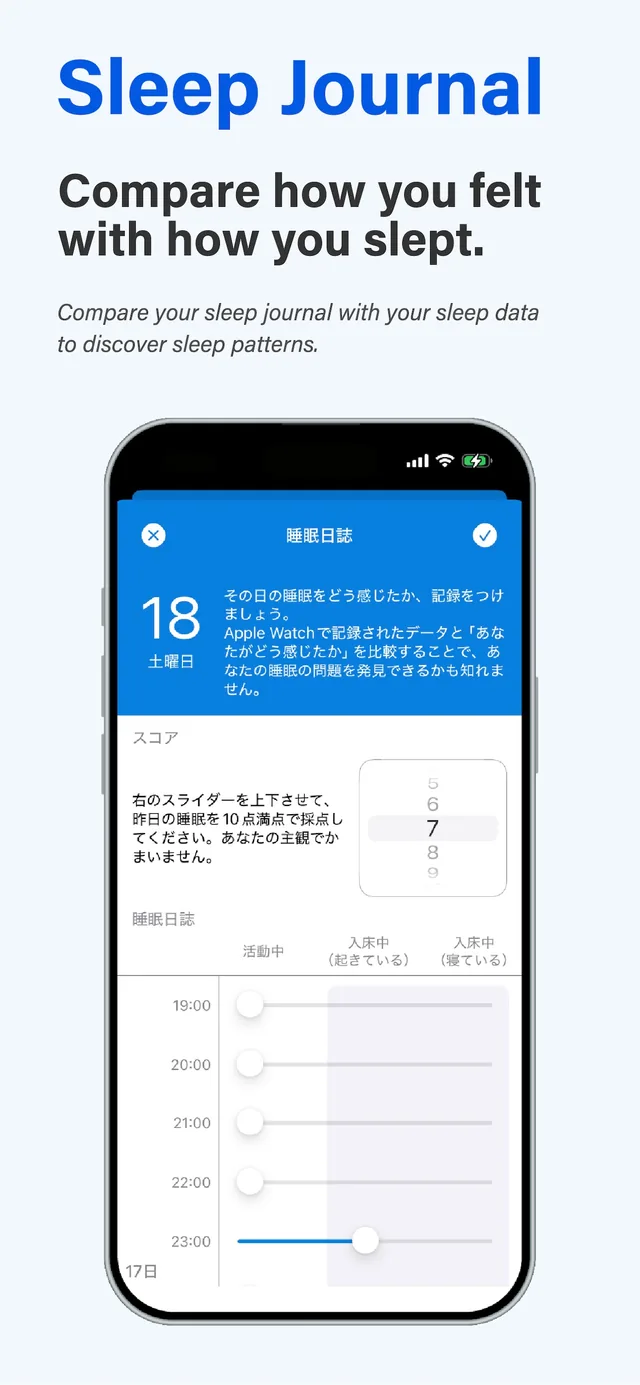
- Sleep journal: rate last night’s sleep out of 10, and mark each hour as Active, In Bed (awake) or In Bed (asleep).
- Side-by-side view: your journal appears right under your Apple Watch sleep graph, on the same timeline, so you can see at a glance what was recorded when you felt awake.
- Daily reminder: Sleepa reminds you to fill in your journal each day. Set the time to the morning in Settings, and it becomes a habit of writing the journal before you look at the data.
- Day-8 review: with seven or more nights of data, tap Analyze, and an AI sums up trends such as your sleep time, how long it takes you to fall asleep and how often you wake up.
All of Sleepa’s features are free for 7 days from the first time you open the app. Open it before bed and start recording that night, and you can fit seven nights of tracking and your day-8 morning review inside the free period. You will not be charged automatically when it ends.
Learn more about the journal in How you felt vs. how you slept, and about the analysis in AI that makes sense of your sleep data.
Sleepa — The Science of Sleep
Look back on the sleep your Apple Watch measures, together with AI sleep analysis and your sleep journal. Learn more about Sleepa.

* Requires an Apple Watch (Series 6 or later) and an iPhone with iOS 26 or later. AI text requires an iPhone that supports Apple Intelligence.
Please note: Sleepa is not a medical device. Its analysis is for reference only and is not a medical diagnosis. If you have symptoms that concern you or are worried about your sleep, please consult a medical professional.