
You open the Health app in the morning and see that your blood oxygen dipped below 90% while you were asleep. During the day it’s 95% or higher, but at night it’s lower. Or maybe your Apple Watch isn’t recording blood oxygen during sleep at all. This article is for you if your Apple Watch blood oxygen data has left you with questions or worries like these.
The short answer: Apple says slightly lower blood oxygen values while sleeping are expected, and a single reading below 90% can’t tell you whether something is wrong with your health. The Blood Oxygen app on Apple Watch isn’t intended for medical use, and readings can be off, or missing, because of how you wear the watch or how your arm is positioned. What’s worth watching is whether low readings keep appearing night after night, and whether you have symptoms such as snoring, pauses in breathing or strong daytime sleepiness. Using Apple’s documentation, public health information and research, this article covers how Apple Watch measures blood oxygen during sleep, what’s typical, why readings can come out low, how accurate they are, what to check when there are no readings, and when to see a doctor.
About this article
This article is written by Masa, an engineer and co-founder of Medisense Inc., the company that develops the sleep app Sleepa. Medisense is led by a physician who specializes in sleep (why we built Sleepa). For the Apple Watch feature that checks for breathing disturbances during sleep, see What are Apple Watch sleep apnea notifications?
How does Apple Watch measure blood oxygen while you sleep?
Apple Watch measures your blood oxygen during sleep automatically, using the Blood Oxygen app’s background measurements. According to Apple, background measurements happen occasionally, usually when you’re not moving, and the number of readings each day and the time between them vary depending on how active you are. Blood oxygen measurements only occur during sleep if the Track Sleep with Apple Watch setting is turned on.
To take a measurement, Apple Watch shines red and infrared light into your wrist from the back of the watch and calculates your blood oxygen from the light that comes back. According to Apple’s white paper, background readings are intermittent spot checks, taken only when the watch senses that your wrist is still and in a suitable position (the arm generally horizontal, palm facing down). They are not the same as the continuous, second-by-second measurements of a bedside pulse oximeter in a hospital.
Supported models and the settings you need
According to Apple Support and the Apple Watch User Guide, you need all of the following for your Apple Watch to record blood oxygen during sleep.
| Requirement | Details |
|---|---|
| Apple Watch | Series 6 or later, or any model of Ultra, with the latest version of watchOS (not Apple Watch SE or Apple Watch For Your Kids) |
| iPhone | The latest version of iOS |
| Country or region | Where the Blood Oxygen app is available (including the U.S. and Japan) |
| Who it’s for | People 18 or older |
| Blood Oxygen settings | In the Settings app on Apple Watch, under Blood Oxygen, Blood Oxygen Recordings is on, and In Sleep Focus hasn’t been turned off |
| Sleep tracking | Track Sleep with Apple Watch is turned on |
One note for the U.S.: on Apple Watch models purchased in the United States on or after January 18, 2024 with part numbers ending in LW/A or LS/A, the Blood Oxygen data analysis is performed on iPhone, and you view the results in the Health app on iPhone (they can’t be viewed on Apple Watch). To find your part number, open the Apple Watch app on your iPhone, tap the My Watch tab, tap General, then tap About, and look at the Model Number field.
Where to see your readings
All blood oxygen measurements, whether taken in the background or on demand, are saved in the Health app on your iPhone. In the Health app, tap Browse, tap Respiratory, then tap Blood Oxygen to see your readings by day, week, month or 6 months. According to Apple Support, you can also filter the chart to show only measurements taken while sleeping.
What is a normal blood oxygen level during sleep?
According to Apple, most people have a blood oxygen level of 95–100%, but some people live a normal life with levels below 95%. Apple also says slightly lower values while sleeping are expected, and some people may see values below 95%. MedlinePlus, the health information site of the U.S. National Library of Medicine, likewise gives 95–100% as a normal oxygen saturation level, and notes that levels may be lower if you live at a higher elevation, where there is less oxygen in the air.
There is also research on the values healthy people have during sleep. A study of all-night data from 350 people aged 1 month to 85 years, all with normal results on an overnight sleep study (polysomnography), found that the median value of the night averaged 96.5%, and the lowest value of the night averaged 90.4% (standard deviation 3.1%). People over 60 had lower values than younger people (their median values averaged 95.1%).
That study measured continuously through the night with sleep lab equipment, which is different from how Apple Watch measures. Still, it shows that a lowest reading of around 90% during the night isn’t unusual, even in healthy people.
Why is my blood oxygen below 90% while sleeping?
A blood oxygen reading below 90% during sleep can come from measurement error, or from a real drop in the oxygen in your blood. From a single Apple Watch reading, it’s hard to tell which.
Fit and arm position can throw readings off
According to Apple’s white paper, when the back of the watch isn’t in full contact with your skin, or the watch is worn very tightly, the usual result is no reading at all, but these conditions can also produce readings that are higher or lower than your true level. In Apple’s validation study, much of the outlying data came from sessions in which the watch wasn’t worn with the recommended snugness.
Arm position matters too. Apple explains that some arm positions let blood in your veins, which carries much less oxygen, affect the signal, and this can make a reading falsely low. To avoid this, Apple Watch withholds readings when it decides that the signal is inadequate or that your position or movement isn’t suitable for a reliable reading.
Breathing can stop during sleep
Sleep apnea is a common condition in which your breathing stops and restarts many times while you sleep. According to the U.S. National Heart, Lung, and Blood Institute (NHLBI), this can prevent your body from getting enough oxygen. In the study above, patients with obstructive sleep apnea also had lower values during sleep than the healthy group.
So if readings below 90% keep showing up night after night, and you also snore or feel sleepy during the day, that’s a reason to talk to a doctor. Whether you actually have sleep apnea is something a doctor decides, based on an evaluation and a sleep study.
How accurate is Apple Watch blood oxygen while sleeping?
Apple Watch blood oxygen performed about as well as medical devices in Apple’s validation study, but that study didn’t measure people during sleep, and individual readings can be off by a few percentage points. In Apple’s white paper (October 2022), Apple Watch Series 6 readings were compared with blood samples drawn from an artery, and the accuracy figure (Arms) was 1.97%. Apple says this is within the limits in U.S. Food and Drug Administration (FDA) guidance and the international standard, and similar to hospital devices tested the same way.
That study, however, involved 50 healthy adults aged 19 to 40 in a lab, with oxygen levels lowered by changing the air they breathed. It didn’t test readings taken at home during sleep. And an Arms of 1.97% means that only about two-thirds of readings fall within 1.97 points of the blood sample value; the rest are further off.
A 2026 review that pooled 82 studies of Apple Watch accuracy found that, for blood oxygen, the average error was close to zero (−0.04%), but the limits of agreement for individual readings were wide (−4.00 to +3.94%). MedlinePlus also notes that pulse oximetry results may be 2% to 4% higher or lower than your actual blood oxygen level.
Apple states that Blood Oxygen app measurements are not intended for medical use and are designed only for general fitness and wellness purposes. Rather than a difference of a few points in one reading, the pattern over several nights is more useful to look at.
Why isn’t my Apple Watch measuring blood oxygen during sleep?
If your Apple Watch isn’t recording blood oxygen during sleep, check your settings, Low Power Mode and how you wear the watch, in that order. Apple notes that even under ideal conditions, your Apple Watch may not get a reliable measurement every time, and for a small percentage of users, various factors may make it impossible to get any measurement.
1. Check your settings and model
- Blood Oxygen Recordings: in the Settings app on your Apple Watch, tap Blood Oxygen and make sure Blood Oxygen Recordings is on.
- In Sleep Focus: if In Sleep Focus is turned off on the same screen, background measurements don’t run while Sleep Focus is on. Because the measurements use a bright red light that’s more visible in the dark, Apple offers this setting for people who find the light distracting. If you ever turned it off for that reason, check it here.
- Track Sleep with Apple Watch: blood oxygen is measured during sleep only when this setting is on. If your sleep itself isn’t being recorded, go through the checks in Apple Watch sleep tracking not working?
- Model, country and age: is your watch a Series 6 or later, or an Ultra (Apple Watch SE isn’t supported)? Is the Blood Oxygen app available in your country or region? Are you 18 or older?
- A second iPhone: on a secondary iPhone that isn’t paired with your Apple Watch, the blood oxygen analysis isn’t available.
2. Was Low Power Mode on?
According to Apple, Low Power Mode turns off background blood oxygen measurements, including during sleep. When your battery goes down to 10%, an alert asks if you want to turn Low Power Mode on, and unless you chose to keep it on for a number of days, it turns off automatically when the battery is charged to 80%. If your sleep was recorded but there are no blood oxygen readings for that night, check whether Low Power Mode was on.
3. Check the fit and your wrist
- Snug fit: the band should be snug but comfortable, not loose, and the back of the watch needs to touch your wrist.
- Away from the wrist bone: if your wrist bone keeps the back of the watch from sitting flush, move the watch 1 to 2 inches up your arm, away from the wrist bone.
- Movement and arm position: motion, and positions such as your arm hanging by your side or your hand in a fist, can lead to unsuccessful measurements.
- Skin perfusion: how much blood flows through your skin varies a lot from person to person, and if it’s too low, for example when your wrist is cold, the sensor may not get a reading.
- Tattoos: the ink, pattern and saturation of some tattoos can block light from the sensor and make measurements difficult.
Apple says the number of readings each day and the time between them vary depending on how active you are. If the number of readings differs from night to night, that alone doesn’t mean anything is broken.
What should you do if your blood oxygen is low at night?
If you see a reading below 90% during sleep, don’t judge by that one reading; look at several nights of data to see whether low readings keep coming back. Then check the following.
- Look at several nights side by side: in the Health app, view Blood Oxygen by week or month and filter to readings taken while sleeping. That shows whether the low reading was a one-off or keeps happening.
- Think back to that night: was the band loose? Did you sleep in a cold room? Were you at a high elevation?
- Check for symptoms: has anyone told you that you snore or stop breathing in your sleep? Do you feel very sleepy during the day? The NHLBI suggests talking to your healthcare provider in these cases.
- Use sleep apnea notifications too: on Apple Watch Series 9 or later, Ultra 2 or later and SE 3, you can also use sleep apnea notifications, which use the accelerometer to look for breathing disturbances during sleep. How they work and how accurate they are is covered in What are Apple Watch sleep apnea notifications?
Apple states that Blood Oxygen app measurements are not intended for medical use, including self-diagnosis or consultation with a doctor. If low readings keep appearing and you’re worried, don’t draw conclusions from your Apple Watch data on your own; talk to a doctor. According to the NHLBI, sleep studies are used to find out whether you have sleep apnea and how serious it is.
Seeing your blood oxygen night by night in Sleepa
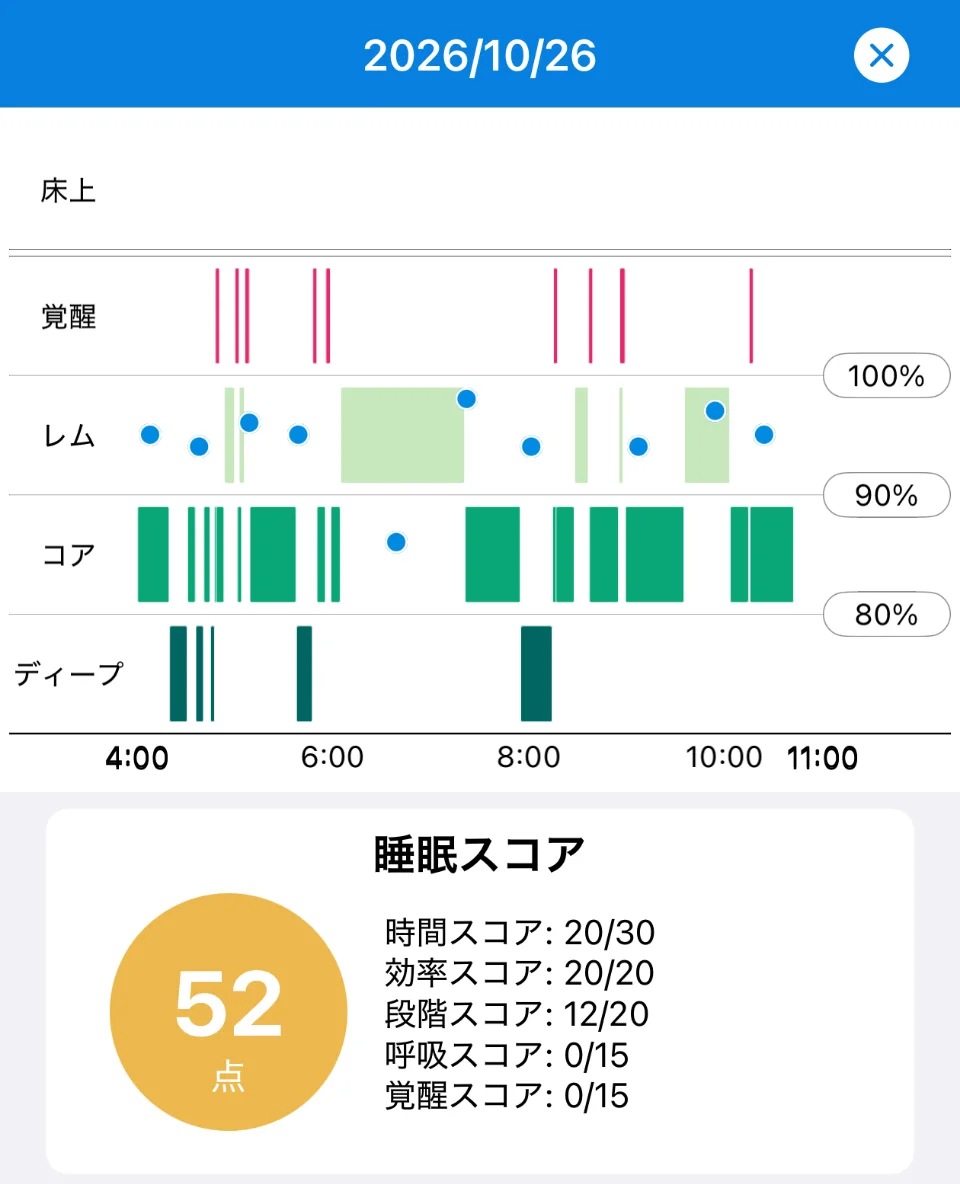
Our sleep app, Sleepa, reads the sleep data your Apple Watch writes to the Health app and shows it to you (Sleepa doesn’t take any measurements itself). It overlays your blood oxygen as blue dots on that night’s sleep graph, so you can see when any low readings occurred alongside your sleep stages.
The graph has rows for In Bed, Awake, REM, Core and Deep, plus a blood oxygen scale (100%, 90% and 80%). Below the graph, Sleepa also shows that night’s blood oxygen range (lowest to highest).
Sleepa is available in English, but some screens are still shown in Japanese. The screenshots in this article show the Japanese version.
The screen above is from the night of October 26. Between 4:00 and 11:00 there are about 10 blue blood oxygen dots, and most of them sit between the 90% and 100% lines. Only one, at around 6:30, is below the 90% line. A single low reading like this can appear within a night. One dot on its own can’t tell you whether it was measurement error or a real dip, so the next step is to see whether low readings keep appearing on other nights.
- Breathing score: 15 of the 100 points in Sleepa’s own sleep score come from Breathing, which is based on your lowest blood oxygen reading during sleep: 95% or higher gives 15 points, 92% or higher 10, 90% or higher 5, and lower 0. On the night above, the lowest reading was below 90%, so Breathing scored 0. For how to read the score breakdown, see Low Apple Watch Sleep Score this morning? What to check.
- The Sleep Apnea section of “Analyze”: once you have at least 7 nights of data, Sleepa can analyze your last 30 days. If Apple Watch recorded sleep apnea notifications during that period, Sleepa shows how many and recommends seeing a doctor or sleep specialist. If there are none, Sleepa shows a caution when your lowest blood oxygen fell below 90% on more than 20% of the nights with blood oxygen data. Otherwise, it says no signs of sleep apnea were seen.
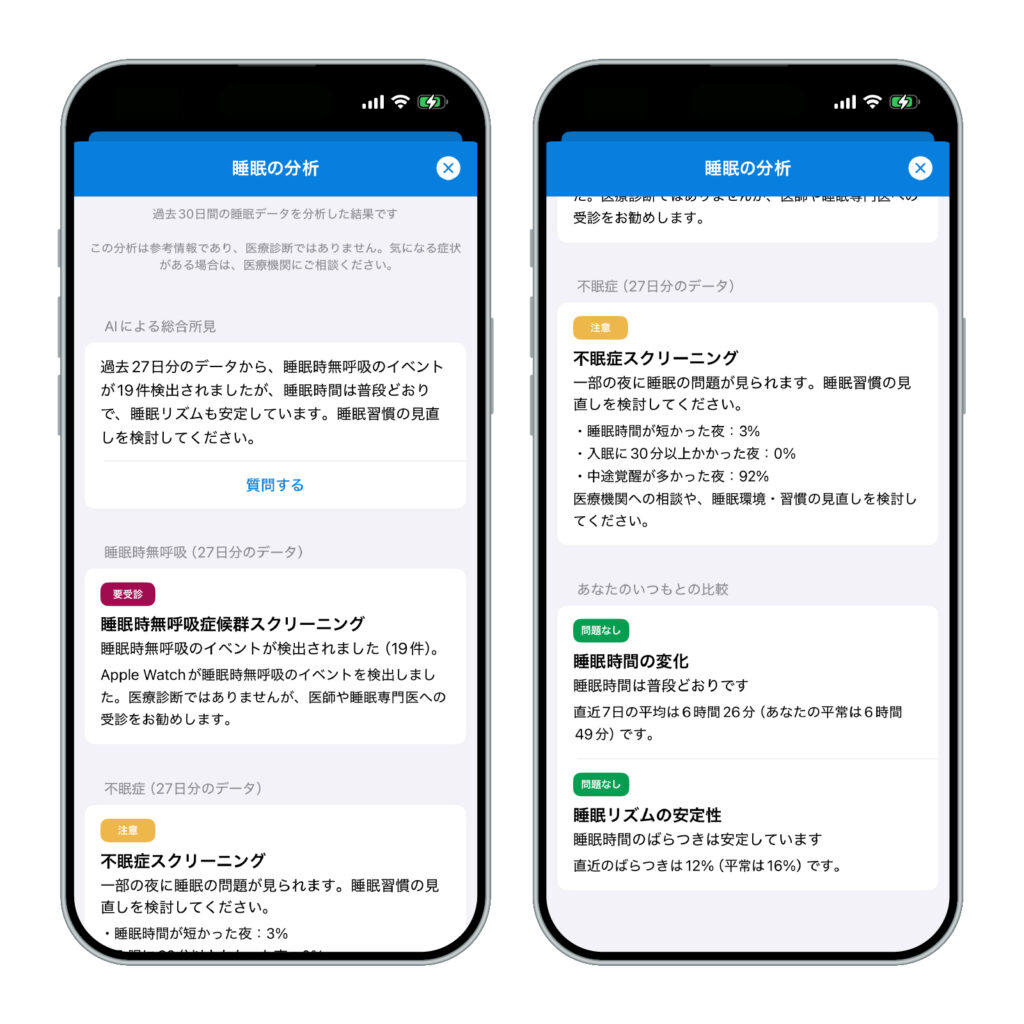
All of these thresholds are used within Sleepa and are not medical criteria. Sleepa’s analysis is not a diagnosis either, and it can’t rule out sleep apnea. The analysis and the AI writing happen on your iPhone, and your sleep data is never sent to an outside AI service. Note that Sleepa doesn’t show heart rate or respiratory rate.
To use Sleepa, you need an Apple Watch that can measure blood oxygen (Series 6 or later, or Ultra) and an iPhone with iOS 26 or later. Apple Watch SE can’t measure blood oxygen, so it isn’t supported.
All Sleepa features are free for 7 days from the first time you open the app (you will not be charged automatically when the free period ends). To see what Sleepa adds compared with the iPhone’s built-in Health app, read What the Health app doesn’t tell you about your Apple Watch sleep data — 5 things Sleepa adds.
When to see a doctor
Neither the Blood Oxygen app on Apple Watch nor Sleepa can diagnose a medical condition. In the following cases, please see a doctor, whatever your readings or score. Your doctor will decide whether you need any tests.
- Low blood oxygen readings (below 90%) keep appearing night after night
- Someone has told you that you snore loudly or stop breathing in your sleep
- Strong daytime sleepiness is interfering with work or driving
- You’ve received a sleep apnea notification from your Apple Watch
- You have trouble breathing or shortness of breath, chest pain or tightness, or lips or nails that look bluish (seek care right away)
- You’re being treated for a lung or heart condition and something in your data concerns you (talk to the doctor treating you)
Frequently asked questions
Is it normal for Apple Watch blood oxygen to drop below 90% while sleeping?
Apple says slightly lower blood oxygen values while sleeping are expected, and in a study of 350 people with normal sleep studies, the lowest value of the night averaged 90.4%. Don’t judge by a single low reading, but see a doctor if readings below 90% keep appearing night after night, or if you snore, stop breathing in your sleep or feel very sleepy during the day.
Why is my blood oxygen lower at night?
Low blood oxygen readings at night can come from measurement error caused by how the watch fits or how your arm is positioned, or from a real drop in oxygen, for example when breathing stops during sleep. Values also tend to be lower for people who live at high elevation and for people over 60.
How accurate is Apple Watch blood oxygen while sleeping?
In Apple’s validation study, Apple Watch blood oxygen had an accuracy figure (Arms) of 1.97% compared with arterial blood samples, but the study tested 50 healthy adults in a lab, not readings taken during sleep. A review of 82 studies found that individual readings can differ by about 4 points either way, and Apple states that Blood Oxygen app measurements are not intended for medical use.
Why isn’t my Apple Watch recording blood oxygen during sleep?
If your Apple Watch isn’t recording blood oxygen during sleep, check that Blood Oxygen Recordings is on, that In Sleep Focus hasn’t been turned off, that Track Sleep with Apple Watch is on, and that Low Power Mode wasn’t on. A loose fit, the watch sitting on your wrist bone, or an arm position that isn’t suitable for measuring can also prevent readings.
Can Apple Watch blood oxygen detect sleep apnea?
The Blood Oxygen app on Apple Watch is not intended for medical use, and its readings can’t tell you whether you have sleep apnea. Whether you have sleep apnea is something a doctor decides, based on an evaluation and a sleep study. Apple Watch has a separate feature, sleep apnea notifications, which uses the accelerometer to look for breathing disturbances.
Can Apple Watch SE measure blood oxygen?
No. According to Apple, the Blood Oxygen app works on Apple Watch Series 6 or later and all models of Apple Watch Ultra, and it is not supported on Apple Watch SE.
Key points
- Apple Watch measures blood oxygen during sleep with occasional background measurements taken when you’re still. It doesn’t measure continuously, second by second
- Most people are at 95–100%, and slightly lower values while sleeping are expected (Apple). In a study of healthy people, the lowest value of the night averaged 90.4%
- Low readings can come from measurement error caused by fit or arm position, or from a real drop in oxygen, for example when breathing stops
- Apple’s validation found an accuracy figure of 1.97%, but not during sleep. The measurements are not intended for medical use
- If there are no readings, check Blood Oxygen Recordings, In Sleep Focus and Track Sleep with Apple Watch, Low Power Mode, and the fit. Apple Watch SE can’t measure blood oxygen
- Don’t judge by one dot; look at several nights. See a doctor if readings below 90% keep coming back, or if you snore, stop breathing in your sleep or feel very sleepy during the day
Sources: Apple, “How to use the Blood Oxygen app on Apple Watch” (Apple Support); Apple, “Measure blood oxygen levels with the Blood Oxygen app” (Apple Watch User Guide); Apple, “Blood Oxygen app on Apple Watch” (October 2022); Apple, “Use Low Power Mode on your Apple Watch” (Apple Support); Apple, “Track your sleep on Apple Watch and use Sleep on iPhone” (Apple Support); Apple, “Identify your Apple Watch” (Apple Support); Apple, “Sleep apnea notifications on your Apple Watch” (Apple Support); Apple, “watchOS 27 – Feature Availability” (checked November 2026); Gries RE, Brooks LJ, “Normal oxyhemoglobin saturation during sleep. How low does it go?” Chest 110(6), 1996; Lambe R et al., “The accuracy of Apple Watch measurements: a living systematic review and meta-analysis” NPJ Digit Med 9, 2026; MedlinePlus, “Pulse Oximetry“; National Heart, Lung, and Blood Institute, “What Is Sleep Apnea?” and “Sleep Apnea Diagnosis“
Sleepa — The Science of Sleep
Look back on the sleep your Apple Watch measures, together with AI sleep analysis and your sleep journal. Learn more about Sleepa.

* Requires an Apple Watch (Series 6 or later) and an iPhone with iOS 26 or later. AI text requires an iPhone that supports Apple Intelligence.
Please note: Sleepa is not a medical device. Its analysis is for reference only and is not a medical diagnosis. If you have symptoms that concern you or are worried about your sleep, please consult a medical professional.
Related articles
- What are Apple Watch sleep apnea notifications? — how they work, supported models, accuracy, and what to do if you get one
- Low Apple Watch Sleep Score this morning? What to check, and how to find the reason in the breakdown
- Apple Watch sleep tracking not working? What to check when your sleep, sleep stages, naps or Sleep Score don’t show up