
You’re about to buy or upgrade an Apple Watch, and you want to know how the sleep features differ from model to model. Does Apple Watch SE 3 give you a Sleep Score and sleep apnea notifications? What can the Series 7 you already own still do? This article is for you if you have questions like these.
The short answer: all three models Apple lists as current Apple Watch models in November 2026 — Series 12, Ultra 4 and SE 3 — track sleep stages and support the Sleep Score, sleep apnea notifications, wrist temperature and the Vitals app. The differences are that SE 3 has no Blood Oxygen app, and that Series 12 and Ultra 4 add heart rate variability (HRV) to the Vitals app and a Readiness app. On older models, the Sleep Score works on Series 6 or later, SE 2 or later and all Ultra models, and sleep apnea notifications work on Series 9 or later, Ultra 2 or later and SE 3. Using Apple’s compare page and support pages, this article lays out the differences model by model.
About this article
This article is written by Masa, an engineer and co-founder of Medisense Inc., the company that develops the sleep app Sleepa. Medisense is led by a physician who specializes in sleep (why we built Sleepa). For the basics of reading the sleep data once it’s recorded, see How to read your Apple Watch sleep data.
Which Apple Watch models does Apple sell right now?
As of November 2026, the models listed under “Current Watch models” on Apple’s compare page are Apple Watch Series 12, Apple Watch Ultra 4 and Apple Watch SE 3. Series 11, Ultra 3, SE 2 and earlier models appear under “More Watch models.”
The latest version, watchOS 27, runs on SE 3, Series 9 and later, and Ultra 2 and later. Apple’s compare page lists the SE (2nd generation) as “Apple Watch SE 2,” so we use “SE 2” in this article too.
How do the sleep features differ across the current models?
The sleep features of the three current Apple Watch models differ in whether they have the Blood Oxygen app, and in what Series 12 and Ultra 4 add. On Apple’s compare page, Series 12 and Ultra 4 have the same sleep-related features.
| Feature | Series 12 and Ultra 4 | SE 3 |
|---|---|---|
| Sleep tracking (sleep stages) | Yes | Yes |
| Sleep Score | Yes | Yes |
| Sleep apnea notifications | Yes | Yes |
| Blood Oxygen app | Yes | No |
| Nightly wrist temperature tracking | Yes | Yes |
| Vitals app | Yes (with HRV and daytime vitals) | Yes (heart rate, respiratory rate, wrist temperature, sleep duration) |
| Readiness app | Yes | No |
| Quick charge for sleep tracking | 5 minutes for up to 10 hours | 8 minutes for up to 8 hours |
Apple’s compare page doesn’t list any model-by-model difference in tracking sleep stages (Awake, REM, Core and Deep). On Ultra 4, just as on Series 12 and SE 3, you can see your sleep stages in the Sleep app and the Health app. For what each stage means, see How to read your Apple Watch sleep data.
What SE 3 lacks: the Blood Oxygen app
Apple Watch SE 3 supports both the Sleep Score and sleep apnea notifications, but not the Blood Oxygen app. According to Apple Support, the Blood Oxygen app works on Series 6 or later and all Ultra models, and isn’t supported on Apple Watch SE. So SE 3 doesn’t measure your blood oxygen while you sleep either, and its Vitals app shows heart rate, respiratory rate, wrist temperature and sleep duration.
Sleep apnea notifications, on the other hand, use the accelerometer to look for breathing disturbances during sleep, so they work on SE 3. For how they work and how accurate they are, see What are Apple Watch sleep apnea notifications?
What Series 12 and Ultra 4 add
- HRV in the Vitals app: according to the Apple Watch User Guide, on Series 12 and Ultra 4 your overnight vitals show heart rate variability instead of sleep duration. There are also new daytime vitals, based on heart rate and heart rate variability measured during the day.
- The Readiness app: a 0–10 score that helps you understand whether you’re ready to push yourself or need to rest. It draws on your recent activity, your overnight vitals and your recent Sleep Score data. It’s available only on Series 12 and Ultra 4, and you need to wear your watch to bed for at least 7 nights before you see a score.
- A night’s tracking from a short charge: Apple says 5 minutes of charging gives up to 10 hours of sleep tracking. For SE 3 it’s 8 minutes for up to 8 hours, and for the previous Series 11 and Ultra 3, 5 minutes for up to 8 hours.
Battery figures: check the test conditions too
Battery life matters if you want to wear your watch to sleep every night. On Apple’s compare page, Series 12 is rated for up to 24 hours, Ultra 4 for up to 50 hours and SE 3 for up to 18 hours. But the tests differ. The Series 12 test includes 6 hours of sleep tracking in 24 hours, and the Ultra 4 test includes 12 hours in 50 hours, while the 18-hour SE 3 test doesn’t include sleep tracking (SE 3 is rated for up to 32 hours in a Low Power Mode test that does include sleep tracking).
Whatever the model, Apple recommends charging your watch to at least 30% before bed. If a night didn’t get recorded because the battery ran low, see Apple Watch sleep tracking not working? for what to check.
Which models support each sleep feature?
Each sleep-related Apple Watch feature is supported by a different set of models. Based on Apple’s compare page and support pages, here they are, including older models.
| Feature | Supported models |
|---|---|
| Sleep tracking | Series 3 or later, and all SE and Ultra models |
| Sleep Score | Series 6 or later, SE 2 or later, all Ultra models |
| Sleep apnea notifications | Series 9 or later, Ultra 2 or later, SE 3 |
| Blood Oxygen app | Series 6 or later, all Ultra models (not SE) |
| Nightly wrist temperature tracking | Series 8 or later, all Ultra models, SE 3 |
| Vitals app | Series 6 or later, SE 2 or later, all Ultra models |
| Readiness app | Series 12, Ultra 4 |
What you need to use them (watchOS, iPhone, age and more)
- Sleep stages: added in 2022 with watchOS 9, which Apple released for Series 4 and later. The tech specs for SE 2 also list “Sleep app including sleep stages.”
- Sleep Score: needs an Apple Watch with watchOS 26 or later, paired with iPhone 11 or later running iOS 26. For how the score is calculated, see How to read your Apple Watch Sleep Score.
- Sleep apnea notifications: need the latest watchOS and iOS, Track Sleep with Apple Watch turned on, and at least 10 nights of wearing your watch to sleep in 30 days. They’re intended for people 18 or older who haven’t been diagnosed with sleep apnea.
- Blood Oxygen app: not available to people under 18. Measurements during sleep happen only when Track Sleep with Apple Watch is turned on.
- Wrist temperature: you need to wear your watch to bed with Sleep Tracking on, and it must track at least 4 hours of sleep each night. Data becomes available after about 5 nights.
- Vitals app: the metrics shown depend on the model. On Apple’s compare page, for example, Series 6 and Series 7 don’t include wrist temperature, and SE 2 shows heart rate, respiratory rate and sleep duration.
How to read the Vitals app is covered in What is the Apple Watch Vitals app?, and how to read your blood oxygen during sleep in Apple Watch blood oxygen low while sleeping?
Which sleep features work on older Apple Watch models?
The sleep features available on older Apple Watch models vary a lot from model to model. Series 6 or later, SE 2 and all Ultra models get as far as the Sleep Score. The table below, based on Apple’s compare page, shows which sleep features each model has.
| Model | Sleep features |
|---|---|
| Series 11, Series 10, Series 9, Ultra 3, Ultra 2 | Sleep stages, Sleep Score, sleep apnea notifications, Blood Oxygen, wrist temperature, Vitals |
| Series 8, original Ultra | Sleep stages, Sleep Score, Blood Oxygen, wrist temperature, Vitals (no sleep apnea notifications) |
| Series 7, Series 6 | Sleep stages, Sleep Score, Blood Oxygen, Vitals (no wrist temperature or sleep apnea notifications) |
| SE 2 | Sleep stages, Sleep Score, Vitals (no Blood Oxygen, wrist temperature or sleep apnea notifications) |
| SE (1st generation), Series 5 and earlier | Sleep tracking (Series 3 and later). No Sleep Score or Vitals app |
Series 9 and later and Ultra 2 and later run the latest watchOS 27. Series 6 to 8, SE 2 and the original Ultra aren’t on the watchOS 27 list, but the Sleep Score only needs watchOS 26 or later. According to Apple, if your watch isn’t compatible with the latest watchOS, Software Update shows you the newest version it can use.
Which features depend on your country or region?
Among the sleep-related features, sleep apnea notifications and the Blood Oxygen app are available only in certain countries and regions. When we checked Apple’s “watchOS 27 – Feature Availability” page in November 2026, both were available in the U.S., the U.K. and Japan, among many others. The Vitals app is listed as available worldwide. Availability can change, so check Apple’s page for the latest information.
Also, on Apple Watch models purchased in the United States on or after January 18, 2024 with part numbers ending in LW/A or LS/A, the Blood Oxygen data analysis is performed on iPhone, and you view the results in the Health app. On these models, Blood Oxygen isn’t available in the Vitals app. This applies only to models purchased in the United States.
Choosing an Apple Watch for sleep: what do the differences mean?
When you choose an Apple Watch for sleep, whether the differences between models matter depends on what you want to see. Rather than one model being “the best,” it helps to think about it this way.
- You want your sleep time, sleep stages and Sleep Score each morning: all three current models do this. Among older models, Series 6 or later, SE 2 and all Ultra models also get the Sleep Score.
- You want to be notified about signs of sleep apnea: all three current models do this. Among older models, it’s Series 9 or later and Ultra 2 or later.
- You also want to see your blood oxygen during sleep: you need a model with the Blood Oxygen app (Series 6 or later, or any Ultra). SE models, including SE 3, can’t measure it.
- You want HRV and a readiness score too: as of November 2026, that’s Series 12 and Ultra 4.
- You want to keep wearing it to bed every night: compare the battery figures above (including the test conditions) and how much sleep tracking a short charge gives you.
On every model, sleep stages are Apple Watch’s estimates. For how accurate they are, see How accurate is Apple Watch sleep tracking? Apple also states that the Blood Oxygen app and the Vitals app are for wellness purposes only and not for medical use. Sleep apnea notifications don’t diagnose anything either, so if you have symptoms that worry you, such as loud snoring or strong daytime sleepiness, see a doctor whatever your model and whether or not you’ve had a notification.
Sleepa works with Apple Watch models that measure blood oxygen
Our sleep app, Sleepa, reads the sleep data your Apple Watch writes to the Health app and shows it to you (Sleepa doesn’t record sleep itself). To use Sleepa, you need an Apple Watch that can measure blood oxygen (Series 6 or later, or Ultra) and an iPhone with iOS 26 or later. Apple Watch SE can’t measure blood oxygen, so SE models, including SE 3, aren’t supported.
Sleepa uses your blood oxygen during sleep in its sleep graph and in its own score.
- Sleep graph: each night’s graph has rows for Awake, REM, Core and Deep (plus In Bed when there’s a record of your time in bed), with your blood oxygen shown as blue dots. Below the graph, you’ll see your bedtime and wake time, sleep time, your blood oxygen range (lowest to highest), the number of awakenings and more.
- Breathing score: 15 of the 100 points in Sleepa’s own sleep score come from Breathing, which is based on your lowest blood oxygen reading during sleep: 95% or higher gives 15 points, 92% or higher 10, 90% or higher 5, and lower 0.
- “Analyze”: once you have at least 7 nights of data, Sleepa can analyze your last 30 days. If Apple Watch recorded sleep apnea notifications during that period, Sleepa shows how many and recommends seeing a doctor or sleep specialist.
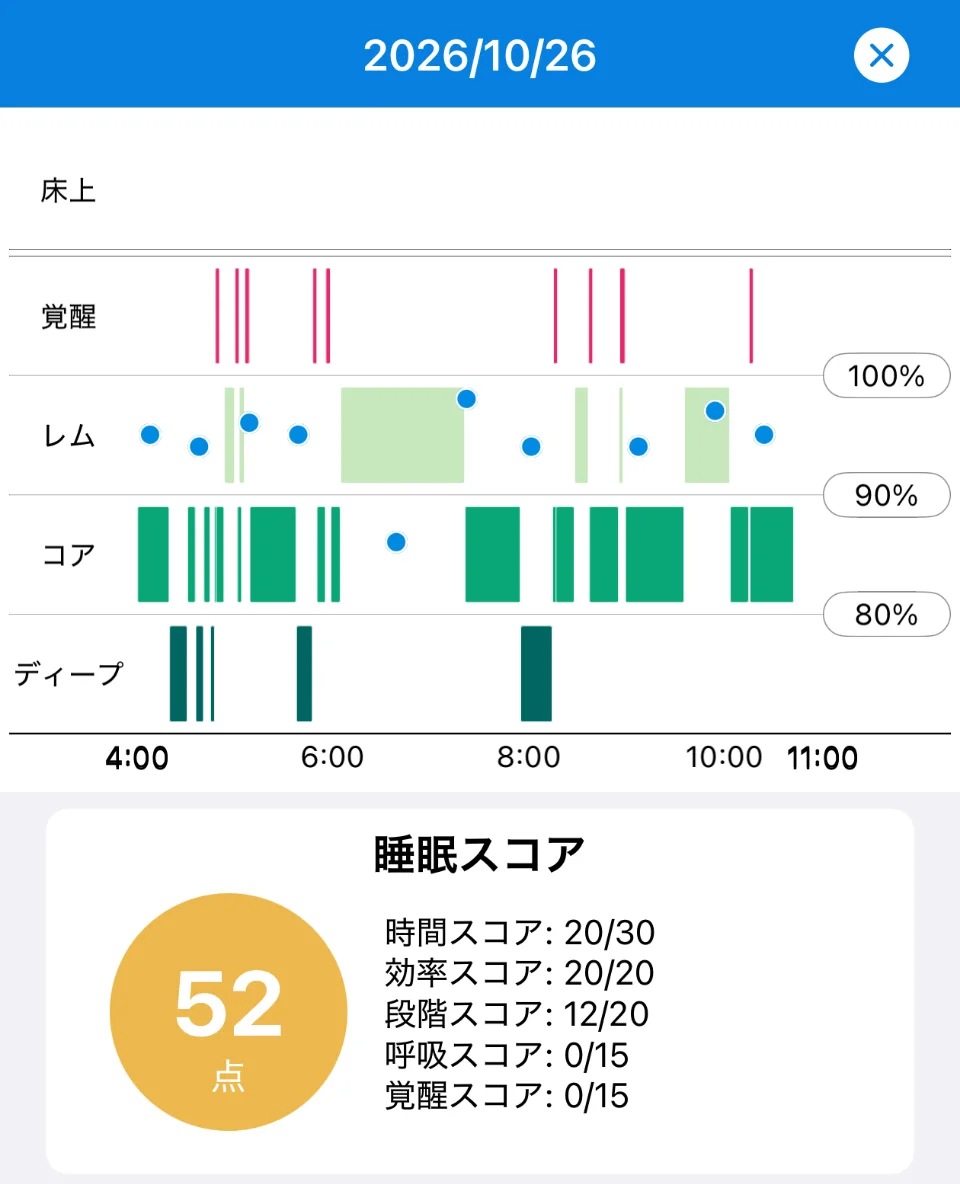
Sleepa is available in English, but some screens are still shown in Japanese. The screenshot in this article shows the Japanese version.
On the other hand, Sleepa doesn’t show heart rate or respiratory rate. All of these thresholds are used within Sleepa and are not medical criteria. Sleepa’s analysis is not a diagnosis either, and it can’t rule out sleep apnea (more about the AI sleep analysis).
All Sleepa features are free for 7 days from the first time you open the app (you will not be charged automatically when the free period ends). To see what Sleepa adds compared with the iPhone’s built-in Health app, read What the Health app doesn’t tell you about your Apple Watch sleep data — 5 things Sleepa adds.
Frequently asked questions
Which Apple Watch models have sleep tracking?
On Apple’s compare page, sleep tracking is available on Apple Watch Series 3 or later and on all SE and Ultra models, so the current Series 12, Ultra 4 and SE 3 all track sleep. Sleep stages such as REM were added in 2022 with watchOS 9.
Which sleep features does Apple Watch SE 3 have?
Apple Watch SE 3 has sleep stage tracking, the Sleep Score, sleep apnea notifications, nightly wrist temperature tracking and the Vitals app. It doesn’t support the Blood Oxygen app, so it can’t measure your blood oxygen while you sleep.
Which Apple Watch models support the Sleep Score?
Apple Watch’s Sleep Score works on Apple Watch Series 6 or later, SE 2 or later and all Ultra models with watchOS 26 or later. You also need iPhone 11 or later running iOS 26.
Which Apple Watch models support sleep apnea notifications?
Apple Watch sleep apnea notifications work on Series 9 or later, Ultra 2 or later and SE 3 with the latest version of watchOS. They’re available only in certain countries and regions, which as of November 2026 include the U.S., the U.K. and Japan.
Which Apple Watch models have the Vitals app?
On Apple’s compare page, the Vitals app is available on Apple Watch Series 6 or later, SE 2 or later and all Ultra models. The metrics shown depend on the model, and SE 2 and SE 3 don’t include blood oxygen.
What’s new for sleep on Series 12 and Ultra 4?
Apple Watch Series 12 and Ultra 4 add heart rate variability (HRV) to the Vitals app and a Readiness app that draws on your recent Sleep Score data, among other things. Apple says 5 minutes of charging gives up to 10 hours of sleep tracking. Sleep stages, the Sleep Score and sleep apnea notifications work just as they do on other supported models.
Key points
- As of November 2026, Apple’s current Apple Watch models are Series 12, Ultra 4 and SE 3
- All three track sleep stages and support the Sleep Score, sleep apnea notifications, wrist temperature and the Vitals app
- SE 3 has no Blood Oxygen app. Series 12 and Ultra 4 add HRV in the Vitals app and the Readiness app
- On older models, the Sleep Score works on Series 6 or later, SE 2 or later and all Ultra models, and sleep apnea notifications on Series 9 or later, Ultra 2 or later and SE 3
- Sleep apnea notifications and the Blood Oxygen app are available only in certain countries and regions (including the U.S., the U.K. and Japan as of November 2026)
- When choosing a model, start from what you want to see (Sleep Score, notifications, blood oxygen, HRV) and from Apple’s battery and charging figures
- Sleepa works with Apple Watch models that can measure blood oxygen (Series 6 or later, or Ultra). SE models aren’t supported
Sources: Apple, “Apple Watch – Compare” (checked November 2026); Apple, “Apple Watch Series 12,” “Apple Watch Ultra 4” and “Apple Watch SE 3“; Apple, “Update your Apple Watch” (Apple Support); Apple, “watchOS 27 – Feature Availability” (checked November 2026); Apple, “Track your sleep on Apple Watch” (Apple Watch User Guide); Apple, “Track your sleep on Apple Watch and use Sleep on iPhone” (Apple Support); Apple, “View your sleep score on Apple Watch” (Apple Watch User Guide); Apple, “Apple debuts Apple Watch Series 11, featuring groundbreaking health insights” (Apple Newsroom, September 2025); Apple, “Sleep apnea notifications on your Apple Watch” (Apple Support); Apple, “How to use the Blood Oxygen app on Apple Watch” (Apple Support); Apple, “Track your nightly wrist temperature on Apple Watch” (Apple Watch User Guide); Apple, “Track your vitals on Apple Watch” (Apple Watch User Guide); Apple, “Use the Readiness app on Apple Watch” (Apple Watch User Guide); Apple, “Apple Watch SE (2nd generation) – Tech Specs” (Apple Support); Apple, “watchOS 9 delivers new ways to stay connected, active, and healthy” (Apple Newsroom, June 2022)
Sleepa — The Science of Sleep
Look back on the sleep your Apple Watch measures, together with AI sleep analysis and your sleep journal. Learn more about Sleepa.

* Requires an Apple Watch (Series 6 or later) and an iPhone with iOS 26 or later. AI text requires an iPhone that supports Apple Intelligence.
Please note: Sleepa is not a medical device. Its analysis is for reference only and is not a medical diagnosis. If you have symptoms that concern you or are worried about your sleep, please consult a medical professional.
Related articles
- How to read your Apple Watch Sleep Score — what decides it, what’s average, and can you get 100?
- What are Apple Watch sleep apnea notifications? — how they work, supported models, accuracy, and what to do if you get one
- How accurate is Apple Watch sleep tracking? What Apple’s validation data shows about its strengths and limits