
You’ve heard that an Apple Watch can pick up signs of sleep apnea, and now you’re wondering. Does it work on your watch? How accurate is it? And if you’ve never had an alert, does that mean you’re fine? This article is for you if you have questions like these.
The short answer: Apple Watch’s sleep apnea notifications use the accelerometer to check for “breathing disturbances” while you sleep, review the data every 30 days, and alert you if it shows signs of moderate to severe sleep apnea. The feature works on Series 9 or later, Ultra 2 or later and SE 3, and is available in many countries and regions, including the U.S. and Japan. It is not a diagnosis, and not getting a notification doesn’t mean you don’t have sleep apnea. Using the information Apple has published, this article covers how the feature works, which models and settings you need, how to set it up, how accurate it is, and what to do if you get a notification.
About this article
This article is written by Masa, an engineer and co-founder of Medisense Inc., the company that develops the sleep app Sleepa. Medisense is led by a physician who specializes in sleep (why we built Sleepa). For how to read your blood oxygen readings during sleep, see Low Apple Watch Sleep Score this morning? What to check.
What are Apple Watch sleep apnea notifications?
Apple Watch’s Sleep Apnea Notifications feature looks for breathing disturbances while you sleep and notifies you if they show consistent signs of moderate to severe sleep apnea. According to Apple, the feature has two parts.
- Breathing Disturbances: a measurement for each night you sleep wearing Apple Watch. Each day, the Health app on your iPhone shows whether your breathing disturbances the night before were “Elevated” or “Not Elevated.”
- Sleep apnea notifications: an alert you receive when 30 days of breathing disturbance data show signs of moderate to severe sleep apnea. The alert tells you when potential sleep apnea occurred and gives you a PDF to discuss with your healthcare provider.
Apple announced the feature in September 2024, saying it would be available that month in more than 150 countries and regions, including the U.S., the EU and Japan.
What is sleep apnea?
Sleep apnea is a common condition in which your breathing stops and restarts many times while you sleep. Signs during sleep, such as loud snoring, breathing that stops and starts, or gasping for air, may go unnoticed until someone else tells you. Some people also feel sleepy during the day.
Apple’s paper notes that some people have no symptoms at all, and that most cases remain undiagnosed. Whether you have sleep apnea is something a doctor decides, based on an evaluation and, if needed, a sleep study.
How does Apple Watch detect sleep apnea?
Apple Watch’s sleep apnea notifications rely on the accelerometer, the sensor that tracks movement, to look for breathing disturbances while you sleep. According to Apple, the accelerometer picks up not only larger body movements but also the small wrist movements that come with breathing, and Apple’s algorithm uses them to estimate how often your breathing pattern is briefly interrupted.
Each night is rated “Elevated” or “Not Elevated”
Breathing disturbances are calculated as events per hour, and each night is rated “Elevated” or “Not Elevated.” Apple notes that breathing disturbances are fairly common, and most people have a few each night. Alcohol, upper respiratory illnesses and even some medications can increase them.
The data is reviewed in 30-day blocks
The notification algorithm makes its first check 30 days after you set up the feature, and then reviews your data every 30 days in separate blocks. If a 30-day block has at least 10 nights with breathing disturbance data, and at least half of them are “Elevated,” you get a notification of possible sleep apnea. If there are fewer than 10 nights, the data isn’t enough to analyze, and no notification is sent. Whether or not you get a notification, the checks continue every 30 days.
Breathing disturbances are not the same as a clinical test result
In clinical sleep tests, the severity of sleep apnea is measured with the apnea-hypopnea index (AHI), the average number of apneas and hypopneas per hour. Apple’s paper defines moderate to severe sleep apnea as an AHI of 15 or more. But Apple states that Apple Watch’s breathing disturbances aren’t equivalent to the AHI.
Does it use blood oxygen or respiratory rate?
In Apple’s description, sleep apnea notifications use accelerometer data, and readings from the Blood Oxygen app are not mentioned as part of how the feature works. Apple Watch SE 3, which doesn’t support the Blood Oxygen app, is included among the supported models for sleep apnea notifications.
Apple Watch also records your respiratory rate during sleep, and you can compare it with your time asleep in Sleep in the Health app. Respiratory rate isn’t mentioned in Apple’s description of how sleep apnea notifications work, either.
Which Apple Watch models support it, and what do you need?
According to Apple Support, you need all of the following to use sleep apnea notifications.
| Requirement | Details |
|---|---|
| Apple Watch | Series 9 or later, Ultra 2 or later, or SE 3, with the latest version of watchOS |
| iPhone | The latest version of iOS |
| Sleep tracking | Sleep set up, with Track Sleep with Apple Watch turned on |
| Nights worn | At least 10 nights over a 30-day period (data is analyzed every 30 days) |
| Who it’s for | People 18 or older who have not been diagnosed with sleep apnea |
| Country or region | Only where the feature is available (including the U.S. and Japan) |
Apple Watch SE 3 is listed as a supported model on Apple’s support page. Apple’s validation paper from September 2024 said the feature excluded Apple Watch SE, but the current support page includes SE 3. Series 8 and earlier, the original Ultra, and SE (2nd generation) and earlier are not on the list.
You can check where the feature is available on Apple’s “watchOS 27 – Feature Availability” page. When we checked in November 2026, the list included the U.S., the U.K., the EU countries, Canada, Australia and Japan, among many others. Availability can change, so check Apple’s page for the latest information.
How to set up sleep apnea notifications, and where to see your data
You set up sleep apnea notifications in the Health app on your iPhone. Here are the steps from Apple Support.
- On your iPhone, open the Health app.
- Tap the Browse tab, then tap Respiratory.
- Under Sleep Apnea Notifications, tap Set Up, then tap Next.
- Confirm your date of birth and whether you’ve ever been diagnosed with sleep apnea, then tap Continue.
- Tap Next, then tap Done.
You can also start from the Health Checklist: tap your picture or initials at the top right of the Health app, tap Health Checklist, then tap Set Up below Sleep Apnea Notifications. That’s also where you turn the notifications off.
To see your data, open the Health app, tap the Browse tab, tap Respiratory, then tap Sleep Apnea Notifications or Breathing Disturbances. You can view your breathing disturbances for the past month, 6 months or year.
Can’t set it up, or no notifications? What to check
- Model: is your watch a Series 9 or later, Ultra 2 or later, or SE 3?
- Software: are watchOS on your Apple Watch and iOS on your iPhone up to date?
- Country or region: is the feature available where you are?
- Age: the feature is for people 18 or older. Setup asks you to confirm your date of birth in the Health app.
- Sleep tracking: is Track Sleep with Apple Watch turned on, and have you worn your watch to sleep for at least 10 nights in 30 days?
- Time since setup: the first check happens 30 days after you set up the feature.
- A second iPhone: on a secondary iPhone that isn’t paired with your Apple Watch, notifications are delayed until your primary iPhone is unlocked and finishes the analysis.
How accurate are Apple Watch sleep apnea notifications?
According to Apple’s validation paper (September 2024), sleep apnea notifications had a sensitivity of 66.3% and a specificity of 98.5% in a clinical study. Sensitivity is the share of people with moderate to severe sleep apnea who got a notification. Specificity is the share of people with no or mild sleep apnea who didn’t get one.
The study enrolled 1,499 people, and 1,448 completed it. Participants wore Apple Watch for up to 30 nights and also did a home sleep apnea test on at least two nights. The reference was the AHI from that test (the higher of the two nights). Apple says the study was carried out to support its submissions to the U.S. Food and Drug Administration (FDA) and other regulators.
| Test result | Outcome |
|---|---|
| Normal (AHI under 5) | None of the 543 people got a notification (100%) |
| Mild (AHI 5 to under 15) | 315 of 346 people did not get a notification (91.0%) |
| Moderate (AHI 15 to under 30) | 89 of 205 people got a notification (43.4%) |
| Severe (AHI 30 or more) | 164 of 184 people got a notification (89.1%) |
The overall sensitivity and specificity are weighted to reflect how common each group is in the real world (moderate and severe weighted one to one for sensitivity; normal and mild weighted five to one for specificity). Here’s what the results show.
- Everyone who got a notification had at least mild sleep apnea: no one whose test came back normal received a notification.
- Most severe cases were caught, but fewer than half of moderate cases: 43.4% of people with moderate sleep apnea got a notification.
- It’s designed to avoid false alerts: because the feature checks repeatedly over time, Apple says it deliberately set the threshold to favor specificity and keep false positives low. The trade-off is that more cases are missed.
For nightly breathing disturbance values, 1,193 of the 1,305 participants with paired watch and test data (91.4%) fell within the error range Apple set (a range that widens as the test value gets higher). Keep in mind that all of these figures come from the people in the study, and the same accuracy may not apply to every individual.
What can’t sleep apnea notifications tell you?
Sleep apnea notifications don’t diagnose any condition. Apple states that the feature is not intended to diagnose, treat or aid in the management of sleep apnea. Here is what else to keep in mind.
- No notification doesn’t mean no sleep apnea: Apple says that not all people with sleep apnea receive a notification. In the study, more than half of the people with moderate sleep apnea didn’t get one.
- It doesn’t consider your symptoms: according to Apple’s paper, the feature doesn’t take your symptoms into account. The Health app also tells you to talk to your doctor if you have symptoms.
- It looks for moderate to severe sleep apnea: the notifications are designed to detect signs of moderate to severe sleep apnea.
- Not for people already diagnosed, or under 18: the feature is not intended for people who have been diagnosed with sleep apnea, or for anyone under 18.
What should you do if you get a sleep apnea notification?
If you get a sleep apnea notification, talk to your doctor. Apple advises that if you have not been diagnosed with sleep apnea, you should talk to your doctor. The notification means signs of sleep apnea showed up in 30 days of data; whether you have the condition is for a doctor to determine through an evaluation and testing.
- Export the PDF: open your sleep apnea notification data in the Health app, scroll down and tap Export PDF to create a report to share with your healthcare provider. According to Apple, it shows when sleep apnea may have occurred and three months of breathing disturbance data.
- Note down what you’ve noticed: has anyone told you that you snore or stop breathing in your sleep? Do you feel sleepy during the day? Does anyone in your family have sleep apnea? According to the U.S. National Heart, Lung, and Blood Institute (NHLBI), your provider will ask about your symptoms, risk factors and family history, and may refer you for a sleep study. A sleep diary that tracks your sleep and daytime sleepiness can also help your provider make a diagnosis.
- Don’t stop your medication on your own: Apple notes that some medications can increase breathing disturbances. Even so, don’t stop or reduce any medication on your own; talk to the doctor who prescribed it.
If you’re not sure where to go, start with your regular doctor, or look for a clinic that can do sleep testing.
Seeing your breathing data and notifications together in Sleepa
Our sleep app, Sleepa, reads the sleep data your Apple Watch writes to the Health app and shows it to you (Sleepa doesn’t record sleep itself). It gives you another angle on your breathing during sleep, alongside Apple’s sleep apnea notifications.
- Breathing score: 15 of the 100 points in Sleepa’s own sleep score come from Breathing. It is based not on Apple Watch’s breathing disturbances but on your lowest blood oxygen reading during sleep: 95% or higher gives 15 points, 92% or higher 10, 90% or higher 5, and lower 0. That night’s graph shows your blood oxygen as blue dots, so you can see when any low readings occurred.
- The Sleep Apnea section of “Analyze”: once you have at least 7 nights of data, Sleepa can analyze your last 30 days. If Apple Watch recorded sleep apnea notifications during that period, Sleepa shows how many and recommends seeing a doctor or sleep specialist. If there are none, Sleepa shows a caution when your lowest blood oxygen fell below 90% on more than 20% of the nights with blood oxygen data. Otherwise, it says no signs of sleep apnea were seen.
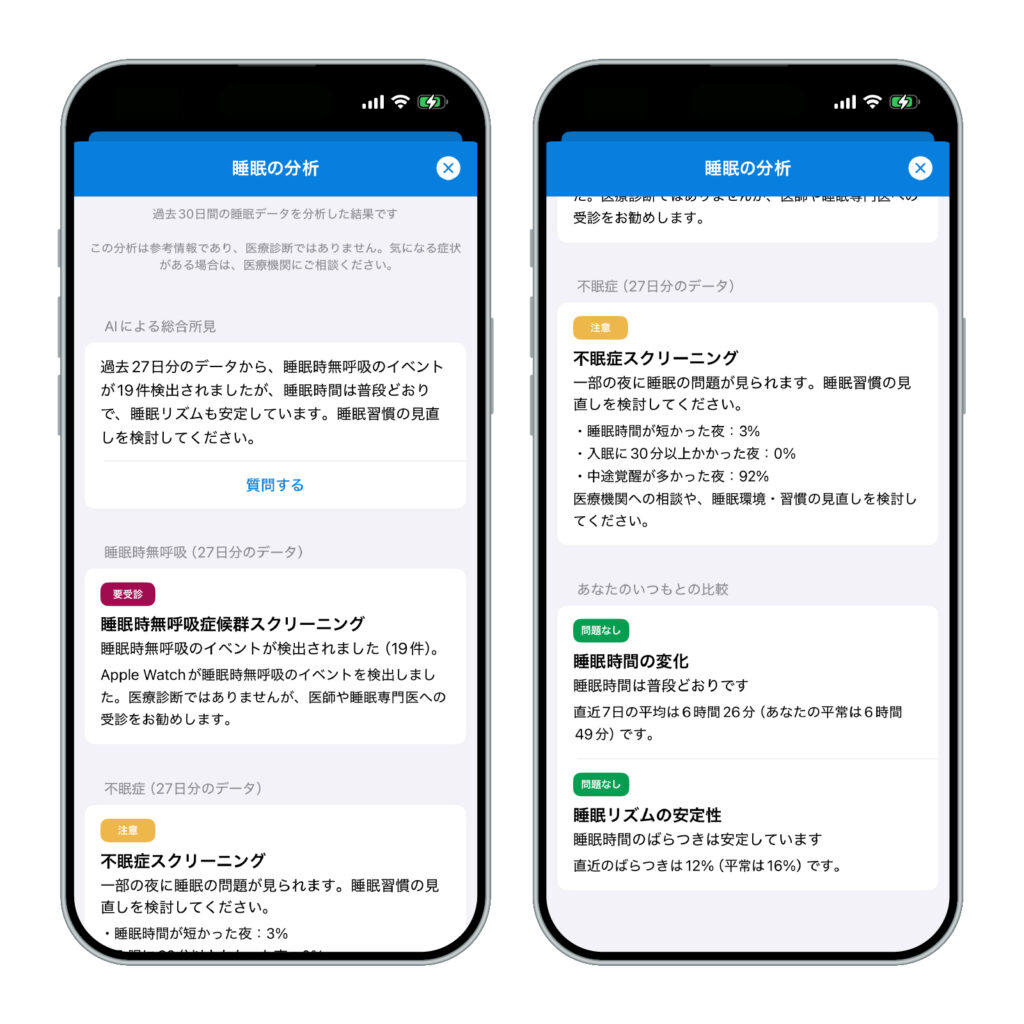
Sleepa is available in English, but some screens are still shown in Japanese. The screenshot in this article shows the Japanese version.
All of these thresholds are used within Sleepa and are not medical criteria. Sleepa’s analysis is not a diagnosis either, and it can’t rule out sleep apnea. The analysis and the AI writing happen on your iPhone, and your sleep data is never sent to an outside AI service (more about the AI sleep analysis).
To use Sleepa, you need an Apple Watch that can measure blood oxygen (Series 6 or later, or Ultra) and an iPhone with iOS 26 or later. Apple Watch SE can’t measure blood oxygen, so on Apple Watch SE 3 you can use sleep apnea notifications, but not Sleepa.
All Sleepa features are free for 7 days from the first time you open the app (you will not be charged automatically when the free period ends). To see what Sleepa adds compared with the iPhone’s built-in Health app, read What the Health app doesn’t tell you about your Apple Watch sleep data — 5 things Sleepa adds.
When to see a doctor
Neither sleep apnea notifications nor Sleepa can diagnose a medical condition. In the following cases, please see a doctor, whether or not you’ve had a notification and whatever your score. The Health app PDF and your daily records will give you something concrete to talk about.
- You’ve received a sleep apnea notification from your Apple Watch
- Someone has told you that you snore loudly or stop breathing in your sleep
- Strong daytime sleepiness is interfering with work or driving
- Low blood oxygen readings (below 90%) keep appearing night after night
- You’ve already been diagnosed with sleep apnea and something about how you feel or your data concerns you (talk to the doctor treating you)
Frequently asked questions
Which Apple Watch models support sleep apnea notifications?
Apple Watch sleep apnea notifications work on Apple Watch Series 9 or later, Ultra 2 or later, and SE 3, with the latest version of watchOS. You also need an iPhone with the latest version of iOS.
Does Apple Watch SE 3 support sleep apnea notifications?
Yes. Apple’s support page lists Apple Watch SE 3 as a supported model for sleep apnea notifications. SE (2nd generation) and earlier are not supported.
How accurate is Apple Watch sleep apnea detection?
In Apple’s clinical study, sleep apnea notifications had a sensitivity of 66.3% and a specificity of 98.5%. 89.1% of people with severe sleep apnea got a notification, compared with 43.4% of people with moderate sleep apnea. No one whose test came back normal received a notification.
Does Apple Watch use blood oxygen to detect sleep apnea?
In Apple’s description, sleep apnea notifications use the accelerometer to look for breathing disturbances during sleep, and readings from the Blood Oxygen app are not mentioned as part of how they work. Apple Watch SE 3, which doesn’t support the Blood Oxygen app, is a supported model for sleep apnea notifications.
Why can’t I set up sleep apnea notifications?
If you can’t set up sleep apnea notifications, check that your model is supported, that watchOS and iOS are up to date, that the feature is available in your country or region, that you’re 18 or older, and that Track Sleep with Apple Watch is turned on. The feature is not intended for people who have been diagnosed with sleep apnea.
If I never get a notification, does that mean I don’t have sleep apnea?
No. Apple says that not all people with sleep apnea receive a notification. If someone has told you that you snore or stop breathing in your sleep, or you’re very sleepy during the day, see a doctor whether or not you’ve had a notification.
Key points
- Apple Watch sleep apnea notifications use the accelerometer to look for breathing disturbances during sleep and alert you to signs of moderate to severe sleep apnea
- Each night is rated “Elevated” or “Not Elevated.” The data is checked every 30 days, and you get a notification if at least half of 10 or more recorded nights are “Elevated”
- It works on Series 9 or later, Ultra 2 or later and SE 3 (with the latest watchOS and iOS), for people 18 or older who haven’t been diagnosed with sleep apnea, in supported countries and regions
- In Apple’s clinical study, sensitivity was 66.3% and specificity 98.5%. About 9 in 10 people with severe sleep apnea got a notification, but only 43.4% of those with moderate sleep apnea
- It isn’t a diagnosis, and not getting a notification doesn’t mean you don’t have sleep apnea
- If you get a notification, export the PDF and talk to your doctor. If you have symptoms, see a doctor whether or not you’ve had a notification
Sources: Apple, “Sleep apnea notifications on your Apple Watch” (Apple Support); Apple, “Receive sleep apnea notifications on Apple Watch” (Apple Watch User Guide); Apple, “Estimating Breathing Disturbances and Sleep Apnea Risk from Apple Watch” (September 2024); Apple, “watchOS 27 – Feature Availability” (checked November 2026); Apple, “Apple introduces groundbreaking health features” (September 2024); Apple, “How to use the Blood Oxygen app on Apple Watch” (Apple Support); Apple, “Track your sleep on Apple Watch and use Sleep on iPhone” (Apple Support); National Heart, Lung, and Blood Institute, “What Is Sleep Apnea?,” “Sleep Apnea Symptoms” and “Sleep Apnea Diagnosis“
Sleepa — The Science of Sleep
Look back on the sleep your Apple Watch measures, together with AI sleep analysis and your sleep journal. Learn more about Sleepa.

* Requires an Apple Watch (Series 6 or later) and an iPhone with iOS 26 or later. AI text requires an iPhone that supports Apple Intelligence.
Please note: Sleepa is not a medical device. Its analysis is for reference only and is not a medical diagnosis. If you have symptoms that concern you or are worried about your sleep, please consult a medical professional.