
You open the Sleep app on your Apple Watch in the morning, and last night isn’t there. The Health app on your iPhone says “No Data.” Or your sleep time shows up, but there’s no REM or Deep breakdown and no Sleep Score. Or you took a nap and it was never recorded. This article goes through what to check in each case, based on Apple’s own documentation.
The short answer: when Apple Watch doesn’t record your sleep, first check that Sleep Tracking is on, that you slept for at least an hour while wearing the watch, and that it was charged to at least 30% before bed. According to Apple, sleep outside your sleep schedule (such as a nap) is recorded only as asleep or awake when it adds up to one to three hours, and with sleep stages such as REM when it’s longer than three hours. The Sleep Score needs an Apple Watch with watchOS 26 or later and an iPhone with iOS 26 or later.
About this article
This article is written by Masa, an engineer and co-founder of Medisense Inc., the company that develops the sleep app Sleepa. Medisense is led by a physician who specializes in sleep (why we built Sleepa). For the basics of reading the sleep data once it’s recorded, see How to read your Apple Watch sleep data.
Which symptom do you have, and where should you look?
When Apple Watch sleep tracking isn’t working, what you should check depends on the symptom. Find yours in the table below, then read that section.
| Symptom | Check first |
|---|---|
| No sleep recorded at all | The Sleep Tracking setting, whether you slept an hour or more wearing the watch, and the charge before bed |
| The record stops partway through the night | Whether the battery ran out or you took the watch off |
| No REM or Deep sleep | Whether you slept more than three hours in total |
| No Sleep Score | watchOS 26 and iOS 26 or later, a supported model, and whether some time has passed since you woke |
| Naps aren’t recorded | Whether you slept an hour or more, and whether you have watchOS 11 or later |
| Nothing in Health or other apps | watchOS updates, the order of data sources, and app access permissions |
Why isn’t my Apple Watch recording any sleep?
Apple lists three conditions for Apple Watch to record your sleep: Sleep Tracking is turned on, you sleep for at least an hour while wearing the watch, and the watch is charged to at least 30% before bed. If no sleep is recorded at all, check them in this order.
1. Is Sleep Tracking turned on?
Open the Settings app on your Apple Watch, tap Sleep, and check that Sleep Tracking is on. When it’s on, your Apple Watch tracks your sleep and adds the data to the Health app on your iPhone. You can change the same setting on your iPhone: open the Apple Watch app, tap My Watch, then tap Sleep.
When you set up Sleep in the Health app on iPhone, the Track Sleep with Apple Watch option appears during setup only if you’ve already paired your Apple Watch with your iPhone. If you paired the watch after setting up Sleep, you can still turn it on later. If you started using your Apple Watch after setting up Sleep, check this first.
2. Did you sleep for at least an hour wearing the watch?
Apple says that to receive sleep data, you must wear your Apple Watch for at least one hour each night. If you don’t wear it to sleep, your graph might not show any data.
You may also see advice online that Apple Watch needs at least four hours of tracking each night. That comes from the user guide for watchOS 10 and earlier. Apple’s current support article says one hour.
3. Was it charged to at least 30% before bed?
Apple recommends charging your Apple Watch to at least 30% before bed. If the battery dies while you sleep, your sleep data won’t be recorded. If your watch is below 30% before bed, it prompts you to charge it.
If you tend to forget, turn on Charging Reminders. On your iPhone, open the Apple Watch app, tap My Watch, then tap Sleep. Your watch will then remind you to charge before your wind down time and let you know when it’s fully charged.
4. Other things to check
- Software versions: Apple lists an iPhone with the latest version of iOS and an Apple Watch with the latest version of watchOS as what you need to track sleep.
- A watch set up for a child: Sleep isn’t available on an Apple Watch set up with Apple Watch For Your Kids (formerly known as Family Setup).
Why does my sleep record stop partway through the night?
The main reasons an Apple Watch sleep record stops partway through the night are that the battery ran out while you slept, or that you took the watch off. In the morning, check that the start and end of the graph match when you actually fell asleep and woke up. If you took the watch off to charge it during the night, the sleep you had while it was off isn’t recorded.
If the record doesn’t seem to match how you slept, check the fit too. According to Apple, if your watch is too loose, the accelerometer might register too much movement during your natural sleep. Wear it so that it fits comfortably and snugly.
If your sleep is recorded but there are no heart rate or blood oxygen readings for the night, check whether Low Power Mode was on. According to Apple, Low Power Mode turns off background heart rate and blood oxygen measurements, including during sleep. When your battery drops to 10%, your watch asks whether you want to turn Low Power Mode on.
Do you need a sleep schedule or Sleep Focus?
An Apple Watch with watchOS 11 or later can track your sleep even if you haven’t set a sleep schedule, or if you sleep outside it. Apple says it expanded sleep tracking beyond the sleep schedule in 2024, with iOS 18 and watchOS 11.
In the user guide for watchOS 10 and earlier, on the other hand, Apple said Apple Watch tracks your sleep based on the sleep schedule you create, and can also track it when your Sleep Focus starts. If your Apple Watch is on watchOS 10 or earlier, set a sleep schedule and go to sleep during it.
Even on current versions, a sleep schedule makes tracking easier to keep up, because Charging Reminders arrive before your wind down time. By default, the Sleep Focus starts at the wind down time you set in the Sleep app.
Why isn’t REM or Deep sleep recorded?
According to Apple, when Apple Watch detects sleep outside your sleep schedule, it records sleep stages (Awake, REM, Core and Deep) only if your total sleep in that session is longer than three hours. If it adds up to one to three hours, only asleep or awake is recorded, with no breakdown into stages.
So if a short sleep such as a nap shows no REM or Deep sleep, that doesn’t necessarily mean something is wrong with tracking. Apple also says that in 2025, with watchOS 26, it improved tracking so that full sleep stages are recorded when you go back to sleep after dismissing an alarm.
Sleep stages were added in 2022 with watchOS 9. Earlier versions of watchOS recorded only whether you were asleep or awake.
If your stages are recorded but you feel there’s too little REM or Deep sleep, that’s not a tracking problem but a question of how to read the amounts (see How much of each sleep stage is normal on Apple Watch?).
Why isn’t my Sleep Score showing?
Apple Watch’s Sleep Score is a feature that arrived with watchOS 26. According to Apple, it works on Apple Watch Series 6 or later, Apple Watch SE (2nd generation) or later, and all Apple Watch Ultra models, paired with iPhone 11 or later running iOS 26. If you don’t see it, check the following.
- Model and software: Series 5 or earlier and SE (1st generation) don’t support the Sleep Score. The latest watchOS 27 runs on SE 3, Series 9 and later, and Ultra 2 and later, but the Sleep Score only needs watchOS 26 or later. Software Update shows the newest version your watch can use.
- Timing: the Sleep Score appears after you wake up. The iPhone User Guide says it appears around 15 minutes after you wake up.
- Your sleep record: the Sleep Score is based on your previous night’s sleep. On a night when sleep wasn’t recorded because Sleep Tracking was off, you slept less than an hour wearing the watch, or the battery ran out, there’s no score either.
- Where to look: on Apple Watch, it appears when you open the Sleep app. On iPhone, open the Health app, tap Browse, then tap Sleep.
For how the score itself is calculated, see How to read your Apple Watch Sleep Score.
Does Apple Watch track naps?
According to Apple, an Apple Watch with watchOS 11 or later also tracks short sleep sessions outside your main night’s sleep, such as naps. But a session that adds up to one to three hours of sleep is recorded only as asleep or awake, without sleep stages.
If a nap isn’t recorded, consider whether you slept for less than an hour. Sleep shorter than an hour falls outside the tracking conditions Apple describes. On watchOS 10 or earlier, Apple Watch tracks sleep based on your sleep schedule.
If you want to keep a record of a nap that wasn’t tracked, you can add sleep data manually: in the Health app on iPhone, tap Browse, tap Sleep, tap Sleep again, then tap the button in the top-right corner. Keep in mind that, by default, data you enter manually takes priority over data from Apple Watch.
What if the Health app shows “No Data” or your sleep doesn’t show up?
If sleep shows “No Data” in the Health app on iPhone, first check whether last night appears in the Sleep app on your Apple Watch. If it’s not there either, the sleep wasn’t recorded at all, so go back to the checks in “Why isn’t my Apple Watch recording any sleep?” above.
It’s on Apple Watch but not on iPhone
Apple says that some iOS updates on your iPhone also require you to update watchOS on your Apple Watch. If your iPhone shows an alert such as “Your Apple Watch software is out of date,” update watchOS so that your data continues to sync to your iPhone. To update, open the Apple Watch app on your iPhone, tap My Watch, tap General, then tap Software Update.
Another app’s data takes priority
When the same type of data comes from more than one source (Apple Watch, another sleep app and so on), the Health app uses the source at the top of the list first. New apps and devices you add are placed at the top automatically. If you also use another sleep app, open the Health app, tap Browse, tap Sleep, tap Sleep again, scroll down and tap Data Sources & Access to check the order. Tap Edit to change it.
You’re tracking with iPhone only
With iPhone alone, what gets recorded is iPhone’s estimate of the time you spend lying in bed intending to sleep, and only if you’ve set up a sleep schedule in the Health app. Sleep stages are recorded when you wear Apple Watch to sleep.
It doesn’t show up in another app
If an app that reads Health data doesn’t show your sleep, check that the app has permission to read sleep data. In the Health app, tap Summary, tap your picture or initials, then under Privacy tap Apps. Tap the app to turn its permission to read data on or off.
What if Sleepa shows no sleep data?
Our sleep app, Sleepa, reads and displays the sleep data your Apple Watch writes to the Health app. Sleepa doesn’t record sleep itself, so on a night your Apple Watch didn’t record, Sleepa shows “No sleep data for this day.” When that happens, check the following in order.
- Is the night in the Health app? Look for that night under Sleep in the Health app. If it isn’t there, go through the checks earlier in this article.
- Can Sleepa read your sleep data? If the night is in Health but not in Sleepa, follow the steps in “It doesn’t show up in another app” above to check that Sleepa has permission to read sleep data.
- Is your watch supported? Sleepa needs an Apple Watch that can measure blood oxygen (Series 6 or later, or Ultra) and an iPhone with iOS 26 or later. Apple Watch SE can’t measure blood oxygen, so it isn’t supported.
Once your sleep is recorded, Sleepa shows that night’s graph with rows for Awake, REM, Core and Deep (plus In Bed when there’s a record of your time in bed), and blue dots for your blood oxygen. Below the graph, you’ll see Sleepa’s own sleep score out of 100 and its breakdown.
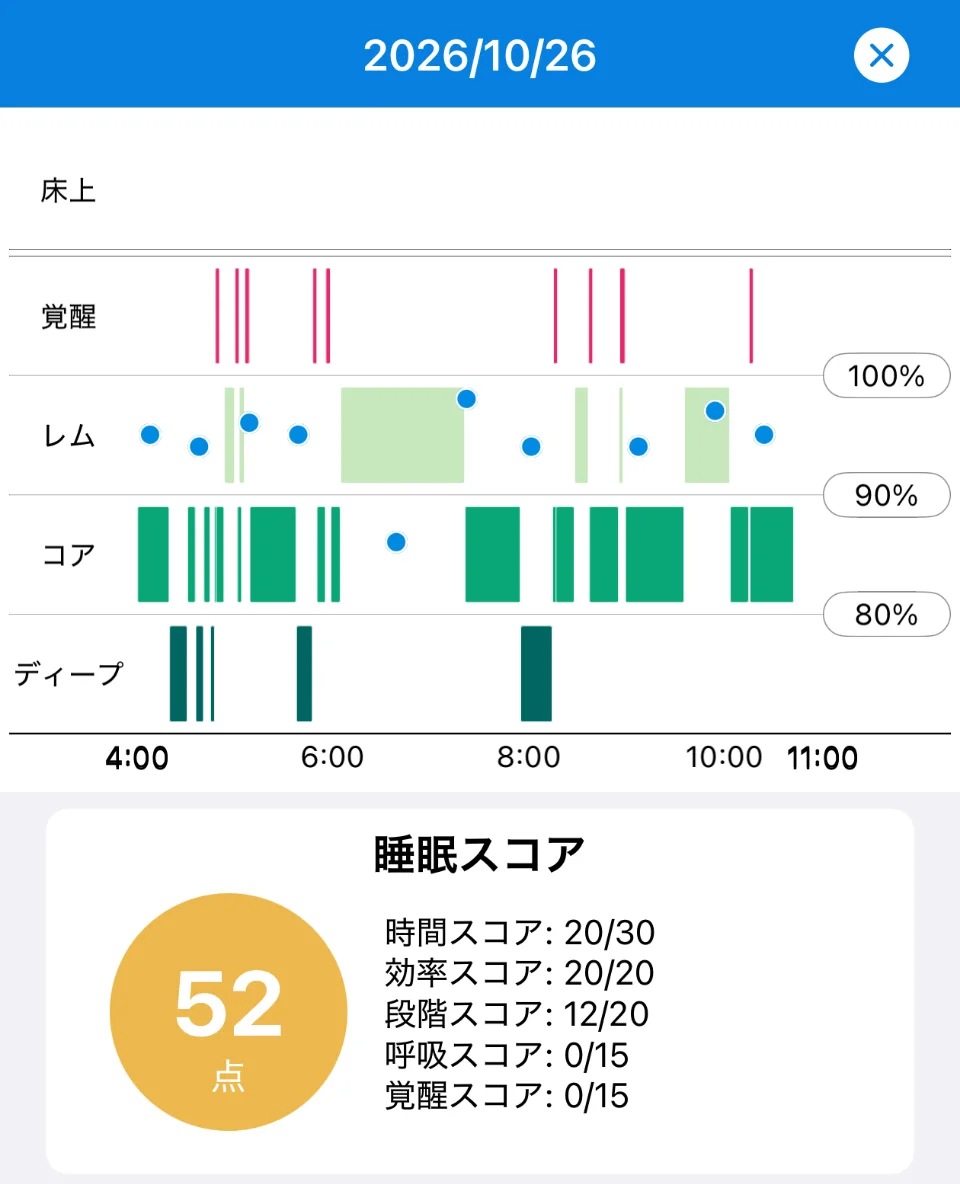
Sleepa is available in English, but some screens are still shown in Japanese. The screenshot in this article shows the Japanese version.
If there are no blue dots for a night, your blood oxygen may not have been measured while you slept. Low Power Mode turns off background blood oxygen measurements, including during sleep. And if you’ve turned off “In Sleep Focus” under Blood Oxygen in the Settings app on your Apple Watch, background measurements don’t run while the Sleep Focus is on.
Once you have 7 or more nights of data, tap “Analyze” to get a short written summary of trends over the last 30 days, such as your sleep time, how long it takes you to fall asleep, how often you wake up and your blood oxygen at night (more about the AI sleep analysis). Trends are harder to see when many nights are missing, so the first step is getting your watch to record every night.
All Sleepa features are free for 7 days from the first time you open the app (you will not be charged automatically when the free period ends). To see what Sleepa adds compared with the iPhone’s built-in Health app, read What the Health app doesn’t tell you about your Apple Watch sleep data — 5 things Sleepa adds.
Frequently asked questions
Why is my Apple Watch not tracking sleep?
For Apple Watch to track your sleep, Sleep Tracking must be on and you need to sleep for at least an hour while wearing the watch. Apple recommends charging it to at least 30% before bed, and if the battery dies while you sleep, your sleep data won’t be recorded.
Does Apple Watch track naps?
According to Apple, an Apple Watch with watchOS 11 or later also tracks short sleep sessions such as naps. A session that adds up to one to three hours of sleep is recorded only as asleep or awake, without sleep stages.
Why aren’t REM and other sleep stages recorded?
According to Apple, when Apple Watch detects sleep outside your sleep schedule, it records sleep stages such as REM only if your total sleep in that session is longer than three hours. If it adds up to one to three hours, only asleep or awake is recorded.
Why isn’t my Apple Watch Sleep Score showing?
Apple Watch’s Sleep Score works on an Apple Watch with watchOS 26 or later (Series 6 or later, SE (2nd generation) or later, or Ultra) paired with iPhone 11 or later running iOS 26. The score appears after you wake up, around 15 minutes later according to the iPhone User Guide, and it doesn’t appear for a night when no sleep was recorded.
Why does sleep show “No Data” in the Health app?
When sleep shows “No Data” in the Health app, first check whether the night appears in the Sleep app on Apple Watch. If it’s on the watch but not in Health, check for a watchOS update and the order of sources under Data Sources & Access in the Health app.
Can iPhone track sleep without Apple Watch?
With iPhone alone, if you set up a sleep schedule in the Health app, iPhone estimates the time you spend lying in bed intending to sleep. Sleep stages such as REM are recorded when you wear Apple Watch to sleep.
Key points
- If no sleep is recorded, check, in this order, the Sleep Tracking setting, whether you slept an hour or more wearing the watch, and whether it was charged to 30% or more before bed
- A record that stops partway usually means the battery ran out or the watch came off during the night. Charging Reminders help you remember to charge
- Since watchOS 11, sleep outside your sleep schedule, including naps, is tracked. “At least four hours” applied to watchOS 10 and earlier
- Sleep outside your schedule is recorded as just asleep or awake at one to three hours in total, and with sleep stages when it’s longer than three hours
- The Sleep Score needs an Apple Watch with watchOS 26 or later (Series 6 or later, SE (2nd generation) or later, or Ultra) and an iPhone with iOS 26 or later
- If your sleep doesn’t show up in Health, check for a watchOS update, the order under Data Sources & Access, and app access permissions
- Sleepa reads and shows the data your Apple Watch records. Once tracking works, you get the graph, the score and a 30-day analysis
Sources: Apple, “Track your sleep on Apple Watch and use Sleep on iPhone“; Apple, “Track your sleep on Apple Watch” (Apple Watch User Guide); Apple, “Set up sleep schedules on Apple Watch” (Apple Watch User Guide); Apple, “Track your sleep with Apple Watch” (Apple Watch User Guide, watchOS 10); Apple, “View your sleep score on Apple Watch” (Apple Watch User Guide); Apple, “Estimating Sleep Stages from Apple Watch” (updated October 2025); Apple, “Apple debuts Apple Watch Series 11, featuring groundbreaking health insights” (Apple Newsroom, September 2025); Apple, “Intro to Health data on iPhone” (iPhone User Guide); Apple, “View your sleep history in Health on iPhone” (iPhone User Guide); Apple, “Share your data in Health on iPhone” (iPhone User Guide); Apple, “Manage Health data on your iPhone, iPad, or Apple Watch“; Apple, “Update your Apple Watch“; Apple, “Use Low Power Mode on your Apple Watch“; Apple, “Measure blood oxygen levels with the Blood Oxygen app” (Apple Watch User Guide)
Sleepa — The Science of Sleep
Look back on the sleep your Apple Watch measures, together with AI sleep analysis and your sleep journal. Learn more about Sleepa.

* Requires an Apple Watch (Series 6 or later) and an iPhone with iOS 26 or later. AI text requires an iPhone that supports Apple Intelligence.
Please note: Sleepa is not a medical device. Its analysis is for reference only and is not a medical diagnosis. If you have symptoms that concern you or are worried about your sleep, please consult a medical professional.