
When you sleep with your Apple Watch on, the Health app on your iPhone shows your sleep stages and Sleep Score. Many people feel that’s all they need.
But even after checking the numbers every morning, do you still wonder: “So is my sleep good or bad?” Or “I felt like I hardly slept, but the data says I slept fine. Which is it?” The short answer: if you just want to record your sleep every night and look back at the numbers, the iPhone’s built-in apps are enough. Our sleep app, Sleepa, uses the same Apple Watch data and adds more ways to interpret it. It adds five things: a comparison with how you felt, a score breakdown with blood oxygen, a 30-day analysis, an AI you can ask, and tools for a daily habit. In this article, we look at what the iPhone’s built-in apps already do, and then at what Sleepa adds.
About this article
This article is written by Masa, an engineer and co-founder of Medisense Inc., the company that develops Sleepa. Medisense is led by a physician who specializes in sleep (why we built Sleepa). Since this is about our own app, we’ve tried to be honest, including about when the built-in apps are all you need.
What can the iPhone’s built-in apps do for your sleep?
When you track your sleep with Apple Watch, the Health app on your iPhone and the Sleep app on your Apple Watch let you check your sleep stages and Sleep Score and look back at each night’s sleep in numbers. Specifically, they let you:
- See how long you spent Awake, in REM, Core and Deep sleep, and what share of the night each took (see How to read your Apple Watch sleep data)
- See a Sleep Score that rates last night from 0 to 100 (watchOS 26 or later; see How to read your Apple Watch Sleep Score)
- Compare your sleep time with your heart rate, respiratory rate and wrist temperature (wrist temperature on supported models only)
- Set a sleep schedule and have the Sleep Focus turn on at bedtime
- Get sleep apnea notifications (on supported models and in supported countries and regions only)
For recording your sleep every night and looking back at the numbers, that’s plenty. Sleepa uses the same Apple Watch data for its records. The difference is in how that data is interpreted.
Five things Sleepa adds
1. See how you felt next to what was recorded
Sleepa has a sleep journal where you note how each night felt. You rate last night’s sleep out of 10, and for each hour you use a slider to choose whether you were active, in bed awake, or in bed asleep.
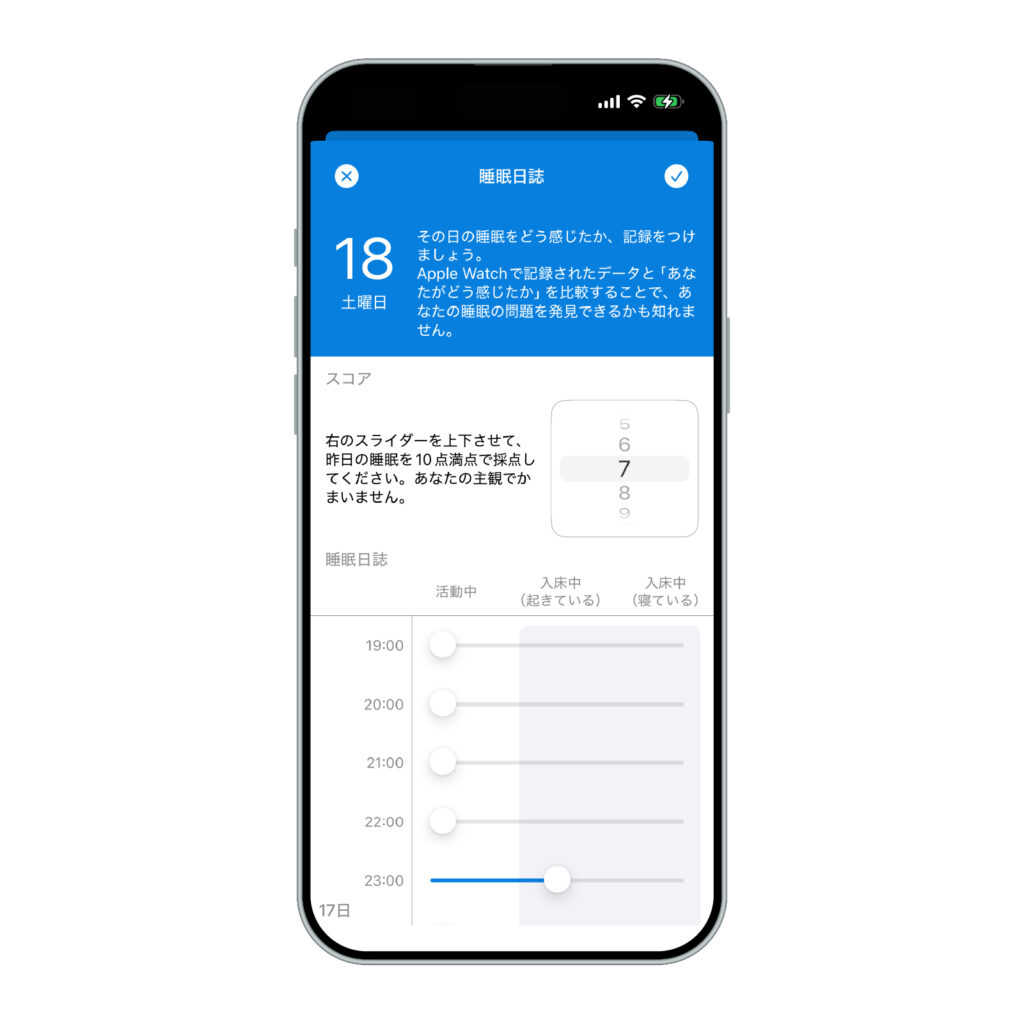
Sleepa is available in English, but some screens are still shown in Japanese. The screenshots in this article show the Japanese version.
Your journal can be shown right under the Apple Watch sleep graph, on the same timeline. On a night you felt you were awake all night, you can see at a glance whether there were really just a few brief awakenings. The gap between how you feel you slept and how you actually slept is called sleep state misperception, and it’s common among people who seek help for insomnia (see What is sleep state misperception?).
2. A score with a breakdown, and blood oxygen on the graph
Sleepa shows its own sleep score out of 100, based on your Apple Watch data. You can see the breakdown into duration, efficiency (the share of your time in bed spent asleep), sleep stages, breathing and awakenings, so you know which part was low on a given night. Your blood oxygen saturation during the night also appears as dots on the sleep graph.
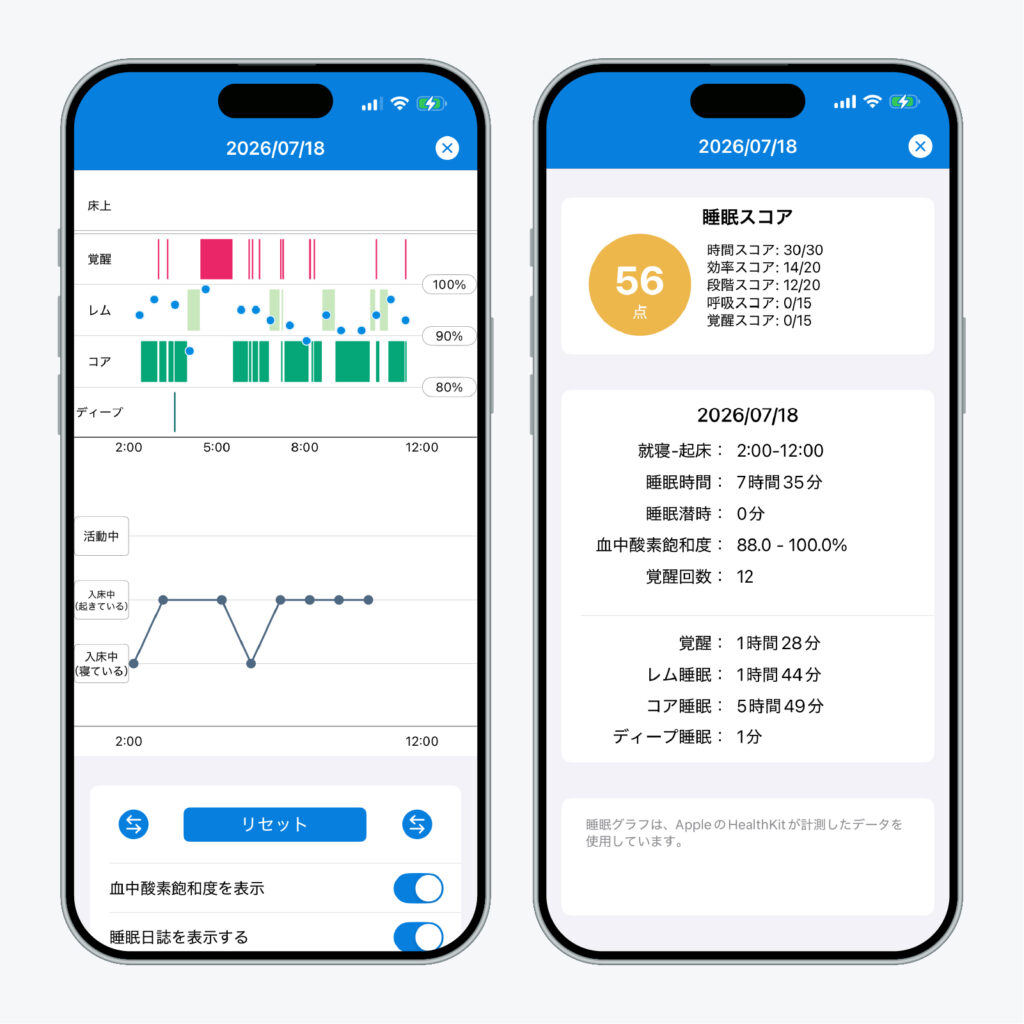
Apple’s Sleep Score looks at duration, bedtime consistency and interruptions, while Sleepa also looks at what your sleep was made of: how efficiently you slept, the balance of stages, and your breathing. Neither is “right”; they look at the same night from different angles (see How much of each sleep stage is normal?).
3. Your 30-day trends, explained in words
Tap “Analyze” on the home screen, and Sleepa analyzes your last 30 days of data and shows the result at the top as a short written summary from the AI.
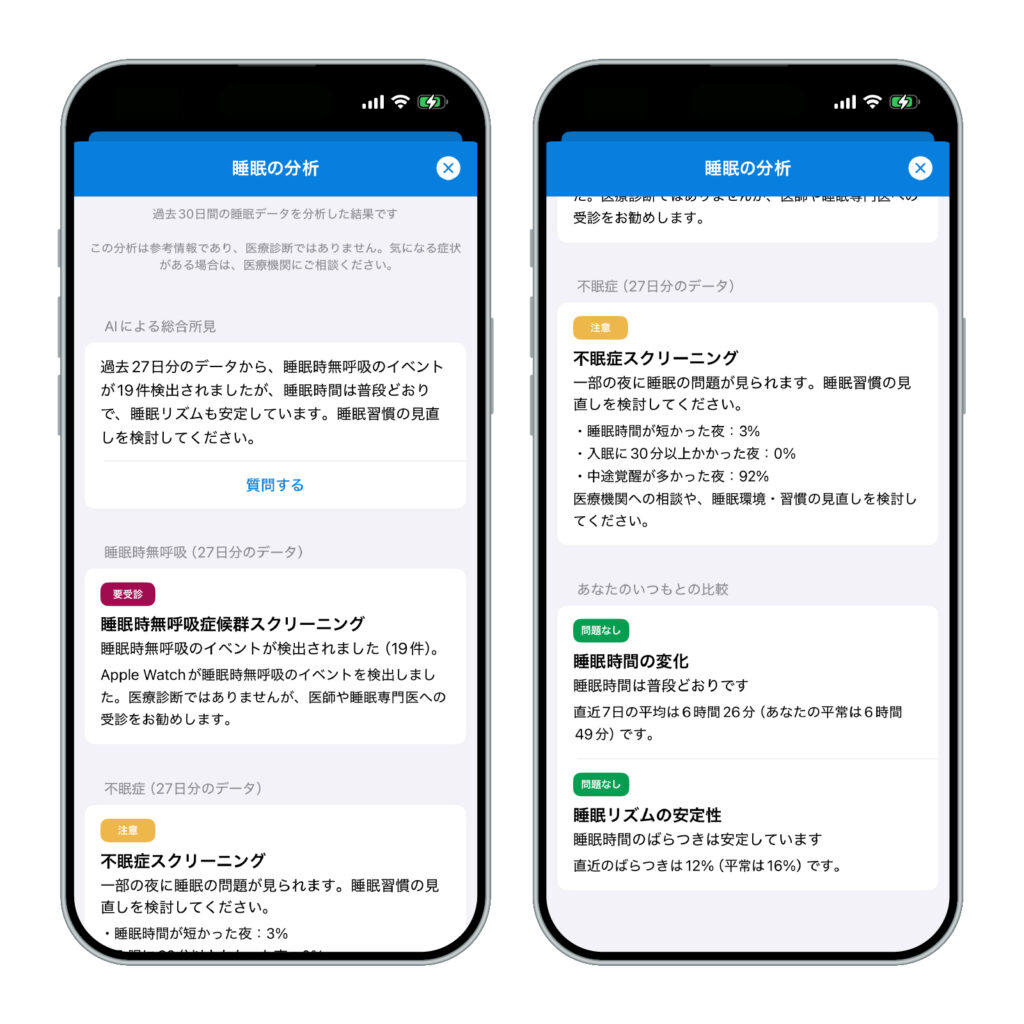
Under the summary, the three items it is based on are listed:
- Sleep apnea: how far your blood oxygen dropped at night, and whether Apple Watch detected breathing disturbances during sleep
- Insomnia: how many nights had short sleep, took 30 minutes or more to fall asleep, or had many awakenings
- Compared with your usual: whether your sleep time and sleep rhythm over the last 7 days differ from your earlier records
The assessments themselves are calculated with fixed rules. The AI only turns the results into readable text. The analysis and the AI writing happen on your iPhone, and your sleep data is never sent to an outside AI service (more about the AI sleep analysis).
4. Ask the AI whatever you want to know
Tap “Ask a question” under the summary to open a chat with the AI. Ask something like “Why do you think I wake up at night?”, and the AI gives a short answer based on your analysis. Even if graphs aren’t your thing, you can learn about your sleep through conversation. Chats aren’t saved and disappear when you close the screen.
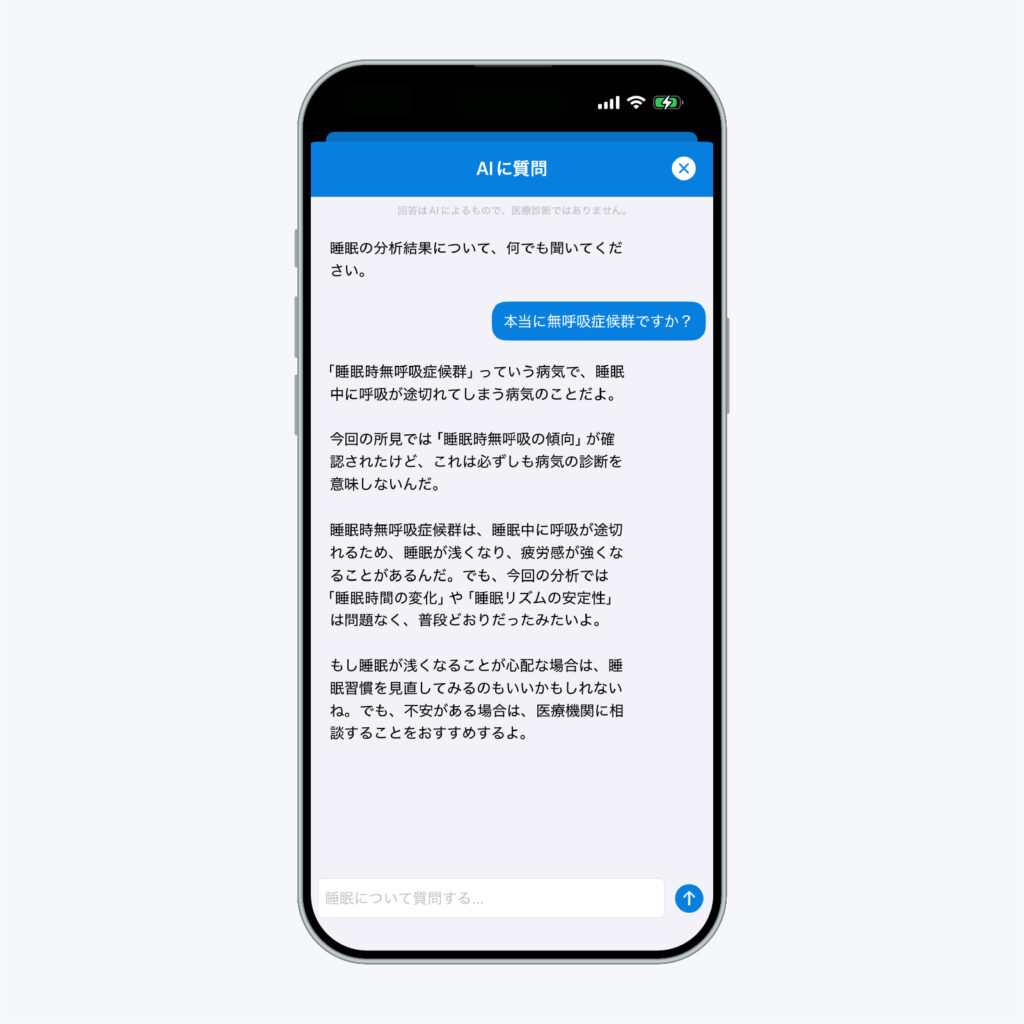
The AI’s answers are not a medical diagnosis. If you have symptoms that concern you, please see a doctor.
5. Built to make a daily habit easy
One night tells you little about your sleep. What matters is learning your pattern from daily records, and Sleepa is built to help you keep it up.
- Notifications: at a set time, you get a reminder to fill in your sleep journal and a Sleep Report about last night’s sleep (you can change the time or turn either off in Settings).
- Day list: your records appear day by day on the home screen; tap a date to open that night’s graph.
- Alarm: you can set an alarm in Sleepa that uses Apple’s AlarmKit, so, like the iPhone’s built-in alarm, it rings even in silent mode (more about the alarm).
Are the built-in apps enough? When does Sleepa help?
If you check your sleep time and score each morning and that answers your questions, the iPhone’s built-in apps are enough. Sleepa should help if:
- You feel you aren’t sleeping, but the data says you slept reasonably well, and you don’t know which to believe
- You look at the numbers but can’t tell whether your sleep is good or bad
- You want to see 30-day trends and how you compare with your own usual, not just one night at a time
- You want to organize your sleep records before talking to a doctor
Sleepa does not diagnose any condition. If someone has told you that you snore or stop breathing in your sleep, or sleepless nights are affecting your daily life, please see a doctor, whatever the app shows. Your Sleepa records will give you something concrete to talk about.
Requirements and pricing
- You need to track your sleep with an Apple Watch (Series 6 or later) and an iPhone with iOS 26 or later.
- The sleep analysis needs at least 7 nights of data.
- The AI summary and chat work on iPhones that support Apple Intelligence, with Apple Intelligence turned on. On other iPhones, the analysis is shown as standard text (without the chat).
- All features are free for 7 days from the first time you open the app. From day 8, a paid plan is required. You will not be charged automatically when the free period ends. You only need an account if you buy the paid plan.
How to start
- Sleep with your Apple Watch on (with sleep tracking turned on)
- In the morning, open Sleepa and look at last night’s graph and score. Fill in your sleep journal too
- Once you have 7 nights, tap “Analyze”
Try it for the one-week free period: just one minute each morning to check your sleep. Put a week side by side, and your own sleep pattern starts to emerge (see Check your sleep in one week).
Frequently asked questions
Does Sleepa use the same sleep data as the Health app?
Yes. Sleepa uses the same Apple Watch data for its sleep records. The difference is in how that data is interpreted: Sleepa adds a comparison with how you felt, a score breakdown with blood oxygen, a 30-day analysis, an AI you can ask, and tools for a daily habit.
How is Sleepa’s sleep score different from Apple’s Sleep Score?
Apple’s Sleep Score looks at duration, bedtime consistency and interruptions. Sleepa’s sleep score is out of 100 with a breakdown into duration, efficiency, sleep stages, breathing and awakenings, so it also looks at what your sleep was made of: how efficiently you slept, the balance of stages, and your breathing. Neither is “right”; they look at the same night from different angles.
Does Sleepa send my sleep data to an outside AI service?
No. Sleepa runs the analysis and the AI writing on your iPhone, and your sleep data is never sent to an outside AI service. The assessments themselves are calculated with fixed rules; the AI only turns the results into readable text.
What do you need to use Sleepa?
To use Sleepa, you need to track your sleep with an Apple Watch (Series 6 or later) and an iPhone with iOS 26 or later. The sleep analysis needs at least 7 nights of data. The AI summary and chat work on iPhones that support Apple Intelligence, with Apple Intelligence turned on.
Is Sleepa free?
All of Sleepa’s features are free for 7 days from the first time you open the app. From day 8, a paid plan is required. You will not be charged automatically when the free period ends.
Can Sleepa tell me if I have a sleep disorder?
Sleepa does not diagnose any condition, and the AI’s answers are not a medical diagnosis. If someone has told you that you snore or stop breathing in your sleep, or sleepless nights are affecting your daily life, please see a doctor, whatever the app shows. Your Sleepa records will give you something concrete to talk about.
Key points
- The iPhone’s built-in apps already show your sleep stages, Sleep Score, and comparisons with heart rate and respiratory rate
- Sleepa adds a comparison with how you felt, a score breakdown with blood oxygen, a 30-day analysis, an AI you can ask, and tools for a daily habit
- The analysis and AI writing happen on your iPhone; your data isn’t sent to an outside AI service
- If the numbers answer your questions, the built-in apps are enough. If you feel you aren’t sleeping or can’t tell whether your sleep is good or bad, give Sleepa a try
- Sleepa is not a diagnostic app. See a doctor if you have symptoms that concern you
Sources: Apple, “Track your sleep on Apple Watch and use Sleep on iPhone” (Apple Support); Apple, “View your sleep score on Apple Watch” (Apple Watch User Guide)
Sleepa — The Science of Sleep
Look back on the sleep your Apple Watch measures, together with AI sleep analysis and your sleep journal. Learn more about Sleepa.

* Requires an Apple Watch (Series 6 or later) and an iPhone with iOS 26 or later. AI text requires an iPhone that supports Apple Intelligence.
Please note: Sleepa is not a medical device. Its analysis is for reference only and is not a medical diagnosis. If you have symptoms that concern you or are worried about your sleep, please consult a medical professional.