
Waking up to a low Sleep Score on your Apple Watch can put a damper on the morning. But the total alone doesn’t tell you why the score was low.
The short answer: on a morning with a low Apple Watch Sleep Score, first check that the night was fully recorded, then look at which part of the breakdown lost points. For Apple’s score, that’s duration (50 points), bedtime consistency (30 points) and interruptions (20 points); for Sleepa’s, it’s Duration, Efficiency, Sleep Stages, Breathing and Awakenings. A low score on one night doesn’t by itself mean there’s a problem with your sleep. This article walks through what to check, and in what order, on a morning when your Sleep Score is low. Along with Apple’s Sleep Score, it shows how to read the score in our sleep app, Sleepa, which breaks things down in more detail, using a real night as an example.
About this article
This article is written by Masa, an engineer and co-founder of Medisense, the company that develops the sleep app Sleepa. Medisense is led by a physician who specializes in sleep (see why we built Sleepa). For the basics of how the Sleep Score works, see how to read your Apple Watch Sleep Score.
What should you check first on a low-score morning?
On a morning with a low Apple Watch Sleep Score, check that last night’s record itself ran all the way through before reading the score. If you took your Apple Watch off during the night or the battery ran out, the record stops partway and your sleep time comes out short. On nights like that, a low score doesn’t necessarily mean you slept badly.
Apple recommends charging your Apple Watch to at least 30% before bed. Check that the start and end of the graph match when you actually fell asleep and woke up.
Which of the three parts of Apple’s Sleep Score is low?
Apple’s Sleep Score is the total of three parts, so on a low-score morning, look at whether you lost points in duration, bedtime consistency or interruptions. To see the breakdown, tap the score in the Sleep app on Apple Watch or in the Health app on iPhone, then tap the info button. Scores of 41 to 60 are “Low,” and 40 or below are “Very Low.”
| Part (points) | What a low value may mean |
|---|---|
| Duration (50 points) | You slept for a short time |
| Bedtime consistency (30 points) | You fell asleep at a different time from the previous 13 days (you stayed up late, or went to bed much earlier than usual) |
| Interruptions (20 points) | You woke up many times during the night, or were awake for a long time |
Half of the score comes from duration, so a short night alone pulls it down a lot. And even if you slept long enough, falling asleep later than usual costs points in bedtime consistency. Once you know which part lost points, it’s easier to tell whether last night just happened to be late, or whether you’ve been sleeping short for a while.
Note that Apple’s score doesn’t include how much Deep or REM sleep you had, or how you were breathing while asleep.
Sleepa’s score narrows it down with five parts
Sleepa also shows its own 100-point sleep score based on your Apple Watch data. Tap a date on the home screen, and the total and its five parts appear below that night’s graph. The total is shown in a green circle at 75 or more, yellow at 50 or more, and red below 50.
| Part (points) | How the points are given |
|---|---|
| Duration (30 points) | Sleep time of 7 hours or more: 30; 6 hours or more: 20; 5 hours or more: 10; less: 0 |
| Efficiency (20 points) | Share of the time from bedtime to wake-up spent asleep: 85% or more: 20; 75% or more: 14; 65% or more: 8; less: 0 |
| Sleep Stages (20 points) | Deep 13% or more and REM 18% or more: 20; one of the two: 12; Deep 8% or more or REM 12% or more: 6; otherwise: 0 |
| Breathing (15 points) | Lowest blood oxygen during sleep of 95% or more: 15; 92% or more: 10; 90% or more: 5; lower: 0 |
| Awakenings (15 points) | Number of awakenings during the night of 2 or fewer: 15; 5 or fewer: 10; 8 or fewer: 5; 9 or more: 0 |
Parts with no data are scored at a middle value. All of these thresholds are used within Sleepa and are not medical criteria.
What should you check when a Sleepa part is low?
When a part of Sleepa’s score is low, use that night’s graph to check whether the record stopped partway, and when any long awakenings or low blood oxygen readings occurred. For every part, look at whether it stays low night after night, not just on one night.
Low Duration
When Sleepa’s Duration score is low, use the time where the graph ends to check whether you really slept less, or the record stopped partway. Seven hours or more is the usual guideline for adults (American Academy of Sleep Medicine and others), but how much sleep people need varies. Japan’s Ministry of Health, Labour and Welfare suggests at least 6 hours.
Low Efficiency
When Sleepa’s Efficiency score is low, look for a thick band (a long awakening) in the Awake row of the graph. Efficiency drops on nights when it took a long time to fall asleep or you lay awake for a long time toward morning. It also tends to drop on nights when you went to bed before you were sleepy. Spending longer in bed to raise the score isn’t recommended, because it can actually make it harder to sleep.
Low Sleep Stages
A low Sleep Stages score in Sleepa means a night with little Deep or REM sleep. Apple Watch tends to label Deep sleep as Core, and Deep and REM sleep decrease with age. Nights with short sleep or alcohol tend to have less REM sleep. Look at whether the score stays low night after night, not at one night (see lots of Core sleep on your Apple Watch?).
Low Breathing
Sleepa’s Breathing score depends on your lowest blood oxygen reading during sleep. Use the blue dots on the graph to see when the low reading occurred. Apple Watch’s blood oxygen measurement is not a medical one, and readings can come out low because of things like wrist movement. Rather than a single low reading, look at whether readings below 90% keep appearing night after night.
Low Awakenings
Sleepa’s Awakenings score depends on how many times you woke up. Apple Watch records brief awakenings too, so this part tends to come out low. Everyone has brief awakenings, and most are forgotten by morning (see lots of “Awake” in your Apple Watch sleep data?). Rather than the count, look at whether there were any long awakenings and how you feel in the morning.
Example: where did a 52-point night lose points?
On the night of October 26, Sleepa’s sleep score was 52, and most of the lost points came from Breathing and Awakenings. Let’s look at the real record. The screen below is from that night, with the total of 52 shown in a yellow circle.
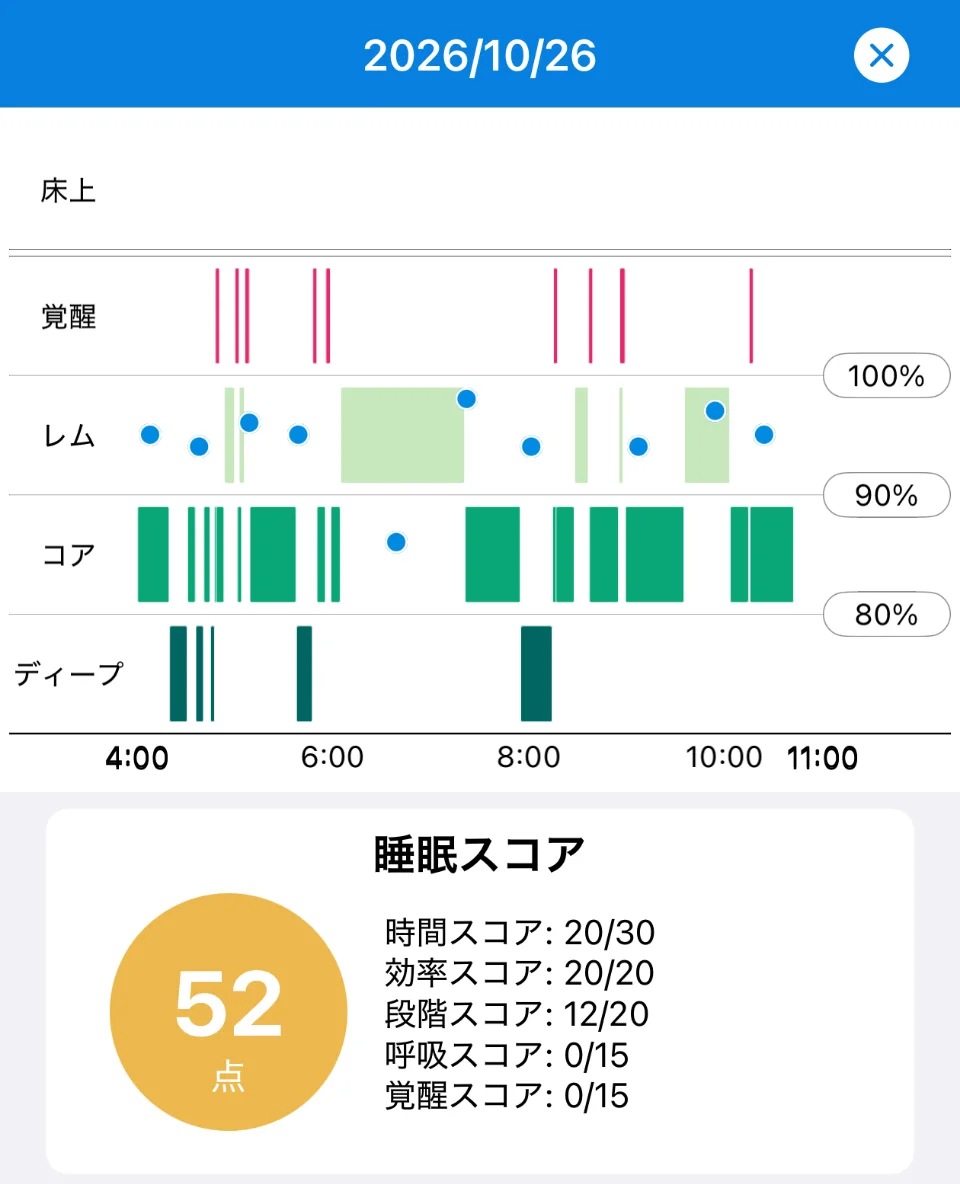
Sleepa is available in English, but some screens are still shown in Japanese. The screenshots in this article show the Japanese version.
- Duration 20: sleep time was 6 hours or more but less than 7.
- Efficiency 20: 85% or more of the time from 4:00 to 11:00 was spent asleep.
- Sleep Stages 12: only one of Deep and REM met its threshold.
- Breathing 0: the lowest blood oxygen reading was below 90%. On the graph, the blue dot at around 6:30 sits below the 90% line.
- Awakenings 0: 9 or more awakenings were recorded. But every red line on the graph is thin, and there were no long awakenings.
Most of the lost points on this night came from Breathing and Awakenings. The awakenings were all brief, so the count is less worrying than it looks. For breathing, there was one low reading, so the next step is to see whether low readings keep appearing on other nights. Also, sleep didn’t start until 4:00, and sleep time fell short of 7 hours. With Apple’s score, a night like this would also lose points in bedtime consistency if it differed from the usual bedtime.
So the same “low score” can have different reasons on different nights. Once you know the reason, you can separate what you don’t need to worry about from what you can change.
Is one night with a low Sleep Score a problem?
A low Sleep Score on one night doesn’t by itself mean there’s a problem with your sleep, because sleep changes from night to night. In Sleepa, you can follow the trend like this.
- Compare with your sleep journal: if you note how you felt you slept on low-score nights, you can see where the data and your feeling differ (see Sleepa’s sleep journal).
- Check whether the same part keeps coming out low: compare one to two weeks to see whether you lose points in the same part every night.
- See your 30-day trends: once you have at least 7 nights, tap “Analyze.” The AI summarizes your sleep time, how long you take to fall asleep, awakenings during the night, and nighttime blood oxygen over the last 30 days in a few sentences (see more about the AI sleep analysis).
Worrying too much about the score can itself cause anxiety and make it harder to sleep. Use the score to understand your sleep, not to blame yourself.
What can you do for the next night?
After a night with a low Sleep Score, there are four things you can do for the next night: make time for sleep, fall asleep at a regular time, go easy on alcohol and caffeine before bed, and go to bed when you’re sleepy.
- Make time for sleep: Japan’s Ministry of Health, Labour and Welfare, in its Sleep Guide for Health Promotion 2023, recommends that adults aim for at least six hours and get the sleep they need.
- Fall asleep at a regular time: avoid shifting your bedtime a lot, including on days off.
- Go easy on alcohol and caffeine before bed: both can shorten your sleep or increase awakenings during the night.
- Go to bed when you’re sleepy: lying awake in bed for a long time can link your bed with the feeling of not being able to sleep, which can make it harder to fall asleep.
All Sleepa features are free for 7 days from the first time you open the app (you will not be charged automatically when the free period ends). To see what Sleepa adds compared with the iPhone’s built-in Health app, read What the Health app doesn’t tell you about your Apple Watch sleep data — 5 things Sleepa adds.
When to see a doctor
The Sleep Score can’t tell you whether you have a medical condition, and Sleepa does not diagnose any condition either. In the following cases, please see a doctor, whatever your score. Your daily records will give you something concrete to talk about.
- Someone has told you that you snore loudly or stop breathing in your sleep
- Low blood oxygen readings (below 90%) keep appearing night after night
- Sleepless nights keep happening and are affecting your daily life
- Strong daytime sleepiness is interfering with work or driving
Frequently asked questions
What Apple Watch Sleep Score counts as low?
Apple Watch Sleep Scores of 41 to 60 are classed as “Low,” and 40 or below as “Very Low.”
Why is my Sleep Score low even though I slept well?
Even if you slept long enough, falling asleep later than usual costs points in the bedtime consistency part (30 points) of Apple’s Sleep Score. And if you took your Apple Watch off during the night or the battery ran out, the record stops partway and your sleep time comes out short.
Why is my Sleep Score lower when I go to bed early?
The bedtime consistency part (30 points) of Apple’s Sleep Score drops when you fall asleep at a different time from the previous 13 days, so going to bed much earlier than usual can also lower the score. In Sleepa’s score, too, Efficiency tends to drop on nights when you went to bed before you were sleepy.
Does waking up during the night lower my Sleep Score?
Apple’s Sleep Score loses points in the interruptions part (20 points) on nights when you woke up many times or were awake for a long time. Sleepa’s Awakenings score also depends on how many times you woke up, but everyone has brief awakenings, so rather than the count, look at whether there were any long awakenings and how you feel in the morning.
What should I do if my Sleep Score is low almost every day?
If your Sleep Score stays low night after night, compare one to two weeks to see whether you lose points in the same part every night. If sleepless nights keep happening and are affecting your daily life, or strong daytime sleepiness is interfering with work or driving, please see a doctor, whatever your score.
Key points
- Before reading the score, check that the record didn’t stop partway
- With Apple’s score, see whether you lost points in duration (50), bedtime consistency (30) or interruptions (20)
- With Sleepa’s score, the five parts (Duration, Efficiency, Sleep Stages, Breathing and Awakenings) and that night’s graph help narrow down the reason
- The awakenings count tends to come out low, and a single blood oxygen reading isn’t enough to go on. For every part, look at whether it continues night after night
- Don’t react to one night’s score; look at it together with your sleep journal and 30-day trends. If you have symptoms that concern you, see a doctor
Sources: Apple, “View your sleep score on Apple Watch” (Apple Watch User Guide); Apple, “Track your sleep on Apple Watch and use Sleep on iPhone” (Apple Support); Apple, “Estimating Sleep Stages from Apple Watch” (updated October 2025); Watson NF et al., “Recommended amount of sleep for a healthy adult,” Sleep 38(6), 2015; Ministry of Health, Labour and Welfare (Japan), “Sleep Guide for Health Promotion 2023” (in Japanese); Ebrahim IO et al., “Alcohol and sleep I: effects on normal sleep,” Alcohol Clin Exp Res 37(4), 2013; Drake C et al., “Caffeine effects on sleep taken 0, 3, or 6 hours before going to bed,” J Clin Sleep Med 9(11), 2013; Baron KG et al., “Orthosomnia: Are some patients taking the quantified self too far?,” J Clin Sleep Med 13(2), 2017
Sleepa — The Science of Sleep
Look back on the sleep your Apple Watch measures, together with AI sleep analysis and your sleep journal. Learn more about Sleepa.

* Requires an Apple Watch (Series 6 or later) and an iPhone with iOS 26 or later. AI text requires an iPhone that supports Apple Intelligence.
Please note: Sleepa is not a medical device. Its analysis is for reference only and is not a medical diagnosis. If you have symptoms that concern you or are worried about your sleep, please consult a medical professional.