
You’ve had night after night of poor sleep, and you’re wondering whether an Apple Watch that tracks your sleep could help. But can you really sleep with a watch on? Will the numbers just make you more anxious? Is it worth buying one at all? This article is for you if you’re still on the fence.
The short answer: an Apple Watch can help if you struggle to sleep, by recording how you actually slept, at home, every night, so you can compare it with how you felt you slept in a sleep diary. But it’s not as accurate as a clinical sleep study and can’t be used to diagnose a sleep disorder. Whether you have insomnia is for a doctor to decide, and your records give you something to talk through with your doctor. We’ll look honestly at what tracking your sleep with an Apple Watch can and can’t tell you about trouble sleeping, and what our sleep app, Sleepa, adds when you use the two together.
About this article
This article is written by Masa, an engineer and co-founder of Medisense, the company that develops Sleepa. Medisense is led by a physician who specializes in sleep (see why we built Sleepa).
To be upfront: Sleepa works with the sleep data your Apple Watch records, so you need an Apple Watch to use it. That means this article does recommend an Apple Watch, partly for the sake of our own app. To balance that, we also cover when an Apple Watch isn’t a good fit, and what you can start tonight without one.
Why is trouble sleeping hard to put into words?
Trouble sleeping is hard to put into words because you can’t really observe your own sleep, and people with insomnia tend to feel they slept less, and took longer to fall asleep, than they actually did. When you see a doctor about insomnia, the first thing they do is ask questions. What time did you go to bed, and when did you fall asleep? How many times did you wake up during the night? Most insomnia diagnoses are based on this kind of interview (see before you take sleeping pills).
The trouble is that you can’t really observe your own sleep. Many studies have found that people with insomnia tend to feel they slept less than they did, and that it took them longer to fall asleep than it actually did. The more you worry about whether you’re sleeping, the more you notice brief awakenings during the night, and the more the time in between feels like time spent awake (see what is sleep state misperception?).
Of course, sometimes you really aren’t getting enough sleep. Which one it is changes what you should do about it. That’s why it matters to know not only how you felt you slept, but how you actually slept (see what causes insomnia?).
How do the three ways to track your sleep compare?
Broadly speaking, there are three ways to find out how you sleep: a sleep diary, an Apple Watch, and a clinical sleep study (polysomnography, or PSG). A sleep diary tells you how you felt you slept, an Apple Watch records your sleep automatically every night just by wearing it, and a clinical sleep study is the most accurate measure of sleep.
| Method | What it tells you | Limitations |
|---|---|---|
| Sleep diary (paper or a notes app) | How you felt you slept. You can start tonight, at no cost | It can’t tell you how long you were actually asleep |
| Apple Watch | Recorded automatically every night just by wearing it: sleep time and stages, heart rate, respiratory rate and more | Not as accurate as a clinical sleep study |
| Clinical sleep study (PSG) | Polysomnography: the most accurate measure of sleep, using brain waves and other signals | Usually done overnight at a clinic, and not something you repeat night after night |
When you can’t sleep, what matters most is comparing how you felt you slept with how you actually slept, over many nights. A sleep diary combined with an Apple Watch lets you do exactly that, at home, every night.
What can’t Apple Watch sleep data tell you?
Apple Watch sleep data isn’t as accurate as a clinical sleep study, and it can’t be used to diagnose a sleep disorder. An Apple Watch is handy, but it isn’t perfect. Here’s what to know before you start.
It’s not as accurate as a clinical sleep study
Apple Watch estimates your sleep from things like wrist movement and heart rate. Wrist-worn devices have trouble telling when you’re awake but lying still, and may record that time as sleep. On nights when you lie awake in bed for a long time, expect the record to show somewhat more sleep than you actually got.
It can’t diagnose a sleep disorder
The American Academy of Sleep Medicine states that consumer sleep trackers like the Apple Watch cannot be used to diagnose or treat sleep disorders. It also says that, when used as part of a proper clinical evaluation, they can enhance the conversation between patient and doctor. Whether you have insomnia, and whether you need treatment, is for a doctor to decide.
Worrying about the numbers can make sleep worse
Doctors have reported patients whose sleep got worse as they tried to improve their tracker numbers. One example is spending longer in bed to push up the recorded sleep time. Insomnia treatment actually recommends not lying in bed awake for long periods.
Your sleep records are there to help you understand yourself, not to blame yourself. Try not to react to each night’s numbers; look at the trend over a week or a month instead.
Sleeping with a watch on isn’t for everyone
To track your sleep, you need to wear your Apple Watch to bed every night and charge it to at least 30% before bed. If having something on your wrist keeps you awake, there’s no need to force it.
What Sleepa adds
With an Apple Watch alone, you can already see each night’s sleep in the iPhone’s Health app. Sleepa builds on that with features for people who struggle to sleep (see what the Health app doesn’t tell you).
1. How you felt and how you slept, on one graph
In Sleepa’s sleep journal, you rate last night’s sleep out of 10, and for each hour you use a slider to choose whether you were active, in bed awake, or in bed asleep. Unlike a paper diary, there’s no need to write down times.
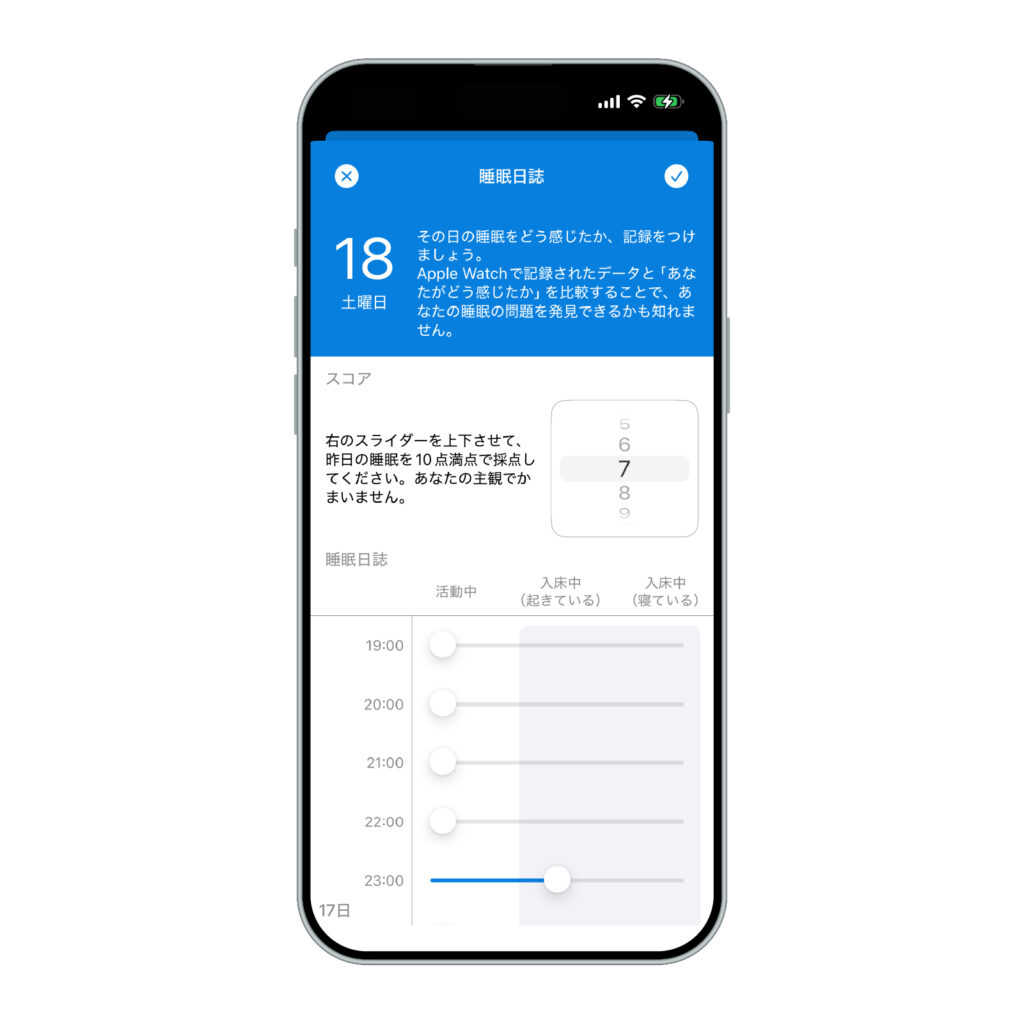
Sleepa is available in English, but some screens are still shown in Japanese. The screenshots in this article show the Japanese version.
Your journal can be shown right under the Apple Watch sleep graph, on the same timeline. On a night you felt you were awake all night, you can see at a glance whether there were just a few brief awakenings, or whether you really were awake for a long time. The trick is to fill in the journal before you look at your Apple Watch data. If you look first, the data tends to sway how you remember the night (see Sleepa’s sleep journal).
2. Your 30-day insomnia trends, explained in words
Once you have at least 7 nights of data, tap “Analyze” on the home screen. Sleepa analyzes your last 30 days and shows the result as a short written summary.
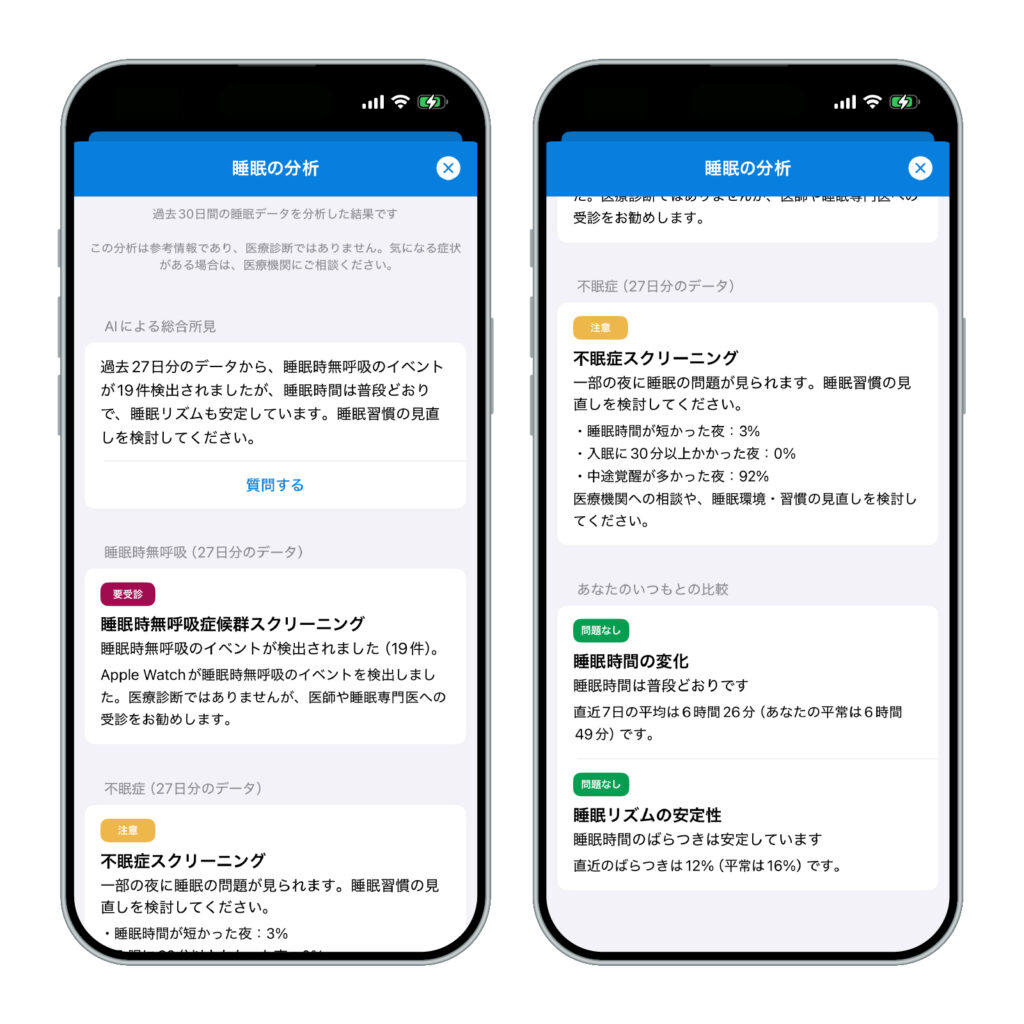
For insomnia, it looks at how many nights had short sleep, took 30 minutes or more to fall asleep, or had many awakenings. You see it as a trend across the month, not as the result of a single night.
It also checks how far your blood oxygen dropped at night and whether Apple Watch detected breathing disturbances during sleep. That’s because sleep apnea can sometimes be what lies behind trouble sleeping.
If something in the analysis isn’t clear, you can ask the AI about it directly. The analysis and the AI writing happen on your iPhone, and your sleep data is never sent to an outside AI service (see more about the AI sleep analysis).
3. A comparison with your own usual
The analysis also compares your last 7 days with your earlier records, to see whether your sleep time or sleep rhythm has changed. Instead of measuring yourself against other people’s averages, you can focus on changes in your own sleep.
4. Something concrete to show your doctor
If your sleep problems continue and you see a doctor, you can show them the Sleepa screen with your journal and Apple Watch data side by side. That way you can share what your sleep actually looked like, not just say “I can’t sleep.” Sleepa isn’t a diagnostic app, but it gives you something to talk through with your doctor.
If you’re choosing an Apple Watch
To use Sleepa, you’ll need:
- Apple Watch: a model that can measure blood oxygen (Series 6 or later, or Ultra). Apple Watch SE can’t measure blood oxygen, so it isn’t supported by Sleepa.
- iPhone: iOS 26 or later
- AI summary and chat: available on iPhones that support Apple Intelligence, with Apple Intelligence turned on. On other iPhones, the analysis is shown as standard text (without the chat).
Once you have your Apple Watch, set up a sleep schedule in the Health app on your iPhone and turn on Track Sleep with Apple Watch. Picking a regular time to charge it, such as after dinner or while you get ready in the morning, makes it easier to have at least 30% battery at bedtime.
All Sleepa features are free for 7 days from the first time you open the app. From day 8, a paid plan is required. You will not be charged automatically when the free period ends.
What can you start tonight without an Apple Watch?
Even without an Apple Watch, you can start a sleep diary tonight, on paper or in a notes app. An Apple Watch isn’t a small purchase. If you’re not sure, start by keeping a sleep diary for a week. Each morning, just write down when you went to bed, when you think you fell asleep, when you think you were awake during the night, when you got up, and how satisfied you were with last night’s sleep. That alone can reveal how much your bedtime varies, and what happened before the nights you couldn’t sleep (see check your sleep in one week).
If keeping the diary leaves you wondering “Am I really sleeping this little?” or “Does what I feel match how I actually sleep?”, that’s a good time to try an Apple Watch with Sleepa.
However, in the following cases, please see a doctor before choosing a tracking tool:
- Your sleep problems have continued and are affecting your daily life or work
- Someone has told you that you snore or stop breathing while you sleep
- You’ve been feeling low or very anxious for a while
- You take sleeping pills and are unsure about the dose or how to stop (don’t reduce or stop them on your own; talk to the doctor who prescribed them)
Frequently asked questions
Can an Apple Watch detect insomnia?
No. The American Academy of Sleep Medicine states that consumer sleep trackers like the Apple Watch cannot be used to diagnose or treat sleep disorders. Whether you have insomnia, and whether you need treatment, is for a doctor to decide.
Is Apple Watch sleep tracking accurate on nights you can’t sleep?
Apple Watch estimates your sleep from things like wrist movement and heart rate, so it’s not as accurate as a clinical sleep study. Wrist-worn devices have trouble telling when you’re awake but lying still, so on nights when you lie awake in bed for a long time, your Apple Watch record may show somewhat more sleep than you actually got.
Do you have to wear your Apple Watch to bed to track your sleep?
Yes. To track your sleep, you need to wear your Apple Watch to bed every night and charge it to at least 30% before bed. If having something on your wrist keeps you awake, there’s no need to force it.
Can tracking your sleep with an Apple Watch make your sleep worse?
Doctors have reported patients whose sleep got worse as they tried to improve the numbers from sleep trackers such as the Apple Watch. One example is spending longer in bed to push up the recorded sleep time. Try not to react to each night’s numbers; look at the trend over a week or a month instead.
Can Apple Watch sleep data help when you see a doctor?
The American Academy of Sleep Medicine states that consumer sleep trackers like the Apple Watch cannot be used to diagnose or treat sleep disorders, but that, when used as part of a proper clinical evaluation, they can enhance the conversation between patient and doctor. Trouble sleeping is hard to put into words, so your Apple Watch records give you something to talk through with your doctor.
Key points
- Trouble sleeping is hard to put into words, and how you feel you slept often differs from how you actually slept
- An Apple Watch records your sleep automatically, every night, at home. But it’s not as accurate as a clinical sleep study and can’t be used for diagnosis
- Don’t fixate on the numbers; look at trends over a week or a month
- Sleepa lets you compare your sleep journal with your Apple Watch data and get a 30-day analysis in one app. It requires an Apple Watch that can measure blood oxygen (Series 6 or later, or Ultra)
- If you’re not sure, start with a paper sleep diary. If you have symptoms that concern you, see a doctor
Sources: Harvey AG, Tang NKY, “(Mis)perception of sleep in insomnia: a puzzle and a resolution,” Psychol Bull 138(1), 2012; Khosla S, et al., “Consumer sleep technology: an American Academy of Sleep Medicine position statement,” J Clin Sleep Med 14(5), 2018; Baron KG, et al., “Orthosomnia: are some patients taking the quantified self too far?,” J Clin Sleep Med 13(2), 2017; de Zambotti M, et al., “Wearable sleep technology in clinical and research settings,” Med Sci Sports Exerc 51(7), 2019; Apple, “Track your sleep on Apple Watch and use Sleep on iPhone” (Apple Support); Apple, “How to use the Blood Oxygen app on Apple Watch” (Apple Support)
Sleepa — The Science of Sleep
Look back on the sleep your Apple Watch measures, together with AI sleep analysis and your sleep journal. Learn more about Sleepa.

* Requires an Apple Watch (Series 6 or later) and an iPhone with iOS 26 or later. AI text requires an iPhone that supports Apple Intelligence.
Please note: Sleepa is not a medical device. Its analysis is for reference only and is not a medical diagnosis. If you have symptoms that concern you or are worried about your sleep, please consult a medical professional.