
If you track your sleep with an Apple Watch, questions tend to come up sooner or later. “I feel like I barely slept, so why does my Apple Watch say I slept just fine?” “My Deep sleep is always low. Is it really that low?” Can a watch on your wrist really tell what’s going on while you sleep?
The short answer: in Apple’s validation, Apple Watch correctly scored almost all real sleep (about 97%) as sleep. What it finds harder is time when you’re awake but lying still, and Deep sleep. Even with watchOS 26, about one fifth of the time you’re awake is scored as sleep, and about a third of your Deep sleep is scored as Core. Using Apple’s published validation data and studies by independent researchers, this article explains what the numbers mean and how to make good use of your sleep data.
About this article
This article is written by Masa, an engineer and co-founder of Medisense Inc., the company that develops the sleep app Sleepa. Medisense is led by a physician who specializes in sleep (why we built Sleepa). For the basics of Apple Watch’s four sleep stages, see How to read your Apple Watch sleep data.
How does Apple Watch track sleep?
Apple Watch estimates your sleep from wrist movement, not from brain waves. According to Apple, the accelerometer in Apple Watch picks up not only large movements such as turning over, but also the subtle movements caused by breathing. From that signal, it classifies every 30 seconds as Awake, REM, Core or Deep. Core corresponds to stages N1 and N2 in the clinical classification of sleep, and Deep corresponds to N3.
- Four sleep stages: introduced in 2022 with watchOS 9. Before that, Apple Watch recorded only asleep or awake.
- Short sleep: since watchOS 11 in 2024, Apple Watch also tracks sleep outside your sleep schedule, such as naps. If the total sleep in a session is one to three hours, only asleep and awake are recorded; above three hours, all four stages are recorded.
- The 2025 update: iOS 26 and watchOS 26 brought an improved way of classifying sleep stages. It is still based on the accelerometer signal.
How did Apple test its accuracy?
Apple had people sleep wearing an Apple Watch while also being measured with a clinical sleep study (polysomnography, or PSG) on the same night, and compared the two, 30 seconds at a time. PSG records brain waves, heart activity, blood oxygen, airflow, leg movements and more, and is considered the gold standard for scoring sleep stages. The PSG recordings were scored by certified technologists following the American Academy of Sleep Medicine’s rules.
- Data used to build the algorithm: 1,171 nights from 858 people
- Data used to test its accuracy: 299 nights from 166 different people (average age 47, 47% women). About 80% of the sessions were in a sleep lab and the rest were PSG at home. Some nights came from people with sleep apnea.
- A check in clinic patients: Apple also tested it separately in 236 adults having a clinical sleep study because a sleep disorder was suspected (390 recordings).
Accuracy was tested on people whose data wasn’t used to build the algorithm. After the 2025 update, Apple tested the new algorithm again on the same 166 people’s data.
How well does it tell sleep from wake?
Apple Watch scores almost all real sleep as sleep, but it also scores some of the time you’re really awake as sleep. Apple describes this with two numbers: sensitivity and specificity.
- Sensitivity: of the time you were really asleep, the share Apple Watch also scored as sleep
- Specificity: of the time you were really awake, the share Apple Watch also scored as Awake
| Measure | Original | watchOS 26 and later |
|---|---|---|
| Sensitivity (sleep scored as sleep) | 97.9% | 96.8% |
| Specificity (wake scored as Awake) | 75.0% | 78.9% |
Both are medians of values calculated for each night. “Original” means the algorithm used when the four sleep stages arrived in 2022. In the group of patients tested for a suspected sleep disorder, sensitivity and specificity were 97.5% and 72.5% with the original algorithm, and 95.0% and 86.5% with watchOS 26 and later.
In other words, Apple Watch rarely mistakes sleep for wake. The other way around is more common: about a quarter of the time you were awake was scored as sleep with the original algorithm, and about a fifth still is with watchOS 26 and later.
The hard part is time when you’re awake but your body is still. Apple says the watchOS 26 update specifically improves detection of this kind of “quiet wake,” which often happens just before or after sleep. Researchers have long pointed out that devices that judge sleep from wrist movement have trouble spotting wake when you’re not moving. According to Apple, wrist actigraphs used in research generally have a sensitivity of about 90–97%, but their specificity is often 50% or less.
How accurate are the sleep stages?
With watchOS 26 and later, Apple Watch matched the sleep study for about 80% of REM, Core and Awake time, and for about 70% of Deep sleep. When it gets a stage wrong, it almost always scores it as Core.
| Actual stage | Scored correctly | Most common error |
|---|---|---|
| Awake | 79% | Core (17%) |
| REM | 82% | Core (16%) |
| Core | 82% | Deep (7.5%) |
| Deep | 68% | Core (32%) |
These figures are for the watchOS 26 algorithm, pooled across all the 30-second segments of the 166 people in the test data. With the original algorithm, they were 70% for Awake, 78% for REM, 83% for Core and 62% for Deep. The table shows two habits of Apple Watch’s sleep data.
- Deep sleep is the most often mixed up: according to Apple, the most common error overall is scoring real Deep sleep as Core. That happened 38% of the time with the original algorithm and 32% with watchOS 26 and later (see Not much Deep sleep on your Apple Watch?).
- When in doubt, it says Core: Awake, REM and Deep are each most often mistaken for Core. Mix-ups between very different stages, such as scoring Deep sleep as Awake, are rare, at under 1%.
Apple says this pattern of errors is similar to how human experts disagree when they score the same recording.
Kappa: one number for overall agreement
Overall agreement across the four stages is also expressed as a “kappa” coefficient. Kappa measures how closely two ways of scoring agree after taking out the agreement you’d expect by chance. Researchers commonly call 0.41–0.60 “moderate” agreement and 0.61–0.80 “substantial” agreement.
In Apple’s validation, kappa rose from 0.63 with the original algorithm to 0.68 with watchOS 26 and later. In the group of patients tested for a suspected sleep disorder, it was 0.55 with the original algorithm and 0.66 with watchOS 26 and later. Even humans don’t agree perfectly: the paper by Schyvens and colleagues, covered in the next section, cites a kappa of 0.75 for agreement between experts scoring sleep studies.
In Apple’s analysis of the original algorithm, agreement was lower on nights with frequent stage changes and on nights with more breathing disturbances (apneas and hypopneas). Being male and age had smaller effects, and the Apple Watch model made no difference.
What do independent studies show?
The numbers so far come from Apple’s own validation. Studies of Apple Watch Series 8 by researchers outside Apple found the same pattern: it detects sleep well, but records less wake and less Deep sleep than a sleep study does.
| Study | Who was tested | Apple Watch results |
|---|---|---|
| Robbins et al. (2024, US) | 35 adults aged 20–50 without a sleep disorder, one night | Sensitivity for sleep vs. wake of 95% or more (for all devices tested). Compared with PSG, it recorded 7 minutes less wake, 43 minutes less Deep sleep and 45 minutes more light sleep |
| Schyvens et al. (2025, Belgium) | 62 adults spending one night in a sleep lab (complete Apple Watch data for 20) | Sensitivity 96%, specificity 52%, kappa 0.53. Compared with PSG, it recorded 20 minutes less wake, 25 minutes less Deep sleep and 59 minutes more light sleep |
Light sleep here means stages N1 and N2, which correspond to Apple’s Core. Both studies were published before the watchOS 26 update, so their numbers reflect the original algorithm. They also tested different people in different ways, so figures such as specificity don’t line up with Apple’s.
Schyvens and colleagues concluded that devices with relatively high agreement, such as Apple Watch Series 8, could be used to track prolonged and significant changes in sleep. Both studies also tested devices from other companies, but this article covers Apple Watch results only.
If you often can’t sleep, how should you read the data?
The longer you lie still in bed unable to sleep, the more likely your Apple Watch is to show more sleep than you actually got. Because part of your awake time is scored as sleep, the more time you spend awake, the bigger that gap can get.
If you simply apply Apple’s specificity for watchOS 26 and later (78.9%), a night with an hour awake in bed would have about 13 minutes of that hour recorded as sleep. But few validation studies have looked at people with insomnia, so the real gap could be larger or smaller.
At the same time, many people with insomnia are known to feel that they took longer to fall asleep and slept less than a sleep study shows (see what is sleep state misperception?). So when your data shows more sleep than you felt you got, the data alone can’t tell you whether that’s tracking error or whether you really slept more than you thought.
Researchers who study sleep devices point out that when a tracker shows “poor sleep,” people with insomnia may become more anxious and worried, and when it wrongly shows “good sleep,” people may put off seeking professional help. Your data can’t tell you whether you have insomnia. For more on how an Apple Watch can help when you struggle to sleep, see Can an Apple Watch help with insomnia?
How should you use your Apple Watch sleep data?
Apple Watch sleep data is better suited to looking at trends over many nights, next to how you felt, than to reading the fine detail of a single night. Apple’s paper itself names tracking sleep night after night as a strength that a brain-wave study of one or a few nights can’t offer.
- Make sure the night is recorded properly: Apple recommends charging your Apple Watch to at least 30% before bed and wearing it at a comfortable fit. If it’s too loose, the accelerometer might register too much movement during your natural sleep.
- Look at trends over many nights: a single night’s numbers include both tracking error and normal night-to-night variation. Line up one to two weeks, or a month, and look for changes.
- Treat Deep and Awake as rough guides: Deep is easily mistaken for Core, and lying awake still is easily mistaken for sleep. Rather than comparing with other people’s numbers, look at changes in your own (see Lots of “Awake” in your Apple Watch sleep data?).
- Compare with how you felt: in the morning, before you look at the data, jot down how you felt you slept. That shows you where the data and your feeling differ. If you look at the data first, it tends to sway how you remember the night.
- Be careful comparing before and after watchOS 26: watchOS 26 changed how sleep is classified and made it better at spotting wake. If you seem to have more Awake time after updating, it doesn’t necessarily mean your sleep has changed. Sleep device researchers also list software updates among the things to consider when using these devices in research.
Seeing your data and how you felt side by side in Sleepa
Our sleep app, Sleepa, reads and displays the sleep data your Apple Watch writes to the Health app. Sleepa doesn’t measure sleep itself, so using Sleepa doesn’t make the data any more accurate than Apple Watch. On a day your Apple Watch didn’t record, Sleepa shows “No sleep data for this day.”
What Sleepa adds is a way to do what this article recommends, looking at trends over many nights next to how you felt, every day.
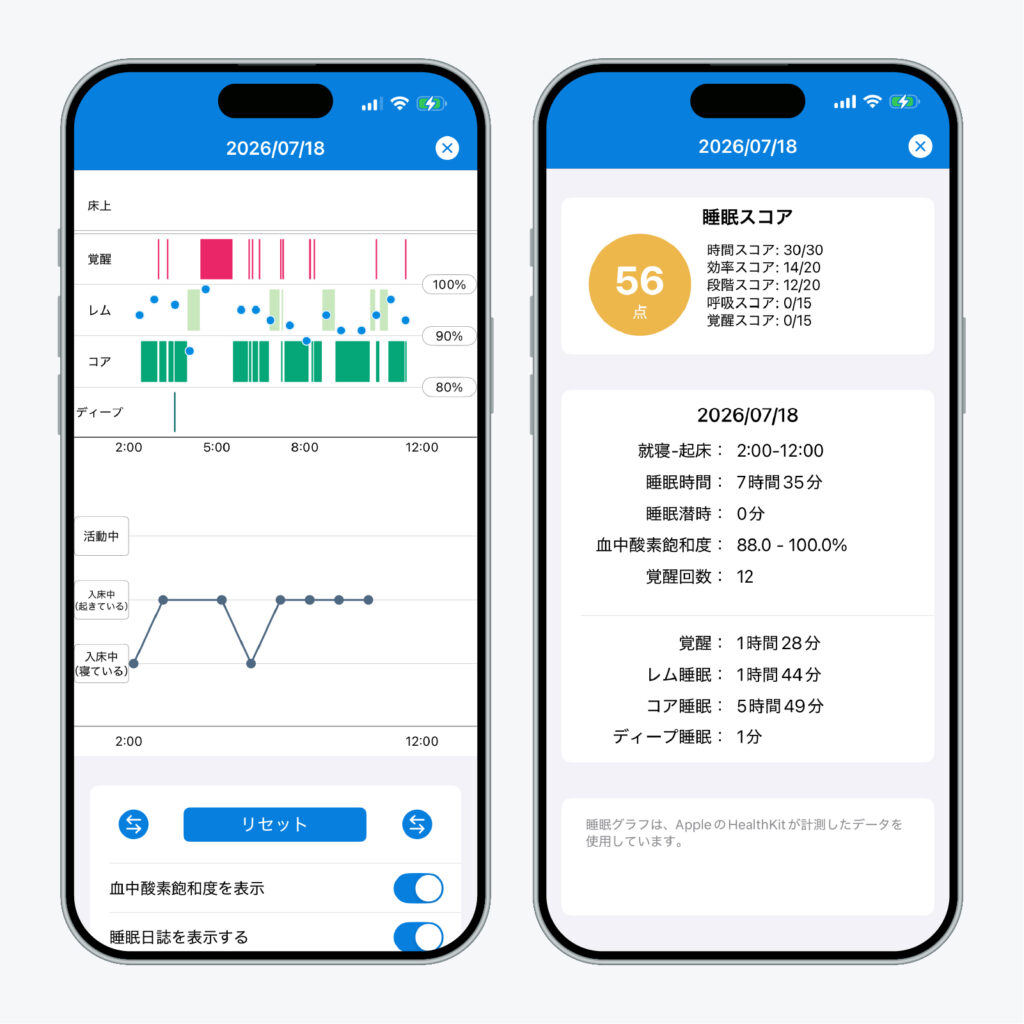
Sleepa is available in English, but some screens are still shown in Japanese. The screenshot in this article shows the Japanese version.
- Compare with how you felt: in the sleep journal, you rate last night’s sleep out of 10, and for each hour you choose whether you were active, in bed awake, or in bed asleep. Your journal can be shown right under the Apple Watch sleep graph, on the same timeline. On a night you felt you were awake all night, you can see at a glance what the data recorded (see Sleepa’s sleep journal).
- See 30-day trends: once you have at least 7 nights of data, tap “Analyze.” Sleepa looks at your last 30 days from three angles: Sleep Apnea, Insomnia, and Compared to your usual. For insomnia, it looks at how many nights had short sleep, took 30 minutes or more to fall asleep, or had many awakenings (see more about the AI sleep analysis).
The analysis and the AI writing happen on your iPhone, and your sleep data is never sent to an outside AI service. The results are not a diagnosis, and they can’t rule out any condition.
All Sleepa features are free for 7 days from the first time you open the app (you will not be charged automatically when the free period ends). To see what Sleepa adds compared with the iPhone’s built-in Health app, read What the Health app doesn’t tell you about your Apple Watch sleep data — 5 things Sleepa adds.
When to see a doctor
Apple Watch sleep data isn’t meant for judging whether you have a medical condition. Apple’s paper itself says that Apple Watch sleep stages aren’t intended for clinical use. In a 2018 statement, the American Academy of Sleep Medicine said consumer sleep trackers can’t be used to diagnose or treat sleep disorders, while also noting that they can enhance the conversation between patient and doctor as part of a proper clinical evaluation. In the following cases, please see a doctor, whatever your data says.
- Sleepless nights keep happening and are affecting your daily life or work
- Your data says you’re sleeping, but you keep feeling you can’t sleep or feel unwell during the day
- Someone has told you that you snore loudly or stop breathing in your sleep
- Strong daytime sleepiness is interfering with work or driving
- You take sleeping pills and your data has you unsure about the dose or how to stop (don’t reduce or stop them on your own; talk to the doctor who prescribed them)
Frequently asked questions
How accurate is Apple Watch sleep tracking?
In Apple’s validation, Apple Watch with watchOS 26 and later scored 96.8% of real sleep as sleep (the median across nights). It scored 78.9% of real wake time as Awake, which means about a fifth of the time you’re awake is recorded as sleep.
How does Apple Watch work out your sleep stages?
Apple Watch uses wrist movement picked up by its accelerometer, including the subtle movements caused by breathing, to classify every 30 seconds as Awake, REM, Core or Deep. It does not measure brain waves.
Why does Apple Watch record sleep when I was awake?
Apple Watch judges sleep from wrist movement, so it has trouble telling sleep apart from time when you’re awake but lying still. Apple says the watchOS 26 update improved detection of this “quiet wake,” but about a fifth of awake time is still scored as sleep.
Does Apple Watch underestimate Deep sleep?
In Apple’s validation, the most common error is scoring real Deep sleep as Core, and with watchOS 26 and later about a third of Deep sleep is still scored as Core. Two independent studies of Apple Watch Series 8 with the original algorithm found it recorded 25 and 43 minutes less Deep sleep than a sleep study.
Did watchOS 26 make sleep tracking more accurate?
According to Apple, the iOS 26 and watchOS 26 update raised the share of wake time scored as Awake (specificity) from 75.0% to 78.9%, and raised agreement across the four stages (kappa) from 0.63 to 0.68. Apple says it is especially better at spotting time when you’re awake but lying still.
Can Apple Watch sleep data tell me if I have insomnia?
Apple Watch sleep data can’t tell you whether you have insomnia. Apple says its sleep stages aren’t intended for clinical use, and the American Academy of Sleep Medicine says consumer sleep trackers can’t be used to diagnose or treat sleep disorders. If sleepless nights keep happening and trouble you, see a doctor, whatever your data says.
Key points
- Apple Watch classifies every 30 seconds into four stages from wrist movement, including the subtle movements of breathing. It doesn’t measure brain waves
- In Apple’s validation, it scores about 97% of real sleep as sleep. But about a fifth of awake time (with watchOS 26 and later) is recorded as sleep
- Its weak spots are lying awake still and Deep sleep. About a third of Deep sleep is scored as Core
- Independent studies (of Apple Watch Series 8 with the original algorithm) also found it records less wake and less Deep sleep
- The more time you spend lying awake in bed, the more your data tends to overstate your sleep. Your data can’t tell you whether you have insomnia
- Look at trends over many nights next to how you felt, rather than at one night’s numbers. If you have symptoms that concern you, see a doctor, whatever your data says
Sources: Apple, “Estimating Sleep Stages from Apple Watch” (updated October 2025); Apple, “Track your sleep on Apple Watch and use Sleep on iPhone“; Robbins R et al., “Accuracy of Three Commercial Wearable Devices for Sleep Tracking in Healthy Adults,” Sensors 24(20), 2024; Schyvens AM et al., “A performance validation of six commercial wrist-worn wearable sleep-tracking devices for sleep stage scoring compared to polysomnography,” Sleep Adv 6(2), 2025; de Zambotti M et al., “Wearable Sleep Technology in Clinical and Research Settings,” Med Sci Sports Exerc 51(7), 2019; Khosla S et al., “Consumer Sleep Technology: An American Academy of Sleep Medicine Position Statement,” J Clin Sleep Med 14(5), 2018; Harvey AG, Tang NKY, “(Mis)perception of sleep in insomnia: a puzzle and a resolution,” Psychol Bull 138(1), 2012
Sleepa — The Science of Sleep
Look back on the sleep your Apple Watch measures, together with AI sleep analysis and your sleep journal. Learn more about Sleepa.

* Requires an Apple Watch (Series 6 or later) and an iPhone with iOS 26 or later. AI text requires an iPhone that supports Apple Intelligence.
Please note: Sleepa is not a medical device. Its analysis is for reference only and is not a medical diagnosis. If you have symptoms that concern you or are worried about your sleep, please consult a medical professional.