
You open the Vitals app on your Apple Watch in the morning and see your heart rate and respiratory rate from the night. Maybe a notification told you that some of them were outside your typical range. What is a normal heart rate or breathing rate while you sleep, anyway? And does an “outlier” mean something is wrong with you? This article is for you if you have questions like these.
The short answer: the Vitals app compares your overnight heart rate, respiratory rate, blood oxygen, wrist temperature and sleep duration with your own typical range. After you wear your Apple Watch to sleep for 7 days, it sets that range, and by default it notifies you the next morning when two or more metrics fall outside it. An outlier means a value was different from your recent normal, not that you have a medical condition. For adults at rest, the usual reference ranges are 60 to 100 heartbeats and 12 to 18 breaths per minute, but sleeping values vary from person to person, so comparing yourself with your own range is more useful than comparing with an average. Using Apple’s documentation and public health sources, this article explains how the Vitals app works and how to read it, what’s typical for sleeping heart rate and respiratory rate, what can change your numbers, and when to see a doctor.
About this article
This article is written by Masa, an engineer and co-founder of Medisense Inc., the company that develops the sleep app Sleepa. Medisense is led by a physician who specializes in sleep (why we built Sleepa). For how to read sleep stages such as REM and Deep, see How to read your Apple Watch sleep data.
What is the Vitals app on Apple Watch?
The Vitals app on Apple Watch takes health metrics measured while you sleep and compares them with your own typical range, so you can check them at a glance. It arrived with watchOS 11 in September 2024. According to Apple Support, it shows these five overnight metrics.
- Heart rate: the number of times your heart beats per minute
- Respiratory rate: the number of breaths you take per minute
- Blood oxygen: the level of oxygen in your blood
- Wrist temperature: the change in your wrist temperature during sleep compared with your baseline
- Sleep duration
On Apple Watch Series 12 and Apple Watch Ultra 4, heart rate variability (HRV) replaces sleep duration. These models also add a daytime vitals view with your resting heart rate and HRV.
According to Apple, the out-of-range classifications and notifications use an algorithm developed with real-world data from the Apple Heart and Movement Study, Apple’s research on the links between heart health and physical activity. Apple also states that Vitals app measurements are not intended for medical use.
Which Apple Watch models support the Vitals app?
The Vitals app came with watchOS 11, which was available for Apple Watch Series 6 and later. Apple’s current support page lists an iPhone with the latest version of iOS and an Apple Watch with the latest version of watchOS. Apple’s “watchOS 27 – Feature Availability” page lists Vitals as “Available worldwide” (checked November 2026).
Some metrics, though, are limited to certain models or users. Here is what Apple’s support pages say.
| Metric | Requirements |
|---|---|
| Heart rate | No model limits mentioned |
| Respiratory rate | Not available for users under 13 |
| Blood oxygen | Not supported on Apple Watch SE, and not for people under 18. On models bought in the U.S. on or after January 18, 2024 with part numbers ending in LW/A or LS/A, it doesn’t appear in the Vitals app (results can be viewed in the Health app) |
| Wrist temperature | Series 8 or later, or any Apple Watch Ultra. For people 14 or older |
| Sleep duration | Replaced by heart rate variability (HRV) on Series 12 and Ultra 4 |
| Daytime vitals | Series 12 and Ultra 4 only |
Note that Apple’s wrist temperature support page also lists Apple Watch SE 3 as able to measure wrist temperature, while the footnote on the Vitals support page mentions only Series 8 or later and Apple Watch Ultra.
How is your typical range set, and how many nights does it take?
The Vitals app sets a typical range for each metric after you wear your Apple Watch to sleep for 7 days. Apple Support lists these requirements.
- An iPhone with the latest version of iOS, and an Apple Watch with the latest version of watchOS
- Sleep set up, with Track Sleep with Apple Watch and Sleep Focus enabled
- Wearing your Apple Watch to sleep for 7 days
- A comfortable, snug fit (if your watch is too loose, the sensors might not capture accurate readings)
Your typical range comes from your own data, not from other people’s averages. The Apple Watch User Guide likewise says More Info explains whether one of your metrics has changed compared with your recent history. The comparison is with your recent self, not with anyone else.
What does an outlier mean, and when do you get a notification?
In the Vitals app, an outlier is a value that falls outside your typical range for that metric. It is a comparison with your own data, not a judgment about whether you have a medical condition.
According to the Apple Watch User Guide, by default you get a notification when at least two of your overnight metrics are outside your typical range. Apple Support says the notification arrives the next morning and tells you about possible factors that may have caused the outliers. The examples Apple gives are medications, elevation, alcohol intake and illness.
On a day when only one metric is out of range, you won’t get a notification by default. You can still see the number of outliers for each metric in the Health app (more on where to look in the next section). If you’ve turned Vitals notifications off, you can turn them back on in the Settings app on your Apple Watch: tap Vitals, then turn on Notifications.
What to think back on after an outlier
On a morning with outliers, start by thinking back on the day before rather than jumping to conclusions about your health. Based on the factors Apple lists, ask yourself:
- Did you drink alcohol, or more than usual?
- How are you feeling? Coming down with a cold, or feverish?
- Were you somewhere at a high elevation?
- Have you started a new medication, or changed a dose? (Even if you suspect it, don’t stop or reduce any medication on your own.)
- Was your Apple Watch on too loosely?
A single night out of range doesn’t tell you much on its own. Apple itself notes that some anomalies may appear in the displayed data, resulting in occasional heart rate readings that are abnormally high or low. Look at whether outliers keep coming back over several days, and whether they change along with your other metrics or how you feel.
Where can you see your vitals?
You can see your vitals in the Vitals app on Apple Watch and in the Health app on iPhone or iPad. Here are the steps from Apple Support and the Apple Watch User Guide.
On Apple Watch
- Open the Vitals app. Your overnight vitals are shown by default.
- Turn the Digital Crown to a metric, then tap it to learn more about the metric and the factors that may cause it to go up or down.
- To see your overnight vitals for the last 7 days, tap the calendar button at the top left.
Tap Overnight Vitals, then More Info, to read what it means when your vitals are outside your typical range and which lifestyle factors may affect your results.
On iPhone
- Open the Health app.
- Tap the Browse tab, then tap Vitals.
The bar graph is set to D (daily) by default. Tap W, M or 6M at the top of the chart to see the past week, month or 6 months. Tap Show More Vitals Data below the graph to choose between two views.
- Metrics: each health metric, and the number of outliers it had during the period you selected
- States: the number of days your vitals were in the High, Typical or Low range during the period you selected
You can also see your sleeping heart rate and respiratory rate under Sleep in the Health app. Tap Browse, then Sleep, then Show More Sleep Data, and choose Comparisons to view your heart rate and respiratory rate alongside your time asleep. And if you tap Browse, Respiratory, Respiratory Rate, then Show More Respiratory Rate Data, the Sleep entry shows the range of your respiratory rate while you slept.
How does Apple Watch measure heart rate and respiratory rate?
Apple Watch measures your heart rate with its optical heart sensor and your sleeping respiratory rate with its accelerometer. Here is how Apple explains it.
- Heart rate: the optical heart sensor uses a method called photoplethysmography. Green LED lights paired with light-sensitive photodiodes detect how much blood is flowing through your wrist. When your heart beats, blood flow in your wrist increases and more green light is absorbed, so by flashing its LEDs hundreds of times per second, Apple Watch can work out how many times your heart beats each minute. The sensor can also use infrared light, and which light it uses depends on factors such as your watch model, your activity level and whether you’re sleeping.
- Respiratory rate: since watchOS 8 in 2021, Apple Watch has used its built-in accelerometer, the sensor that tracks movement, to measure your respiratory rate (breaths per minute) while you sleep.
For the heart rate sensor to work, the back of your Apple Watch needs skin contact. And if the watch is too loose, the accelerometer might register too much movement during your natural sleep. Apple recommends wearing it at a comfortable, snug fit.
Respiratory rate is not the same as “breathing disturbances”
Your sleeping respiratory rate is the number of breaths you take per minute. Breathing Disturbances, the metric behind sleep apnea notifications, is a separate measurement that picks up small wrist movements linked to interruptions in your normal breathing pattern. For how that works and what to do if you get a notification, see What are Apple Watch sleep apnea notifications?
What is a normal sleeping heart rate?
There is no single average sleeping heart rate that applies to everyone. Heart rate varies a lot from person to person, so comparing yourself with your own usual values is more useful than comparing with an average. As a reference, MedlinePlus from the U.S. National Library of Medicine gives a resting heart rate of 60 to 100 beats per minute for adults, and 40 to 60 for well-trained athletes. These are ranges for when you’re awake and resting, though, and you can’t compare your sleeping values with them directly.
How do heart rate and breathing change while you sleep?
Your heart rate and breathing change with each stage of sleep. According to the U.S. National Institute of Neurological Disorders and Stroke (NINDS), your heartbeat and breathing slow down as you enter non-REM sleep and reach their lowest levels during deep non-REM sleep (stage 3). During REM sleep, your breathing becomes faster and irregular, and your heart rate and blood pressure rise to near waking levels.
Deep sleep comes mostly in the first half of the night, and REM periods get longer as the night goes on. So it’s not surprising for your heart rate to rise and fall over the course of a night. For how much of each stage is typical, see How much of each sleep stage is normal on Apple Watch?
How much does heart rate differ between people?
A study that tracked the resting heart rate of 92,457 people in the U.S. with a wrist-worn device from 2016 to 2018 (Quer et al., 2020) shows how much heart rate differs between people. The average daily resting heart rate was 65 beats per minute, but individuals ranged from 40 to 109, and one person’s normal could differ from another’s by as much as 70 beats per minute.
Within the same person, on the other hand, resting heart rate stayed relatively stable over the short term for most people. Still, 20% had at least one week in which it moved by 10 beats per minute or more. There was also a small seasonal pattern, lowest in July and highest in January. Because heart rate differs so much between people but stays fairly steady within each person, the Vitals app’s approach of comparing you with your own typical range makes sense.
What is a normal respiratory rate during sleep?
Research suggests that healthy adults average about 15 breaths per minute during sleep, with most values falling between about 12 and 19. In a report by Fitbit researchers who analyzed data from 10,000 users aged 20 to 69 in the U.S. and Canada (Natarajan et al., 2021), the average nighttime respiratory rate for healthy adults was 15.4 breaths per minute, and 90% of values fell between 11.8 and 19.2. For comparison, MedlinePlus gives 12 to 18 breaths per minute for adults who are awake and resting.
The same study found that respiratory rate goes down slightly with age, and that women had a higher rate than men under age 50, with no difference after that. People with a higher nighttime heart rate also tended to have a higher respiratory rate. Note that the Fitbit devices in this study estimated respiratory rate from heart rate variability, which is a different method from Apple Watch’s accelerometer.
If your respiratory rate shows as High or Low
The High, Typical and Low states in the Health app are categories within the Vitals app’s ranges, not a medical diagnosis. Start with the questions in “What to think back on after an outlier” above.
Respiratory rate can also change with your health. In the Fitbit study above, respiratory rate was often elevated in people diagnosed with COVID-19. But your respiratory rate alone can’t tell you whether you’re ill. If you have symptoms that worry you, such as trouble breathing, see a doctor whatever your numbers say.
How should you read wrist temperature and blood oxygen?
Wrist temperature is shown not as your actual temperature but as a change from your own baseline. According to Apple, your Apple Watch sets that baseline after about 5 nights, then looks for nightly changes from it. Your body temperature naturally varies from night to night with diet and exercise, alcohol, your sleep environment, and factors such as menstrual cycles and illness, and the feature is not a thermometer. To record wrist temperature, Sleep Focus must be on for at least 4 hours a night for about 5 nights. In the Health app, tap Search, then Body Measurements, then Wrist Temperature.
In the Vitals app, blood oxygen is compared with your typical range in the same way as the other metrics. You can see the history of your readings in the Health app by tapping Browse, Respiratory, then Blood Oxygen. To see what your blood oxygen was at each point in the night, you can also use Sleepa’s graph, described below. What to check when your blood oxygen is low during sleep is covered in Apple Watch blood oxygen low while sleeping?
What can change your vitals?
Apple says factors such as your medications, elevation, alcohol intake or even illness can affect your vitals. Adding what research and public health sources say, here’s what to keep in mind.
- Alcohol: in a study of 4,098 Finnish employees (Pietilä et al., 2018), comparing each person’s nights with and without alcohol showed a higher heart rate during the first 3 hours of sleep after drinking, and the more they drank, the bigger the increase. On average, heart rate rose by 1.4 beats per minute after a low amount (up to 0.25 g of pure alcohol per kg of body weight), 4.0 after a moderate amount, and 8.7 after a high amount (more than 0.75 g per kg, or more than 45 g for a 60 kg person).
- Illness: as in the Fitbit study above, people with an infection can have a higher nighttime respiratory rate than usual.
- Exercise habits and medications: according to MedlinePlus, heart rate may drop below 60 beats per minute in people who exercise regularly or take medicines that slow the heart. If you’re concerned about a medication, don’t stop or reduce it on your own; talk to the doctor who prescribed it.
- Elevation: Apple also lists changes in elevation as a possible factor.
- Things that affect body temperature: wrist temperature can vary from night to night with diet and exercise, alcohol, your sleep environment, menstrual cycles and illness.
- Fit: if your Apple Watch is too loose, the sensors might not capture accurate readings.
Why is the Vitals app showing no data?
If the Vitals app shows no values, first check whether you’ve worn your Apple Watch to sleep for 7 days. Your typical range needs 7 days of data. Here is what else to check.
- Sleep settings: are Track Sleep with Apple Watch and Sleep Focus turned on?
- Low Power Mode: Low Power Mode turns off background heart rate and blood oxygen measurements, including during sleep.
- Respiratory Rate setting: in the Settings app on your Apple Watch, tap Privacy & Security, then Health, then Respiratory Rate, and check that Respiratory Rate isn’t turned off. Respiratory rate isn’t available for users under 13.
- Blood oxygen: it isn’t supported on Apple Watch SE, or for people under 18. Also, if you’ve turned off “In Sleep Focus” under Blood Oxygen in the Settings app on your Apple Watch, background measurements don’t run while Sleep Focus is on.
- Wrist temperature: do you have a Series 8 or later, or an Ultra? Is Wrist Temperature turned off under Privacy in the Watch app on your iPhone? For about 5 nights while your baseline is being set, the Health app shows “Needs More Data.”
- Software: are iOS on your iPhone and watchOS on your Apple Watch up to date?
If your sleep itself wasn’t recorded, the Vitals app won’t show values for that night either. For what to check when your sleep isn’t recorded, see Apple Watch sleep tracking not working?
Using Sleepa alongside Vitals to see how you slept
Our sleep app, Sleepa, reads the sleep data your Apple Watch writes to the Health app and shows it to you (Sleepa doesn’t record sleep itself). To be upfront: Sleepa doesn’t show heart rate or respiratory rate. It isn’t a replacement for the Vitals app, but used together, it shows you how you actually slept that night.
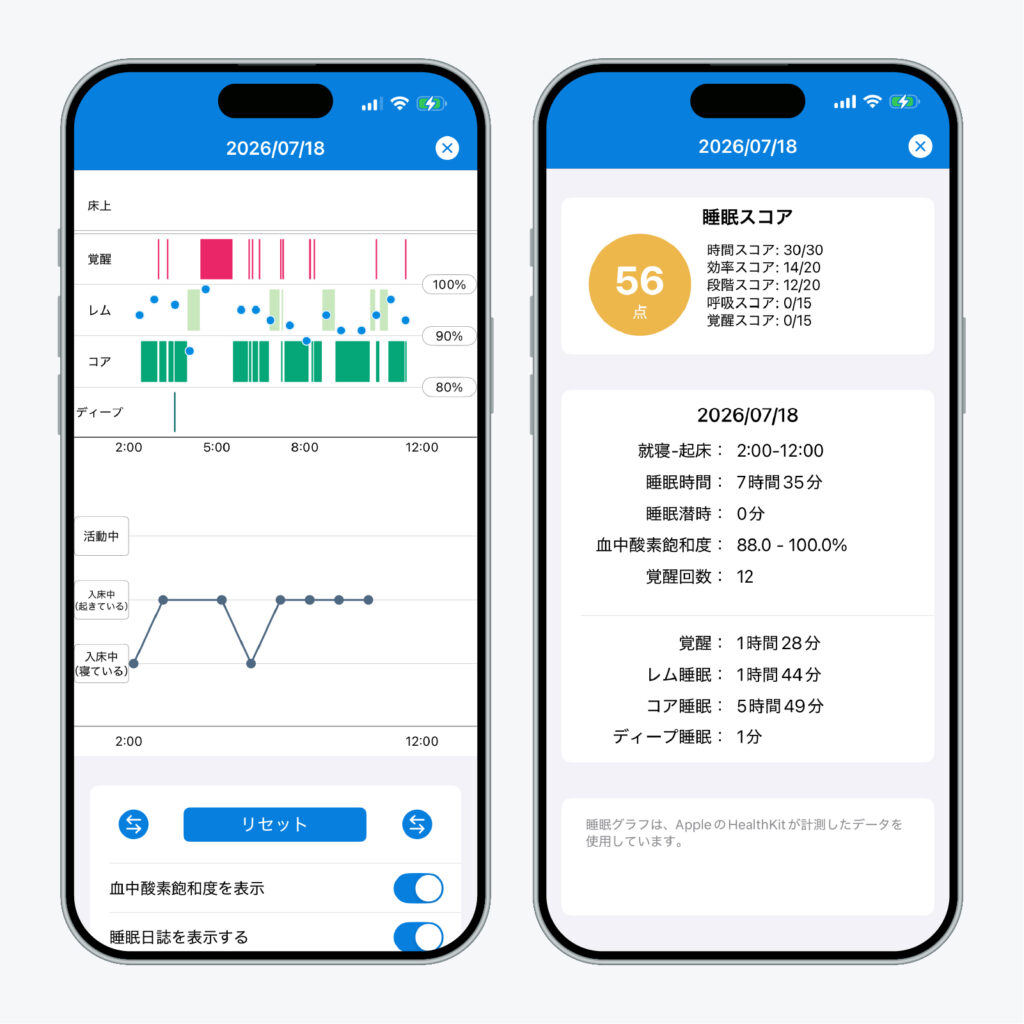
Sleepa is available in English, but some screens are still shown in Japanese. The screenshot in this article shows the Japanese version.
- That night’s sleep graph: rows for in bed, Awake, REM, Core and Deep, with your blood oxygen shown as blue dots (on a 100%, 90% and 80% scale). Below the graph you’ll find your bedtime and wake time, sleep time, how long it took to fall asleep, your blood oxygen range (lowest to highest), the number of awakenings, and the time in each stage.
- Sleep journal: record how the night felt (a score out of 10 and your state hour by hour), and it appears under the graph on the same timeline (more about the sleep journal).
- 30-day trends: once you have at least 7 nights of data, “Analyze” reviews your last 30 days. It has three sections, Sleep Apnea, Insomnia and Compared to your usual; the last one compares your sleep time over the past 7 days, and how regular it was, with your earlier records (more about the AI sleep analysis).
For example, on a morning when the Vitals app flags outliers, you can open that night’s graph and sleep journal in Sleepa and look back at whether you fell asleep late, woke up many times, and how you felt you slept. Sleepa’s analysis isn’t a diagnosis either, and it can’t rule out any condition. The analysis and the AI writing happen on your iPhone, and your sleep data is never sent to an outside AI service.
To use Sleepa, you need an Apple Watch that can measure blood oxygen (Series 6 or later, or Ultra) and an iPhone with iOS 26 or later. Apple Watch SE can’t measure blood oxygen, so it isn’t supported.
All Sleepa features are free for 7 days from the first time you open the app (you will not be charged automatically when the free period ends). To see what Sleepa adds compared with the iPhone’s built-in Health app, read What the Health app doesn’t tell you about your Apple Watch sleep data — 5 things Sleepa adds.
When to see a doctor
Neither the Vitals app nor Sleepa can diagnose a medical condition. Apple, too, advises consulting your healthcare provider before making decisions about your health. In the following cases, please see a doctor, whatever the Vitals app shows. Your records in the Health app will give you something concrete to talk about.
- You have symptoms such as chest pain, shortness of breath, dizziness, or feeling faint (MedlinePlus advises calling 911 or your local emergency number if these come with heart palpitations)
- Your heart rate is over 100 beats per minute without exercise, anxiety or fever
- Your resting heart rate, measured while you’re awake, is continually high or low
- Your vitals keep falling outside your typical range for days, and you don’t feel well
- Someone has told you that you snore loudly or stop breathing in your sleep
- You have a health condition or take medication, and something in your data concerns you (talk to the doctor treating you)
Frequently asked questions
What is the Vitals app on Apple Watch?
The Vitals app on Apple Watch shows your overnight heart rate, respiratory rate, blood oxygen, wrist temperature and sleep duration compared with your own typical range. It sets that range after you wear your Apple Watch to sleep for 7 days, and by default notifies you the next morning when two or more metrics fall outside it.
Which Apple Watch models support the Vitals app?
The Vitals app arrived with watchOS 11, which was available for Series 6 and later, and Apple Support lists an Apple Watch with the latest watchOS and an iPhone with the latest iOS as requirements. Wrist temperature needs Series 8 or later or an Ultra, HRV and daytime vitals are only on Series 12 and Ultra 4, and blood oxygen isn’t supported on Apple Watch SE.
What does an outlier mean in the Vitals app?
An outlier in the Vitals app is a value outside your own typical range for that metric, not a sign that you have a medical condition. Apple says medications, elevation, alcohol and illness can affect your metrics, so think back on the day before and watch whether outliers keep coming back.
What is a normal sleeping heart rate?
There is no single average sleeping heart rate that applies to everyone. In a study of more than 90,000 people, the average resting heart rate was 65 beats per minute, but individuals ranged from 40 to 109. During sleep your heart rate slows in non-REM sleep and rises to near waking levels in REM sleep, so comparing with your own typical range is the most useful approach.
What is a normal respiratory rate during sleep?
In a study of data from 10,000 Fitbit users, healthy adults had an average nighttime respiratory rate of 15.4 breaths per minute, with 90% of values between 11.8 and 19.2. For adults who are awake and resting, MedlinePlus gives 12 to 18 breaths per minute.
Why is my Vitals app showing no data?
The Vitals app needs 7 days of wearing your Apple Watch to sleep to set your typical range, with Track Sleep with Apple Watch and Sleep Focus turned on. Low Power Mode turns off background heart rate and blood oxygen measurements during sleep, and respiratory rate and wrist temperature aren’t recorded if you’ve turned them off in settings.
Key points
- The Vitals app compares your overnight heart rate, respiratory rate, blood oxygen, wrist temperature and sleep duration with your own typical range. On Series 12 and Ultra 4, HRV replaces sleep duration and daytime vitals are added
- Your typical range is set after 7 days of wearing your watch to sleep. By default, you get a notification the next morning when two or more metrics are out of range
- An outlier is a value outside your own recent range, not a diagnosis. Medications, elevation, alcohol, illness and how you wear the watch can all change your numbers
- For adults who are awake and resting, the usual ranges are 60 to 100 beats and 12 to 18 breaths per minute. During sleep, both change with sleep stage, and they vary a lot from person to person
- In one study, healthy adults averaged 15.4 breaths per minute at night, with 90% of values between 11.8 and 19.2. In another, average resting heart rate was 65 beats per minute, ranging from 40 to 109 between people
- Look at whether changes last for days, not just one night. If you have symptoms such as chest pain or shortness of breath, see a doctor whatever your vitals show
Sources: Apple, “Track your overnight and daytime vitals with Apple Watch” (Apple Support); Apple, “Track your vitals on Apple Watch” (Apple Watch User Guide); Apple, “watchOS 11 is available today” (September 2024); Apple, “watchOS 27 – Feature Availability” (checked November 2026); Apple, “Monitor your heart rate with Apple Watch” (Apple Support); Apple, “watchOS 8 brings new access, connectivity, and mindfulness features to Apple Watch” (June 2021); Apple, “Track your sleep on Apple Watch” (Apple Watch User Guide); Apple, “Track your sleep on Apple Watch and use Sleep on iPhone” (Apple Support); Apple, “Track your nightly wrist temperature changes with Apple Watch” (Apple Support); Apple, “Use Low Power Mode on your Apple Watch” (Apple Support); Apple, “Measure blood oxygen levels with the Blood Oxygen app” (Apple Watch User Guide); MedlinePlus, “Vital signs,” “Pulse” and “Heart palpitations” (U.S. National Library of Medicine); National Institute of Neurological Disorders and Stroke, “Brain Basics: Understanding Sleep“; MSD Manual Consumer Version, “Overview of Sleep“; Quer G et al., “Inter- and intraindividual variability in daily resting heart rate and its associations with age, sex, sleep, BMI, and time of year: Retrospective, longitudinal cohort study of 92,457 adults,” PLoS One 15(2), 2020; Natarajan A et al., “Measurement of respiratory rate using wearable devices and applications to COVID-19 detection,” NPJ Digit Med 4(1), 2021; Pietilä J et al., “Acute Effect of Alcohol Intake on Cardiovascular Autonomic Regulation During the First Hours of Sleep in a Large Real-World Sample of Finnish Employees: Observational Study,” JMIR Ment Health 5(1), 2018
Sleepa — The Science of Sleep
Look back on the sleep your Apple Watch measures, together with AI sleep analysis and your sleep journal. Learn more about Sleepa.

* Requires an Apple Watch (Series 6 or later) and an iPhone with iOS 26 or later. AI text requires an iPhone that supports Apple Intelligence.
Please note: Sleepa is not a medical device. Its analysis is for reference only and is not a medical diagnosis. If you have symptoms that concern you or are worried about your sleep, please consult a medical professional.
Related articles
- What are Apple Watch sleep apnea notifications? — how they work, supported models, accuracy, and what to do if you get one
- How to read your Apple Watch sleep data — what is Core sleep, and what do Awake, REM and Deep mean?
- Apple Watch sleep tracking not working? What to check when your sleep, sleep stages, naps or Sleep Score don’t show up