
You open your Apple Watch sleep data in the morning and see “Awake” recorded again and again. “Was I really awake that often?” If you have ever worried about this, you are not alone.
The short answer: seeing several Awake periods in your data is not unusual in itself. In this article, we look at what Awake means on Apple Watch, how much is typical, what tends to increase it, and what matters more than the number of awakenings.
About this article
This article is written by Masa, an engineer and co-founder of Medisense Inc., the company that develops the sleep app Sleepa. Medisense is led by a physician who specializes in sleep (why we built Sleepa). For the basics of Apple Watch’s four sleep stages, see How to read your Apple Watch sleep data.
What “Awake” means on Apple Watch
Apple Watch sorts your sleep into four stages: Awake, REM, Core and Deep. Awake is the time you are awake, including brief awakenings during the night after you have fallen asleep. In the Health app on your iPhone, under Sleep, you can see how much time you spent awake and what share of the night it was.
The key point is that even normal, healthy sleep includes many brief awakenings during the night. Most of them are short, and people often don’t remember them. Apple’s own paper also notes that brief awakenings are common in normal sleep and may go unnoticed.
Apple Watch records even these awakenings you don’t remember. That’s why you can see ten Awake periods on a night when you don’t recall waking up at all. Having Awake in your data is not a sign that something is wrong.
How much Awake is typical?
Doctors usually look at the total time spent awake after falling asleep, rather than the number of awakenings. Here are some useful reference points.
- About 35 minutes: in the study Apple used to check Apple Watch’s accuracy (166 participants, average age 47), detailed tests with brain-wave recordings showed that people spent about 35 minutes awake on average after falling asleep.
- It increases with age: an analysis combining many studies of healthy people found that, through adulthood, the time spent awake during the night increases with age, while the share of time in bed spent asleep (sleep efficiency) goes down.
- 31 minutes or more, three nights a week: in insomnia research, taking 31 minutes or more to fall asleep, or being awake for 31 minutes or more during the night, at least three nights a week for at least six months, is one of the criteria used to define insomnia.
In other words, being awake for around 30 minutes in total during the night is not unusual at all. These are figures used in research, though, not a line beyond which something is wrong. There is also no set number of awakenings that counts as “normal.”
Apple Watch’s Awake data has a margin of error
Apple Watch estimates your sleep stages from wrist movement, heart rate and other signals. In Apple’s study, of the time people were actually awake according to detailed testing, Apple Watch correctly labeled about 75% as Awake. With the improvements in iOS 26 and watchOS 26, this rose to about 79%.
Put another way, about a fifth of the time people were actually awake was labeled as sleep. Lying still in bed while awake is hard to tell apart from sleeping. Treat the Awake time in your data as an estimate.
Common reasons for more awakenings
On nights with more Awake than usual, one of these may be the reason.
- Alcohol before bed: alcohol may seem to help you fall asleep, but it makes sleep lighter in the second half of the night and makes you more likely to wake up.
- Caffeine: research has shown that caffeine taken even six hours before bed can disrupt sleep. It’s safer to have coffee, green tea and energy drinks no later than early afternoon.
- Getting up to use the bathroom: how much you drink before bed, your age, and conditions such as prostate problems can make you wake up more often to use the bathroom.
- Your bedroom: heat, cold, noise and light all make you more likely to wake up.
- Anxiety and stress: when you have worries on your mind, your mind and body stay tense and your sleep becomes lighter (see What causes insomnia?).
- Snoring and sleep apnea: when your breathing stops or becomes shallow during sleep, you briefly wake up each time. Many people don’t notice this themselves.
- Pain and itching: back or joint pain and itchy skin can also wake you up at night.
Three things that matter more than the count
Rather than worrying about the number of awakenings, look at these three things.
- Whether long awakenings happen night after night: if you fall back asleep quickly, many brief awakenings are nothing to worry about. What matters is whether you keep waking up and then lying awake for a long time. Look at one to two weeks of data, not just a single night.
- How you feel during the day: if you don’t feel very sleepy, unfocused or exhausted during the day, you are most likely getting enough sleep, even if your data shows a lot of Awake.
- The gap between how you felt and the data: on a night when you felt you didn’t sleep at all, the data may show only a few brief awakenings. Feeling that you were awake for the whole time between awakenings is called “sleep state misperception” (see What is sleep state misperception?). Writing down each morning how you felt you slept lets you compare it with the data.
Focusing too much on the numbers can itself become a source of anxiety and make your sleep lighter. Use your data as a way to understand your sleep.
When to see a doctor
In the following cases, please see a doctor soon. Your Apple Watch data will give you something concrete to talk about.
- You often wake up during the night and can’t get back to sleep for 30 minutes or more, several nights a week, for weeks
- Someone has told you that you snore loudly or stop breathing while you sleep
- You get up many times during the night to use the bathroom
- Strong sleepiness during the day is affecting your work or driving
- You keep feeling low or unable to enjoy anything
How Sleepa can help
Our sleep app, Sleepa, lets you look at Awake in your Apple Watch data in these ways.
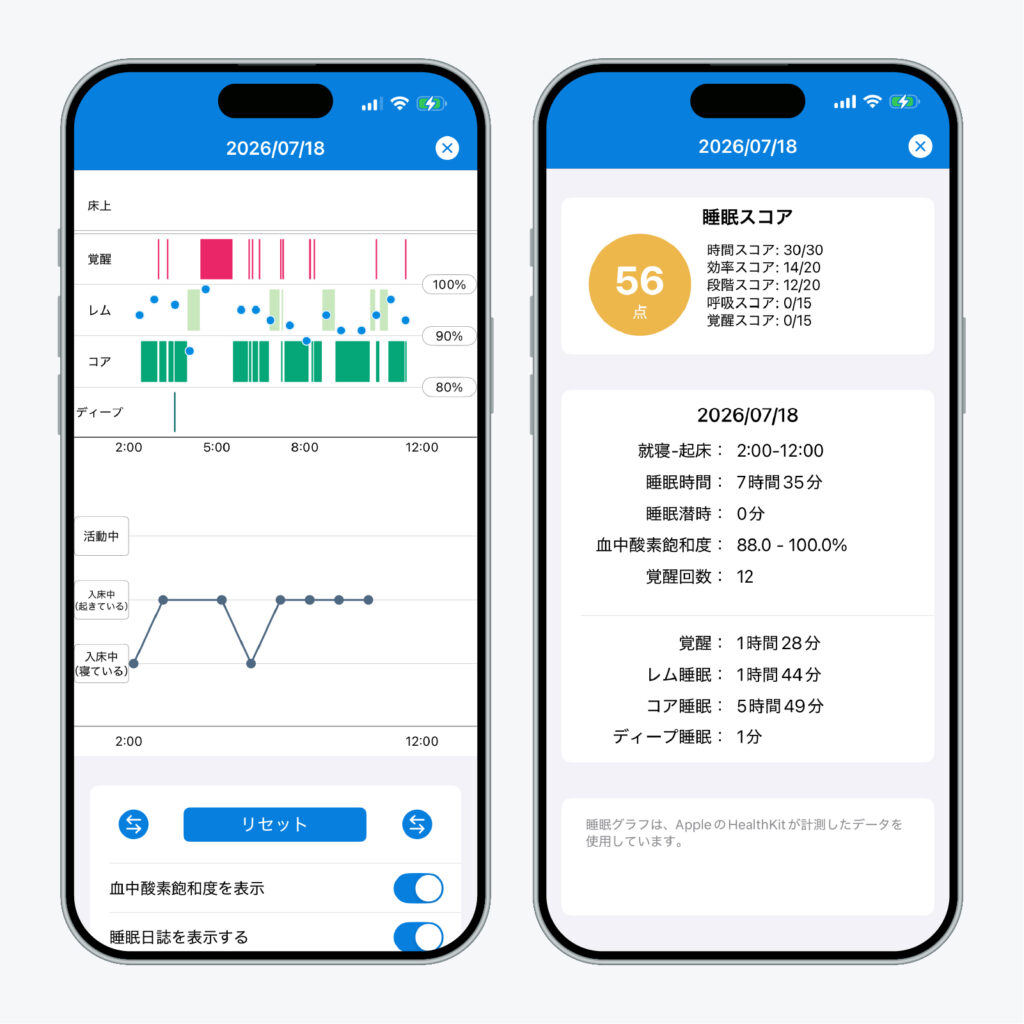
Sleepa is available in English, but some screens are still shown in Japanese. The screenshot in this article shows the Japanese version.
- Number and length of awakenings: each night, it shows the number of awakenings and the time spent Awake, in REM, Core and Deep sleep. The graph shows when each awakening happened and how long it lasted.
- Compare with how you felt: your sleep journal appears right under the graph on the same timeline, so any gap between the time you felt awake and the data is easy to spot (more about the sleep journal).
- 30-day trends: tap “Analyze,” and an AI sums up trends from the last 30 days, such as your sleep time, how long it takes you to fall asleep and how often you wake up (more about the AI sleep analysis).
Sleepa does not diagnose any condition. Use it to understand your own sleep and to bring something concrete to your doctor. All features are free for 7 days from the first time you open the app. (You will not be charged automatically when the free period ends.)
Key points
- Even normal sleep includes many brief awakenings. Seeing Awake in your data is not a sign that something is wrong
- Participants in Apple’s study (average age 47) spent about 35 minutes awake on average after falling asleep, and this time increases with age
- Apple Watch’s Awake data is an estimate: about a fifth of the time people were actually awake was labeled as sleep
- Alcohol, caffeine, bathroom trips, your bedroom, anxiety and snoring can all increase awakenings
- More than the count, look at long awakenings, how you feel during the day, and the gap between how you felt and the data
- See a doctor if you keep lying awake for long periods, if you snore or stop breathing in your sleep, or if you are very sleepy during the day
Sources: Apple, “Estimating Sleep Stages from Apple Watch” (updated October 2025); Ohayon MM et al., “Meta-analysis of quantitative sleep parameters from childhood to old age in healthy individuals,” Sleep 27(7), 2004; Lichstein KL et al., “Quantitative criteria for insomnia,” Behav Res Ther 41(4), 2003; Ebrahim IO et al., “Alcohol and sleep I: effects on normal sleep,” Alcohol Clin Exp Res 37(4), 2013; Drake C et al., “Caffeine effects on sleep taken 0, 3, or 6 hours before going to bed,” J Clin Sleep Med 9(11), 2013
Sleepa — The Science of Sleep
Look back on the sleep your Apple Watch measures, together with AI sleep analysis and your sleep journal. Learn more about Sleepa.

* Requires an Apple Watch (Series 6 or later) and an iPhone with iOS 26 or later. AI text requires an iPhone that supports Apple Intelligence.
Please note: Sleepa is not a medical device. Its analysis is for reference only and is not a medical diagnosis. If you have symptoms that concern you or are worried about your sleep, please consult a medical professional.