
Since watchOS 26, Apple Watch can show you a Sleep Score. When you wake up, last night’s sleep is rated from 0 to 100. But what decides the score? What do most people get? And is 100 even possible? If you have wondered about any of this, read on.
The short answer: Apple Watch’s Sleep Score is the total of three parts: duration (50 points), bedtime consistency (30 points) and interruptions (20 points). Apple hasn’t published an average score, and 61 to 80 counts as “OK.” You can score 100, but there’s no need to aim for it every night. Using the information Apple has published, this article explains how the Sleep Score works and how to read it, what you can do to raise it, and what the score can’t tell you.
About this article
This article is written by Masa, an engineer and co-founder of Medisense Inc., the company that develops the sleep app Sleepa. Medisense is led by a physician who specializes in sleep (why we built Sleepa). For the basics of Apple Watch’s four sleep stages, see How to read your Apple Watch sleep data.
What is the Apple Watch Sleep Score?
Apple Watch’s Sleep Score rates last night’s sleep from 0 to 100. It appears after you wake up in the morning.
- Where to find it: it’s the first thing you see when you open the Sleep app on Apple Watch. On iPhone, open the Health app and go to Sleep, where the Sleep Score has its own section. Tap the score, then the info button, to see the breakdown and how it’s calculated.
- What you need: an Apple Watch with watchOS 26 or later (Series 6 or later, SE (2nd generation) or later, or Ultra) and an iPhone with iOS 26 or later.
- Recording your sleep: turn on sleep tracking with Apple Watch, and sleep for at least an hour while wearing it. Apple recommends charging your Apple Watch to at least 30% before bed.
What determines your Sleep Score?
According to Apple, Apple Watch’s Sleep Score is the total of three parts: duration (50 points), bedtime consistency (30 points) and interruptions (20 points). Here is what each part looks at.
| Part (points) | What it looks at |
|---|---|
| Duration (50 points) | How long you slept |
| Bedtime consistency (30 points) | Whether you fell asleep at a similar time to the previous 13 days |
| Interruptions (20 points) | How often you woke up during the night, and how long you were awake |
Half of the score, 50 points, comes from how long you slept. The next biggest part is whether you fall asleep at about the same time every night. Even with the same amount of sleep, your score can drop on a night when you go to sleep later than usual.
Apple has not published the detailed calculation within each part. Its official description also does not list the amount of Deep or REM sleep as one of the parts.
What are the Sleep Score ranges?
Apple Watch shows your total Sleep Score in one of five ranges. Since watchOS 26.2, 61–80 is “OK,” 81–95 is “High” and 96–100 is “Very High.”
| Range | Score |
|---|---|
| Very Low | 0–40 |
| Low | 41–60 |
| OK | 61–80 |
| High | 81–95 |
| Very High | 96–100 |
These ranges changed with watchOS 26.2 in December 2025. Before that, 90 and above was the top range, and lower scores generally reached the higher ranges. What changed is where the ranges start and end, not how the score is calculated. So some people now see their nights placed in a lower range even though their sleep hasn’t changed.
What’s the average Sleep Score?
Apple has not published an average Apple Watch Sleep Score for its users. The ranges are the best guide: 61 to 80 counts as “OK.”
That said, your Sleep Score is more useful when you compare it with your own past scores than with other people’s. Daily routines and age make higher scores easier for some people than others. Instead of reacting to a single night, look at the trend over one to two weeks.
Can you get a Sleep Score of 100?
Yes. If you get full marks on all three parts, your Apple Watch Sleep Score is 100. That means sleeping long enough, falling asleep at a time that matches the previous 13 days, and having few, short awakenings, all on the same night.
But there’s no need to aim for 100 every night. Even normal sleep includes many brief awakenings, and Apple Watch records them too (see Lots of “Awake” in your Apple Watch sleep data?). Worrying too much about the score can itself cause anxiety and make it harder to sleep. Sleep experts call this “orthosomnia” and have warned about it.
How can you raise your Sleep Score?
There are three things you can do to raise your Apple Watch Sleep Score: make time for sleep, fall asleep at a regular time, and reduce awakenings during the night. All three help both your score and your sleep.
- Make time for sleep: Japan’s Ministry of Health, Labour and Welfare, in its Sleep Guide for Health Promotion 2023, recommends that adults aim for at least six hours and get the sleep they need. How much sleep people need varies.
- Fall asleep at a regular time: 30 points come from bedtime consistency. Keeping your bedtime from shifting too much, including on days off, helps keep your score steady.
- Reduce awakenings during the night: alcohol or caffeine before bed, a room that’s too hot or cold, and noise all increase awakenings.
However, we don’t recommend going to bed early when you aren’t sleepy, or staying in bed longer, just to raise your score. Spending a long time in bed unable to sleep can link your bed with “not sleeping” and make sleep even harder (see What causes insomnia?). The same guide also recommends that older adults keep their time in bed under eight hours.
What the Sleep Score can’t tell you
Apple Watch’s Sleep Score can’t tell you how you felt or how your day goes, what your sleep was made of, or whether you have a health condition. The sleep data behind the score also has a margin of error.
- How you felt and how your day goes: the score doesn’t know whether you felt well rested. Even with a low score, if you feel fine during the day, you are most likely getting enough sleep.
- What your sleep was made of: the balance of Deep and REM sleep and your breathing during sleep are not part of the three parts.
- Whether you have a health condition: the score isn’t a diagnosis. A high score doesn’t rule out conditions such as sleep apnea. Separately from the score, Apple Watch has a sleep apnea notification feature (only on supported models, such as Series 9 and later, and in supported countries and regions).
- Measurement error: the sleep data behind the score is estimated from wrist movement, heart rate and other signals, so it has a margin of error (see How accurate is Apple Watch’s sleep data?).
If someone has told you that you snore loudly or stop breathing while you sleep, if you are very sleepy during the day, or if sleepless nights keep happening, please see a doctor, whatever your score.
How Sleepa’s sleep score is different
Our sleep app, Sleepa, also shows its own sleep score out of 100, based on your Apple Watch data. It looks at different things from Apple’s score.
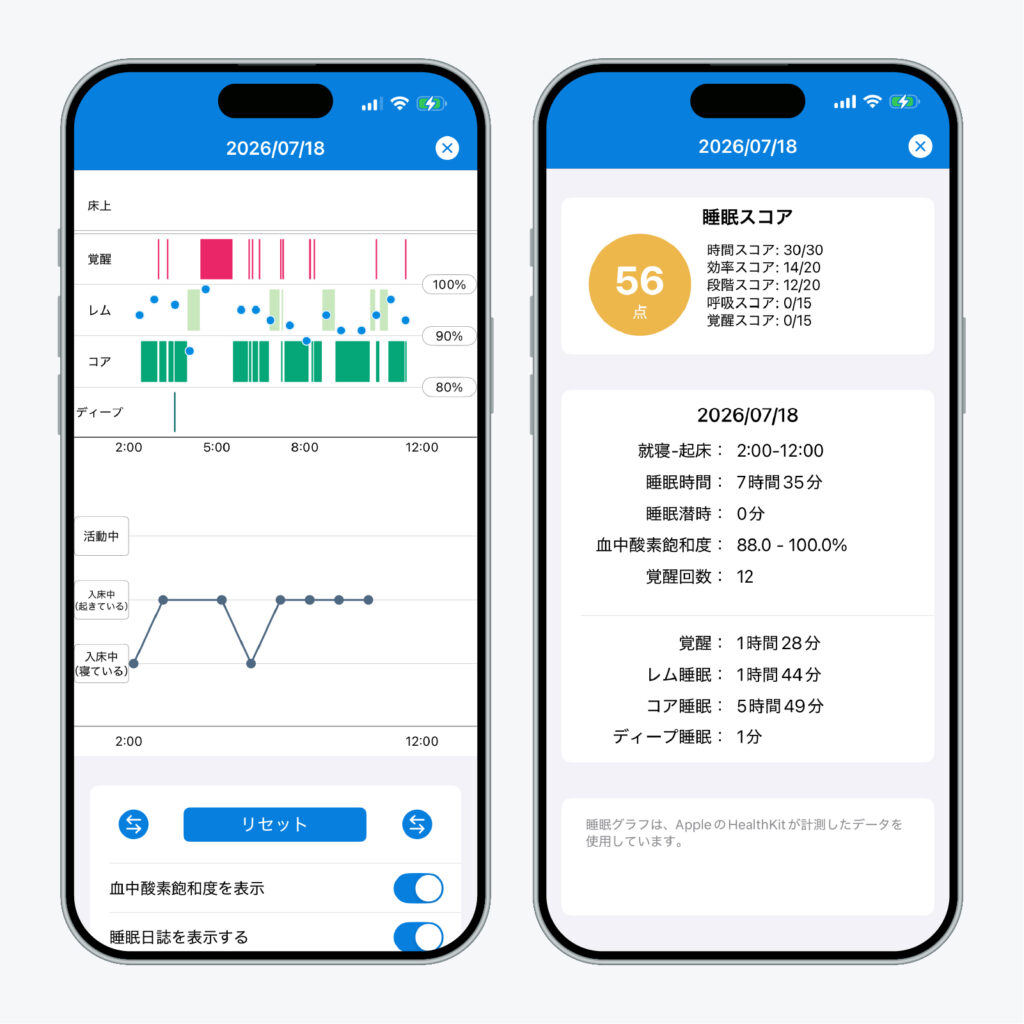
Sleepa is available in English, but some screens are still shown in Japanese. The screenshot in this article shows the Japanese version.
| Sleepa’s part (points) | Full marks when |
|---|---|
| Duration (30 points) | You slept 7 hours or more |
| Efficiency (20 points) | You were asleep for 85% or more of your time in bed |
| Sleep Stages (20 points) | Deep sleep was 13% or more and REM 18% or more |
| Breathing (15 points) | Your lowest blood oxygen during sleep was 95% or higher |
| Awakenings (15 points) | You woke up only a few times during the night |
Apple’s score looks at duration, regularity and interruptions, while Sleepa also looks at what your sleep was made of: how efficiently you slept, the balance of sleep stages, and your breathing. Both sets of thresholds are guides used within each app, not medical criteria. If the two scores differ, neither is wrong; they simply look at your sleep from different angles.
With Sleepa, you can also:
- Compare with how you felt: your sleep journal appears right under the Apple Watch sleep graph on the same timeline, so any gap between your feeling and the data is easy to spot (more about the sleep journal).
- See 30-day trends: tap “Analyze,” and an AI sums up trends from the last 30 days, such as your sleep time, how long it takes you to fall asleep and how often you wake up (more about the AI sleep analysis).
Sleepa does not diagnose any condition. Use it to understand your own sleep and to bring something concrete to your doctor. All features are free for 7 days from the first time you open the app. (You will not be charged automatically when the free period ends.)
To see what Sleepa adds compared with the iPhone’s built-in Health app, read What the Health app doesn’t tell you about your Apple Watch sleep data — 5 things Sleepa adds.
Frequently asked questions
Where can I see my Apple Watch Sleep Score?
Apple Watch’s Sleep Score is the first thing you see when you open the Sleep app on Apple Watch. On iPhone, open the Health app and go to Sleep, where the Sleep Score has its own section. Tap the score, then the info button, to see the breakdown and how it’s calculated.
Which Apple Watch models support the Sleep Score?
Apple Watch’s Sleep Score works on an Apple Watch with watchOS 26 or later: Series 6 or later, SE (2nd generation) or later, or Ultra. You also need an iPhone with iOS 26 or later.
What do I need to do to get a Sleep Score?
To get an Apple Watch Sleep Score, turn on sleep tracking with Apple Watch and sleep for at least an hour while wearing it. Apple recommends charging your Apple Watch to at least 30% before bed.
What does “bedtime consistency” mean in the Sleep Score?
Bedtime consistency is one of the parts of Apple Watch’s Sleep Score (30 points), and it looks at whether you fell asleep at a similar time to the previous 13 days. Even with the same amount of sleep, your score can drop on a night when you go to sleep later than usual.
Why is my Sleep Score in a lower range than before?
Apple Watch’s Sleep Score ranges changed with watchOS 26.2 in December 2025. Before that, 90 and above was the top range; now 96–100 is “Very High.” What changed is where the ranges start and end, not how the score is calculated.
Does the Sleep Score include Deep or REM sleep?
Apple’s official description does not list the amount of Deep or REM sleep as one of the parts of the Sleep Score. Apple Watch’s Sleep Score has three parts: duration (50 points), bedtime consistency (30 points) and interruptions (20 points).
Key points
- Apple Watch’s Sleep Score rates last night’s sleep from 0 to 100. You can see it in the Sleep app on Apple Watch and in the Health app on iPhone
- The score is the total of duration (50 points), bedtime consistency (30 points) and interruptions (20 points)
- 61–80 is “OK,” 81–95 is “High” and 96 or more is “Very High.” The ranges became stricter in watchOS 26.2
- Apple hasn’t published an average. Compare with your own past scores rather than other people’s
- You can score 100, but there’s no need to aim for it. Try not to worry too much about the number
- Making time for sleep, falling asleep at a regular time and reducing awakenings help both your score and your sleep
- The score can’t tell you how you felt, what your sleep was made of, or whether you have a health condition
Sources: Apple, “View your sleep score on Apple Watch” (Apple Watch User Guide); Apple, “Track your sleep on Apple Watch and use Sleep on iPhone“; MacRumors, “iOS 26.2 and watchOS 26.2 Update Sleep Score Ranges” (November 2025); Ministry of Health, Labour and Welfare (Japan), “Sleep Guide for Health Promotion 2023” (in Japanese); Baron KG et al., “Orthosomnia: Are some patients taking the quantified self too far?,” J Clin Sleep Med 13(2), 2017
Sleepa — The Science of Sleep
Look back on the sleep your Apple Watch measures, together with AI sleep analysis and your sleep journal. Learn more about Sleepa.

* Requires an Apple Watch (Series 6 or later) and an iPhone with iOS 26 or later. AI text requires an iPhone that supports Apple Intelligence.
Please note: Sleepa is not a medical device. Its analysis is for reference only and is not a medical diagnosis. If you have symptoms that concern you or are worried about your sleep, please consult a medical professional.