
When you track your sleep with an Apple Watch, the longest stage is usually Core sleep. More than half of the night, sometimes close to 70 percent, shows up as Core, and you may be wondering whether you’re getting too little Deep sleep, or whether your sleep is too light.
The short answer: a lot of Core sleep on Apple Watch is, in most cases, not a problem. Almost all Core sleep is N2, a normal stage that often makes up more than half of a night’s sleep, and even in the participants of Apple’s study, about 66% of sleep time was Core. Drawing on Apple’s documentation and sleep research, this article explains why Core sleep tends to show up so much, and what’s worth paying more attention to than the percentages.
About this article
This article is written by Masa, an engineer and co-founder of Medisense, the company that develops the sleep app Sleepa. Medisense is led by a physician who specializes in sleep (see why we built Sleepa). For the basics of the four sleep stages, see how to read your Apple Watch sleep data.
Does a lot of Core sleep mean your sleep is light?
A lot of Core sleep on Apple Watch doesn’t, by itself, mean your sleep is light. A lot of Core sleep means a lot of the stage at the center of your sleep.
According to Apple, Core sleep on Apple Watch corresponds to the stages called N1 and N2 in the medical classification of sleep. N1 is the drowsy transition into sleep and makes up only a small part of the night. Almost all Core sleep is the stage called N2.
Some other sleep trackers call this stage “light sleep.” Apple explains that it chose the name Core instead because N2 often makes up more than half of a night’s sleep, is completely normal, and is an important part of sleep. N2 has its own characteristic brain waves, called sleep spindles and K-complexes.
Is more than half Core sleep normal?
It’s normal for Core sleep on Apple Watch to make up more than half of your sleep time. Core sleep (N1 and N2) makes up about 55% of sleep time in typical textbook values and about 66% in the participants of Apple’s study. Both figures come from clinical sleep studies (polysomnography), which measure brain waves and other signals.
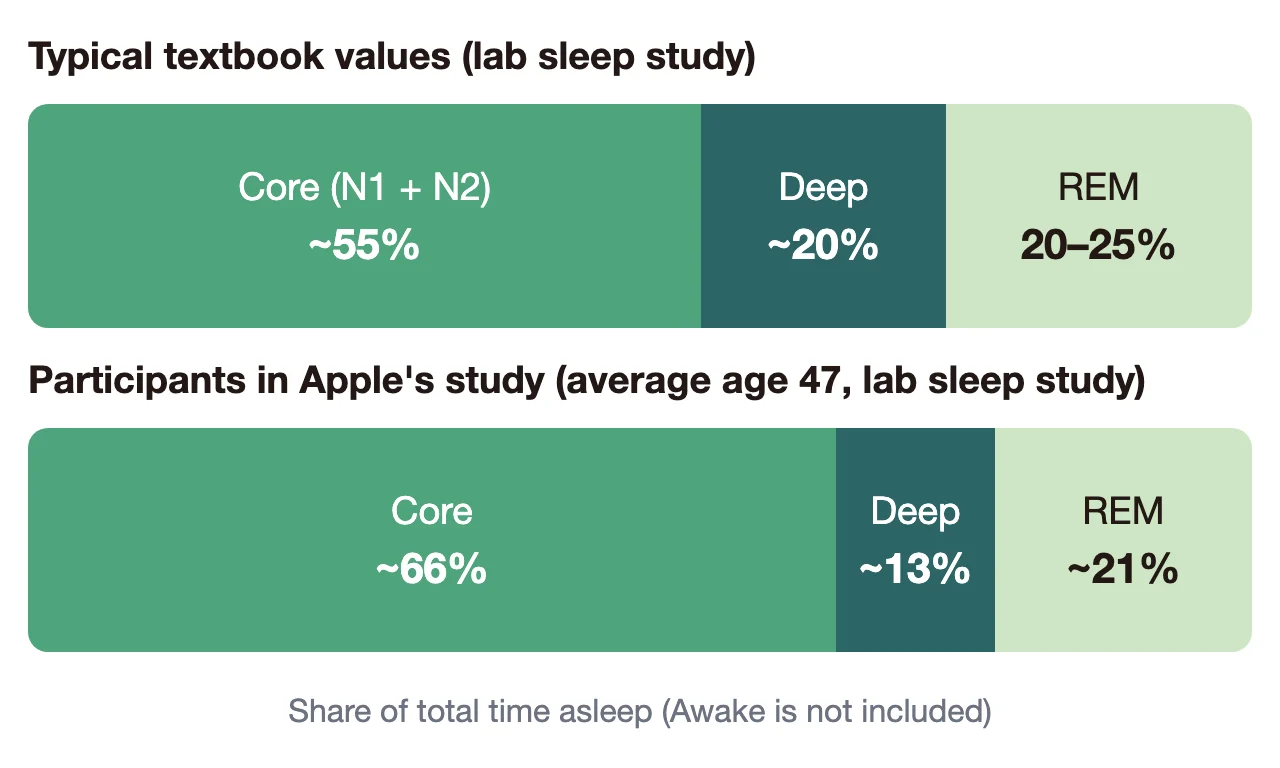
- Typical textbook value: about 55% (N1 about 5%, N2 about 50%)
- Participants in Apple’s study: about 66% (sleep study results from the 166 people, average age 47, whom Apple used to check Apple Watch’s accuracy; about 70% in the 858 people used to develop it)
In Apple’s study, the variation from night to night (standard deviation) was about 11 percentage points. Core sleep making up 60 to 70 percent of the night is nothing unusual. For typical shares of every stage, see how much of each sleep stage is normal.
Why does Core sleep look so high?
As a share of the night, Core sleep on Apple Watch goes up when less Deep or REM sleep is recorded. There are three main reasons Core sleep can look high: Apple Watch’s estimation error, age, and nights when REM sleep is cut short.
1. Apple Watch’s estimation error
Apple Watch doesn’t measure brain waves; it estimates sleep stages from things like wrist movement. When Apple compared it with clinical sleep studies, the most common mistake was classifying time that was actually Deep sleep as Core. For Awake, REM and Deep alike, when the watch got the stage wrong, it most often labeled it as Core.
So it’s fair to expect Apple Watch data to show somewhat more Core and somewhat less Deep sleep than you actually had (see not much Deep sleep on your Apple Watch?).
2. Age
An analysis that pooled studies of healthy people’s sleep found that, as adults get older, the share of N2 rises while the shares of Deep and REM sleep fall. A growing share of Core sleep with age is a common change.
3. Nights when REM sleep is cut short
REM sleep gets longer toward the morning. On nights when you sleep less, or wake up earlier than usual, the REM-rich part of the night gets cut off, so you tend to get less REM sleep. Studies also report that drinking a fair amount of alcohol before bed often reduces REM sleep.
What should you look at instead of the percentages?
Rather than the share of Core sleep on Apple Watch, look at three things: sleep duration, whether some Deep and REM sleep is recorded each night, and how you feel in the morning and during the day. You don’t need to judge your sleep by the share of Core sleep alone.
- Duration: 7 hours or more for adults (American Academy of Sleep Medicine and others). Japan’s Ministry of Health, Labour and Welfare suggests at least 6 hours.
- Whether some Deep and REM sleep is recorded each night: one night with little of either is nothing to worry about. Look across many nights, and check whether nights with less than your usual keep repeating.
- How you feel in the morning and during the day: if you feel you slept well and aren’t very sleepy during the day, you’re almost always getting enough sleep.
Trying to improve the percentages, for example by spending longer in bed or worrying about the numbers every morning, can actually make it harder to sleep. Your sleep data is there to help you understand yourself (see can an Apple Watch help with insomnia?).
Check your own Core sleep in Sleepa
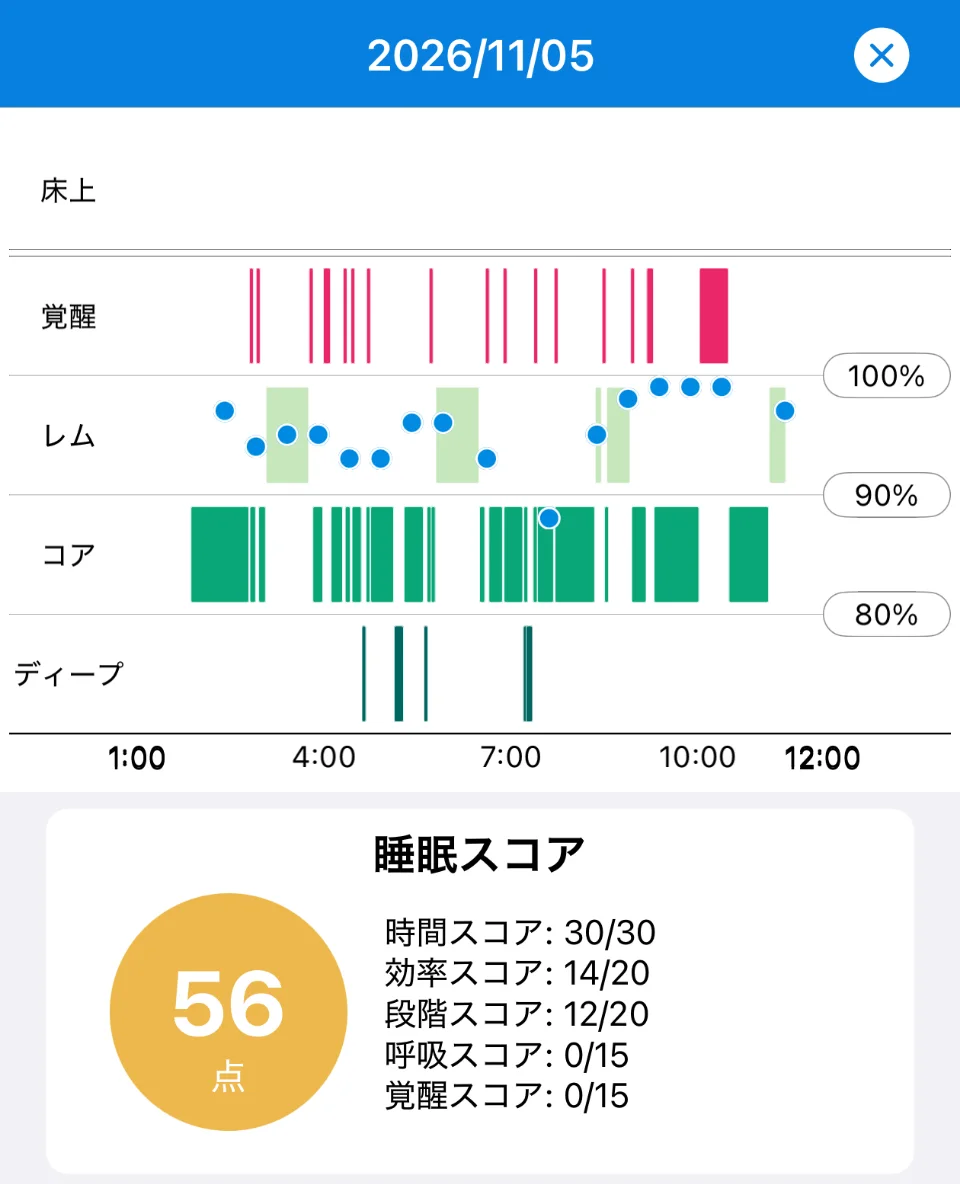
In our sleep app, Sleepa, tap a date on the home screen to open that night’s sleep graph. Each stage has its own row, so you can see at a glance where and how much Core sleep you had during the night. The time spent in each stage is shown at the bottom of the screen.
Sleepa is available in English, but some screens are still shown in Japanese. The screenshots in this article show the Japanese version.
On this night (November 5), for example, most of the time was Core, and Deep sleep appeared only as a few thin lines. REM showed up several times.
The Sleep Stages part of the Sleepa score (20 points) doesn’t look at the share of Core. It checks whether Deep is 13% or more and REM is 18% or more. Meeting both gives 20 points; meeting one gives 12. This night scored 12, meeting only one of them. Nights with a lot of Core tend to lose points here. These thresholds are used within Sleepa and are not medical criteria.
What matters is the trend, not one night’s score. Here’s how to check it in Sleepa.
- Look at last night’s graph and Sleep Stages score each morning: you can also see where in the night Deep and REM appeared.
- Keep the sleep journal: you’ll see how you felt you slept on nights with a lot of Core (see Sleepa’s sleep journal).
- Compare one to two weeks: do low Sleep Stages scores keep repeating? What happens on nights you drank alcohol or slept less? Your own pattern starts to emerge.
- See your 30-day trends: once you have at least 7 nights, tap “Analyze,” and the AI summarizes your sleep time, how long you take to fall asleep, and awakenings during the night over the last 30 days in a few sentences (see more about the AI sleep analysis).
All Sleepa features are free for 7 days from the first time you open the app (you will not be charged automatically when the free period ends). To see what Sleepa adds compared with the iPhone’s built-in Health app, read What the Health app doesn’t tell you about your Apple Watch sleep data — 5 things Sleepa adds.
When to see a doctor
A lot of Core sleep can’t tell you whether you have a medical condition, and Sleepa does not diagnose any condition either. In the following cases, please see a doctor, whatever the percentages show. Your daily records will give you something concrete to talk about.
- Someone has told you that you snore loudly or stop breathing in your sleep
- Sleepless nights keep happening and are affecting your daily life
- Strong daytime sleepiness is interfering with work or driving
- You keep waking up unrefreshed even though you should be getting enough sleep
Frequently asked questions
Is it bad to have a lot of Core sleep on Apple Watch?
A lot of Core sleep on Apple Watch is, in most cases, not a problem. Almost all Core sleep is N2, a normal stage that often makes up more than half of a night’s sleep, and Apple describes it as an important part of sleep. Rather than one night’s percentage, look across many nights and check whether nights with less Deep or REM sleep than your usual keep repeating.
Is it normal for Core sleep to be close to 70% on Apple Watch?
Core sleep making up 60 to 70 percent of the night on Apple Watch is nothing unusual. In Apple’s study, clinical sleep studies showed the participants averaging about 66% Core sleep (about 70% in the 858 people used in development), and the variation from night to night (standard deviation) was about 11 percentage points.
Why does my Apple Watch show lots of Core sleep and little Deep sleep?
One reason Apple Watch shows a lot of Core and little Deep sleep is its estimation error. When Apple compared Apple Watch with clinical sleep studies, the most common mistake was classifying time that was actually Deep sleep as Core. So Apple Watch data can show somewhat more Core and somewhat less Deep sleep than you actually had.
Does the share of Core sleep increase with age?
An analysis that pooled studies of healthy people’s sleep found that, as adults get older, the share of N2, the main part of Core sleep, rises while the shares of Deep and REM sleep fall. A growing share of Core sleep with age is a common change.
Should I try to lower my Core sleep percentage?
You don’t need to judge your sleep by the share of Core sleep on Apple Watch alone. Trying to improve the percentages, for example by spending longer in bed or worrying about the numbers every morning, can actually make it harder to sleep. Look at sleep duration and how you feel in the morning and during the day instead.
Can a lot of Core sleep on Apple Watch tell you whether you have a medical condition?
A lot of Core sleep on Apple Watch can’t tell you whether you have a medical condition. If someone has told you that you snore loudly or stop breathing in your sleep, or strong daytime sleepiness is interfering with work or driving, please see a doctor, whatever the percentages show.
Key points
- Core sleep on Apple Watch is N1 and N2 in the medical classification. It’s mostly N2 and doesn’t mean “light” sleep
- Core making up more than half of the night is normal. In Apple’s study, Core averaged about 66%
- Core can look high because of estimation error (Deep sleep is easily labeled Core), age, and nights when REM sleep is cut short (short sleep, alcohol)
- Rather than the percentages, look at sleep duration, whether some Deep and REM sleep shows up each night, and how you feel in the morning and during the day
- In Sleepa, you can check each night’s stages with the graph and Sleep Stages score, and follow the trend together with your sleep journal
Sources: Apple, “Estimating Sleep Stages from Apple Watch” (updated October 2025); Billings ME, “Interpreting Sleep Study Reports: A Primer for Pulmonary Fellows,” American Thoracic Society, 2014; Ohayon MM et al., “Meta-analysis of quantitative sleep parameters from childhood to old age in healthy individuals,” Sleep 27(7), 2004; Ebrahim IO et al., “Alcohol and sleep I: effects on normal sleep,” Alcohol Clin Exp Res 37(4), 2013; Watson NF et al., “Recommended amount of sleep for a healthy adult,” Sleep 38(6), 2015; Ministry of Health, Labour and Welfare (Japan), “Sleep Guide for Health Promotion 2023” (in Japanese)
Sleepa — The Science of Sleep
Look back on the sleep your Apple Watch measures, together with AI sleep analysis and your sleep journal. Learn more about Sleepa.

* Requires an Apple Watch (Series 6 or later) and an iPhone with iOS 26 or later. AI text requires an iPhone that supports Apple Intelligence.
Please note: Sleepa is not a medical device. Its analysis is for reference only and is not a medical diagnosis. If you have symptoms that concern you or are worried about your sleep, please consult a medical professional.