
When you sleep with your Apple Watch on, your night is recorded as Awake, REM, Core and Deep. But how much of each is normal? And what does good sleep actually look like?
The short answer: there are typical ranges, but they are wide, and a single night’s numbers don’t tell you whether your sleep is good or bad. What matters is getting to know your own sleep pattern from your daily records. Using Apple’s developer documentation and the American Academy of Sleep Medicine’s classification, this article explains the four stages, how they look in Sleepa, the typical ranges, what makes for good sleep, and how to check your sleep each day.
About this article
This article is written by Masa, an engineer and co-founder of Medisense Inc., the company that develops the sleep app Sleepa. Medisense is led by a physician who specializes in sleep (why we built Sleepa). For how Apple Watch measures sleep and how accurate it is, see How to read your Apple Watch sleep data.
Apple Watch’s sleep categories follow the medical classification
The standard classification in medicine comes from the American Academy of Sleep Medicine (AASM). A detailed sleep study (polysomnography) records brain waves, eye movements and chin muscle activity. The recording is divided into 30-second sections, and each is scored as one of five stages: W (wake), N1, N2, N3 or R (REM sleep).
- N1: the lightest sleep, when you are just dozing off.
- N2: the sleep that makes up the core of the night.
- N3: the deepest sleep, with large, slow brain waves (slow-wave sleep).
- R (REM sleep): your eyes move rapidly and your body’s muscles are relaxed. This is when dreams are most common.
For app developers, Apple Watch’s records are provided through a HealthKit type called HKCategoryValueSleepAnalysis. Apple’s documentation states which AASM stage each value corresponds to. Together with Sleepa’s labels, it looks like this.
| Sleepa’s label | Apple’s value | AASM classification |
|---|---|---|
| Awake | awake | W (awake) |
| REM | asleepREM | R (REM sleep) |
| Core | asleepCore | N2 (plus a small amount of N1) |
| Deep | asleepDeep | N3 (slow-wave sleep) |
| In Bed | inBed | Not a stage (time in bed) |
Apple’s documentation describes Core as “light or intermediate sleep” and says it corresponds to N2, which takes up a large part of the night. “Light” may sound bad, but this is perfectly normal and important sleep.
Keep in mind, though, that Apple Watch doesn’t measure brain waves. It estimates these stages from wrist movement, heart rate and other signals. The names are the same, but the accuracy isn’t the same as a detailed sleep study.
A night of sleep repeats in cycles
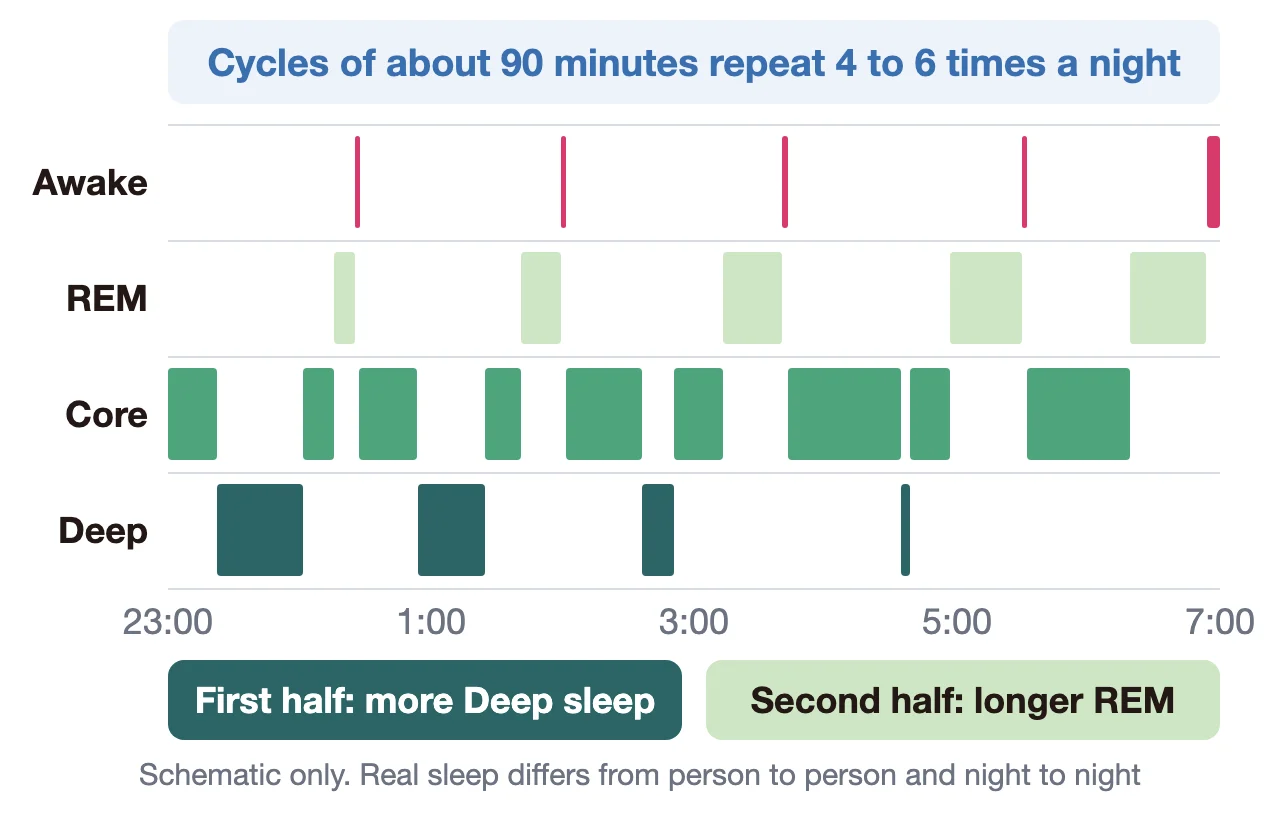
Sleep doesn’t stay at one depth. Cycles averaging about 90 minutes repeat 4 to 6 times a night. Deep sleep comes mostly in the first half of the night, and REM periods get longer toward morning.
How it looks in Sleepa
Tap a date on Sleepa’s home screen to open that night’s sleep graph. The screen below is an example of a real record.
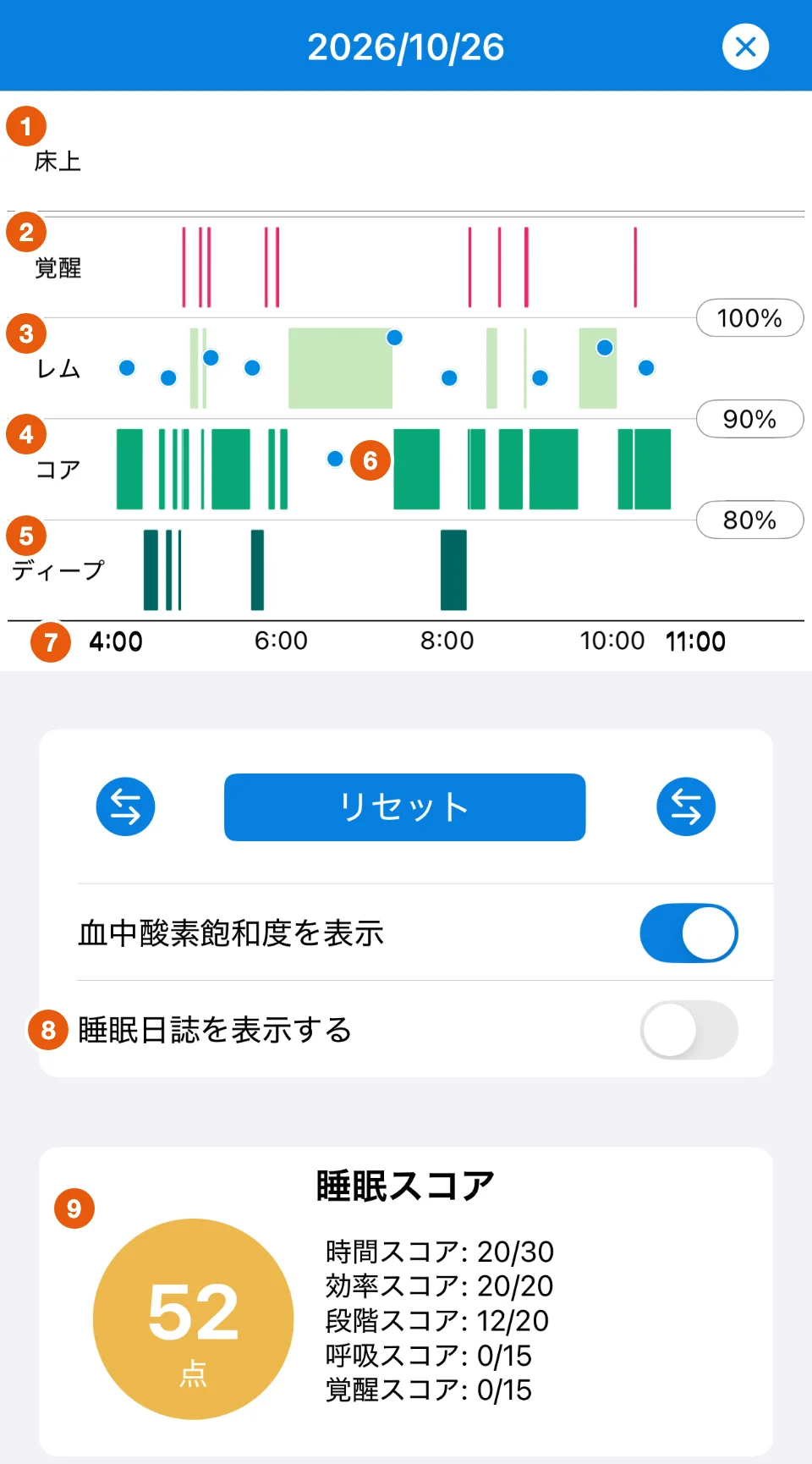
Sleepa is available in English, but some screens are still shown in Japanese. The screenshots in this article show the Japanese version.
- In Bed: your time in bed. It appears only when there is a record (there is none for this night).
- Awake: the red lines. Everyone has brief awakenings, and Apple Watch records them too (see Lots of “Awake” in your Apple Watch sleep data?).
- REM: the light green bands.
- Core: the green bands. This is usually the longest stage.
- Deep: the dark green bands.
- Blue dots: your blood oxygen saturation, read against the 100%, 90% and 80% scale on the right. Turn off “Displays blood oxygen saturation” to hide them.
- Horizontal axis: the time. Bold times show when you went to bed and got up. Use the arrow buttons under the graph to change the time range shown.
- Display sleep journal: turn this on to show your sleep journal under the graph on the same timeline, so you can compare how you felt with the data.
- Sleep score: Sleepa’s own score out of 100, with a breakdown into duration, efficiency, sleep stages, breathing and awakenings.
Further down the screen, you can also see your bedtime and wake time, sleep time, sleep latency (how long it took to fall asleep), blood oxygen saturation, number of awakenings and the time spent in each stage. To work out a percentage, divide the time in a stage by your sleep time. For example, 1 hour of Deep in 7 hours of sleep is about 14%.
How much of each stage is normal?
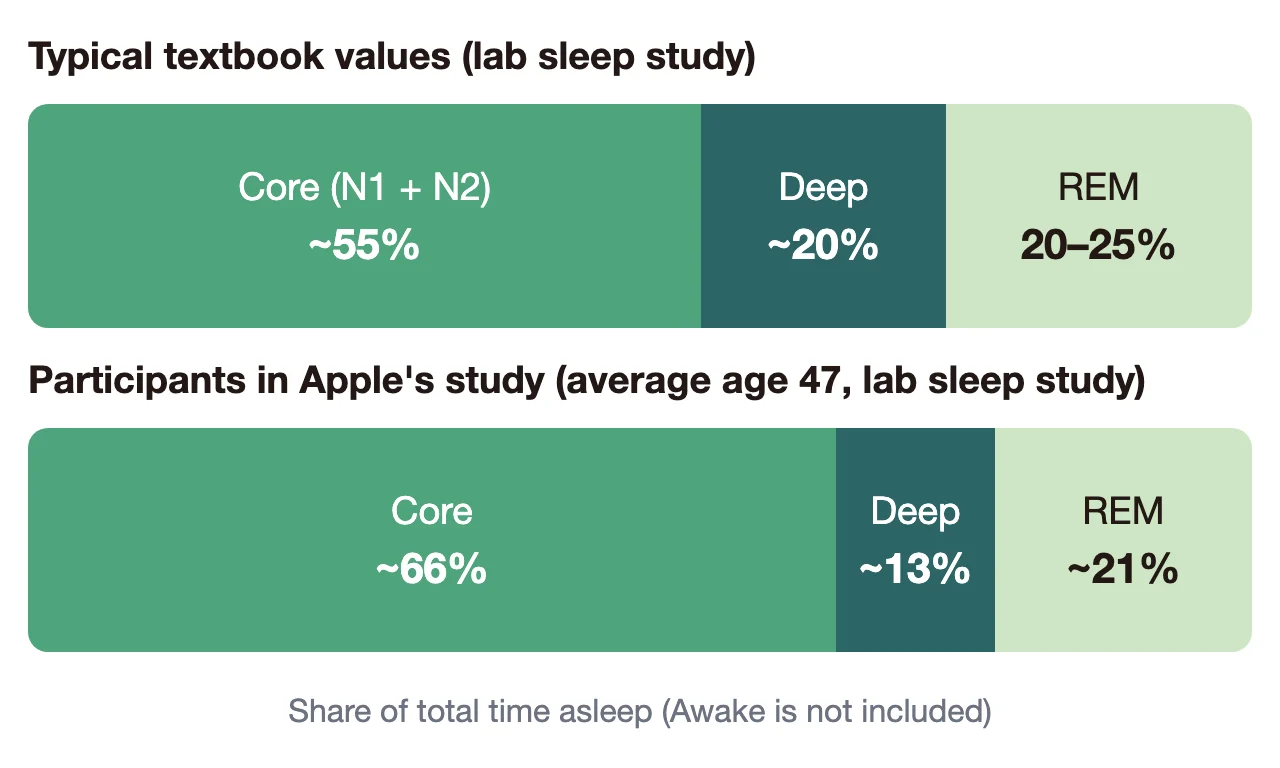
Here are some reference figures for how much of your total sleep time each stage takes up. They all come from detailed sleep studies, not from Apple Watch.
| Stage | Textbook value | Expert consensus |
|---|---|---|
| Core (N1 + N2) | About 55% (N1 about 5%, N2 about 50%) | N1: 5% or less. N2: no consensus |
| Deep (N3) | About 20% | 16–20% |
| REM (R) | 20–25% | 21–30% |
The “textbook values” come from an American Thoracic Society primer on sleep study reports. “Expert consensus” shows the ranges a National Sleep Foundation expert panel agreed on by vote as good sleep for adults. The lower bar in the chart, “Participants in Apple’s study,” shows detailed sleep study results for the people in the study Apple used to check Apple Watch’s accuracy (166 participants, average age 47).
Keep these points in mind when you look at the figures.
- “Normal” has a wide range: even in a detailed sleep study, participants in Apple’s study had about 13% Deep sleep, below the textbook figure of about 20%. Having less than 20% doesn’t mean something is wrong.
- Experts don’t fully agree on the percentages: the National Sleep Foundation panel failed to reach agreement on many of the sleep stage measures. What it did agree on includes that more REM isn’t always better (41% or more doesn’t indicate good sleep) and that 5% or less of Deep sleep doesn’t indicate good sleep (except in older adults).
- Sleep changes with age: in general, Deep and REM sleep decrease with age and awakenings increase. An analysis of studies of healthy adults found that with each decade of age, sleep time fell by about 10 minutes and sleep efficiency by about 2%.
- Apple Watch’s figures are estimates: its most common mix-up is labeling actual Deep sleep as Core. A low Deep reading doesn’t by itself mean you really got little Deep sleep (see Not much Deep sleep on your Apple Watch?).
Sleepa’s Sleep Stages score checks whether you had at least 13% Deep and at least 18% REM. These are guides used within Sleepa, not medical criteria.
What does good sleep look like?
Good sleep isn’t decided by stage percentages alone. Sleep researcher Dr. Daniel Buysse has proposed looking at sleep health in terms of regularity, satisfaction, alertness, timing, efficiency and duration. And what the National Sleep Foundation panel broadly agreed on as signs of good sleep were how quickly you fall asleep, how much you wake up and your sleep efficiency, rather than stage percentages. Put together, it looks like this.
- Duration: 7 hours or more for adults (American Academy of Sleep Medicine and others). Japan’s Ministry of Health, Labour and Welfare suggests at least 6 hours. In Sleepa, look at Sleep Time and the Duration score.
- Regularity and timing: you sleep at night, at about the same time every day. In Sleepa, compare the graph’s time axis from day to day.
- Efficiency: you are asleep for 85% or more of your time in bed. In Sleepa, look at the Efficiency score.
- Falling asleep: you fall asleep within 30 minutes. In Sleepa, look at Sleep Latency.
- Waking during the night: 20 minutes or less awake after falling asleep, and no more than 1 awakening of over 5 minutes (2 for older adults). In Sleepa, look at Awake on the graph and the time spent Awake.
- Satisfaction: you feel you slept well and feel rested in the morning. In Sleepa, you can record this as your sleep journal score.
- Alertness: you aren’t very sleepy during the day and can concentrate. You can only check this by how you feel.
You don’t need to meet all of these every night. For example, participants in Apple’s study spent about 35 minutes awake on average after falling asleep. And because Apple Watch also records brief awakenings, its figures tend to come out higher than these guides. Treat them as clues for understanding your sleep.
More important than any number is how you feel in the morning and during the day. Japan’s Sleep Guide for Health Promotion 2023 also puts weight on feeling rested after sleep.
Check every day and get to know your pattern
All the figures so far are averages across many people. To know how your own sleep is doing, you have to look at your own records. And because sleep changes from night to night, one night isn’t enough. That’s why it’s important to check every day and learn what your “usual sleep” looks like. Once you know your usual, you can spot unusual nights and changes over time.
The screens below show two nights of the same person’s sleep, side by side.
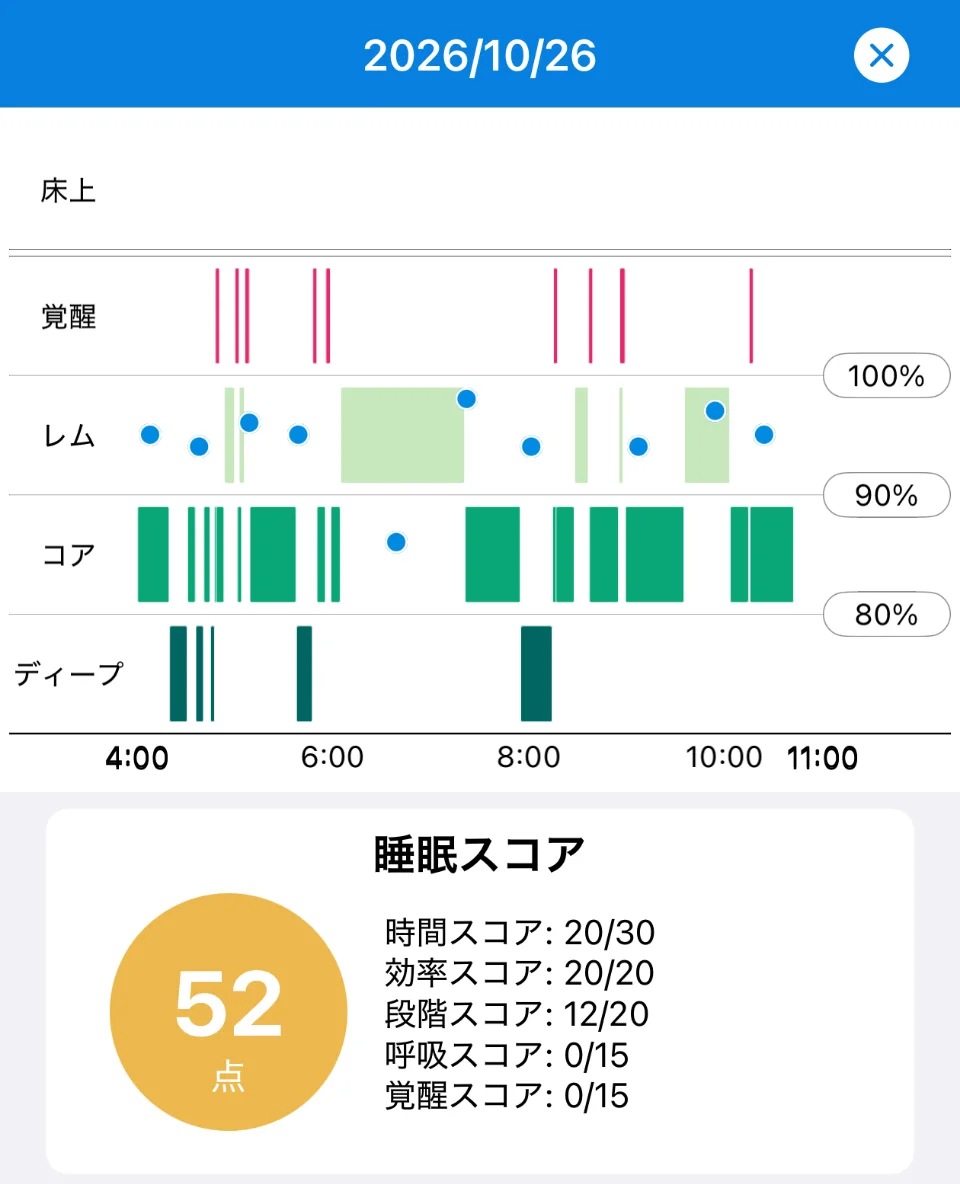
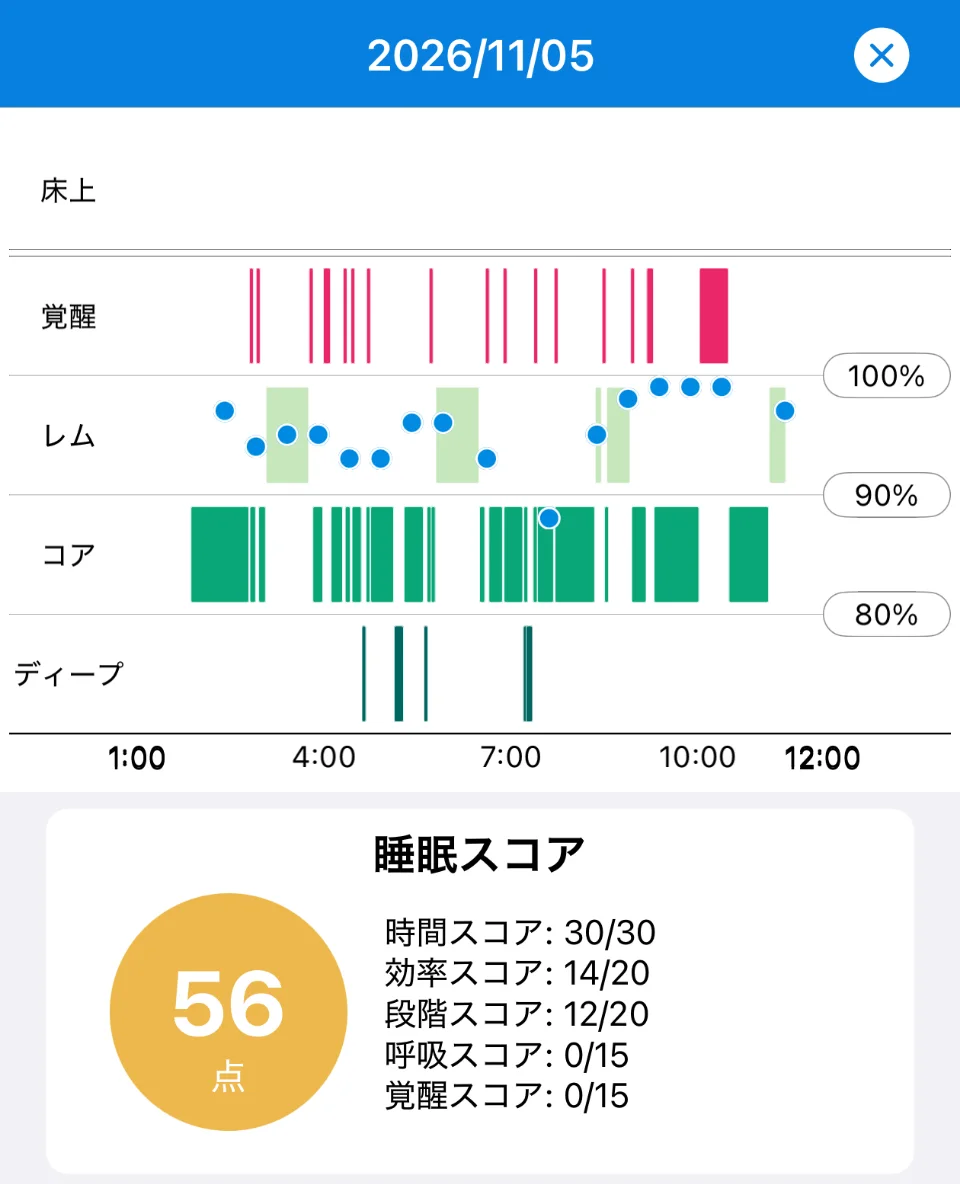
The totals are close, at 52 and 56 points, but the nights are quite different.
- Bedtime: 4:00 on October 26 and 1:00 on November 5, a three-hour difference.
- Duration and efficiency: on November 5, the longer sleep earned a full Duration score (30 of 30), but with many awakenings, including a long one toward morning, the Efficiency score fell to 14 of 20. On October 26, the Duration score was 20 of 30, but the Efficiency score was a full 20 of 20.
- Sleep stages: both nights scored 12 of 20, meaning they met only one of the two guides (Deep 13% or more, REM 18% or more). Where Deep and REM appear also differs from night to night.
- Breathing and awakenings: both nights scored 0 on each. The Breathing score depends on your lowest blood oxygen, and the Awakenings score on the number of awakenings. Because Apple Watch also counts brief awakenings, the Awakenings score tends to come out low.
Checking your sleep in Sleepa is simple.
- Take a minute each morning to open last night’s graph: see when you fell asleep and woke up, and whether there were any long awakenings. For the sleep score, look not just at the total but at which part is low.
- Record how you felt you slept in your sleep journal: putting your feeling next to the data shows what really happened on nights you felt you didn’t sleep (see What is sleep state misperception?).
- Compare one to two weeks: how much does your bedtime differ between weekdays and days off? What happens on nights when you drink alcohol or have caffeine late? What do the nights you feel you slept well have in common? Your own pattern starts to emerge (see Check your sleep in one week).
- Ask the AI about 30-day trends: tap “Analyze,” and an AI sums up trends from the last 30 days, such as your sleep time, how long it takes you to fall asleep and how often you wake up. As your records build up, it also shows changes compared with your own usual sleep (more about the AI sleep analysis).
That said, the point of checking every day isn’t to react to each score. Focusing too much on the numbers can itself cause anxiety and make it harder to sleep. Don’t worry about any one night; look at the trend.
When to see a doctor
Sleepa does not diagnose any condition. In the following cases, please see a doctor. Your daily records will give you something concrete to talk about.
- Someone has told you that you snore loudly or stop breathing while you sleep
- Low blood oxygen readings (below 90%) keep appearing night after night (Apple Watch’s blood oxygen readings aren’t for medical use and can read low because of wrist movement and other factors, but please ask a doctor if you are concerned)
- You keep having sleepless nights and it is affecting your daily life
- Strong sleepiness during the day is affecting your work or driving
- You keep feeling low or unable to enjoy anything
All Sleepa features are free for 7 days from the first time you open the app. (You will not be charged automatically when the free period ends.)
Key points
- On Apple Watch, Core corresponds to N2 (and N1) in the AASM classification, Deep to N3, and REM to R
- Typical shares are about 55% Core, about 20% Deep and 20–25% REM, but the range is wide: participants in Apple’s study had about 13% Deep
- Experts don’t fully agree on stage percentages, and Apple Watch’s figures are estimates
- Judge good sleep by duration, regularity, efficiency, falling asleep, waking during the night, how you feel in the morning, and how you are during the day
- Averages describe other people. Checking every day in Sleepa to learn your own pattern is what matters
- Don’t react to one night’s score; look at the trend. See a doctor if you have symptoms that concern you
Sources: Apple, “HKCategoryValueSleepAnalysis” (Apple Developer Documentation); Apple, “Estimating Sleep Stages from Apple Watch” (updated October 2025); American Academy of Sleep Medicine, “The AASM Manual for the Scoring of Sleep and Associated Events”; Billings ME, “Interpreting Sleep Study Reports: A Primer for Pulmonary Fellows,” American Thoracic Society, 2014; Ohayon M et al., “National Sleep Foundation’s sleep quality recommendations: first report,” Sleep Health 3(1), 2017; Patel AK et al., “Physiology, Sleep Stages,” StatPearls; Boulos MI et al., “Normal polysomnography parameters in healthy adults: a systematic review and meta-analysis,” Lancet Respir Med 7(6), 2019; Buysse DJ, “Sleep health: can we define it? Does it matter?,” Sleep 37(1), 2014; Watson NF et al., “Recommended amount of sleep for a healthy adult,” Sleep 38(6), 2015; Ministry of Health, Labour and Welfare (Japan), “Sleep Guide for Health Promotion 2023” (in Japanese)
Sleepa — The Science of Sleep
Look back on the sleep your Apple Watch measures, together with AI sleep analysis and your sleep journal. Learn more about Sleepa.

* Requires an Apple Watch (Series 6 or later) and an iPhone with iOS 26 or later. AI text requires an iPhone that supports Apple Intelligence.
Please note: Sleepa is not a medical device. Its analysis is for reference only and is not a medical diagnosis. If you have symptoms that concern you or are worried about your sleep, please consult a medical professional.